
About
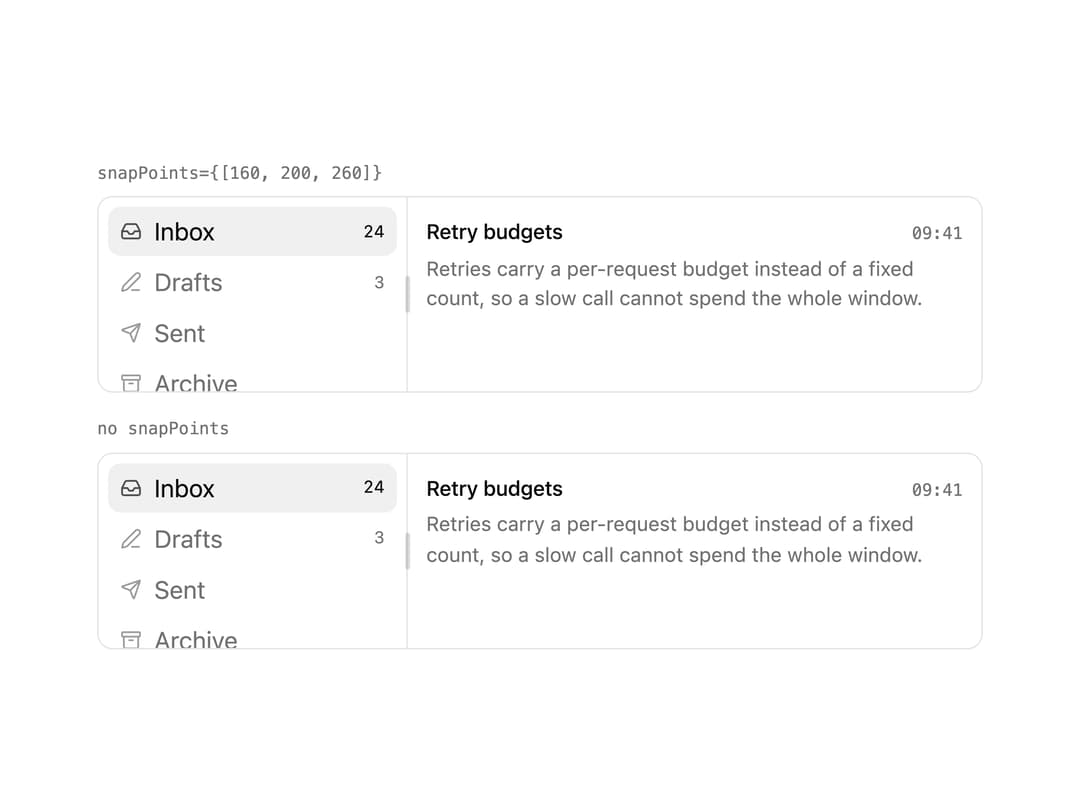
A resizable split-panel layout whose divider magnetically leans toward configured snap points and can be collapsed, used for sidebars, IDE-style layouts, and mail-client panes.
Built with React and Tailwind. Copy the prompt and paste it into Claude Code, Cursor or Lovable: your agent adds Snap Panels to your project and fits it to your theme.
Code
How Snap Panels is used: the demo's code. The component's own source comes with a free account.
Usage.tsx
"use client";

import type { ReactNode } from "react";
import { Archive, Inbox, PenLine, Send } from "lucide-react";
import type { LucideIcon } from "lucide-react";

import { cn } from "@/lib/utils";
import {
  SnapPanel,
  SnapPanelGroup,
  SnapPanelHandle,
} from "@/components/ui/snap-panels";

/** Both groups are identical apart from `snapPoints`. Drag one divider, then
 *  the other, and the difference is in your hand rather than in a caption. */
const ROWS: { icon: LucideIcon; label: string; count: string }[] = [
  { icon: Inbox, label: "Inbox", count: "24" },
  { icon: PenLine, label: "Drafts", count: "3" },
  { icon: Send, label: "Sent", count: "" },
  { icon: Archive, label: "Archive", count: "" },
];

function Sidebar() {
  return (
    <div className="flex h-full flex-col gap-px bg-background p-1.5">
      {ROWS.map(({ icon: Icon, label, count }) => (
        <span
          key={label}
          className={cn(
            "flex items-center gap-2 rounded-md px-2 py-1 text-caption",
            label === "Inbox"
              ? "bg-active text-foreground"
              : "text-muted-foreground",
          )}
        >
          <Icon className="size-3.5 shrink-0 opacity-70" />
          <span className="truncate">{label}</span>
          {count && (
            <span className="ml-auto shrink-0 text-2xs tabular-nums">
              {count}
            </span>
          )}
        </span>
      ))}
    </div>
  );
}

function Body() {
  return (
    <div className="flex h-full flex-col gap-1 p-3">
      <div className="flex items-baseline justify-between gap-3">
        <span className="truncate text-control text-foreground">
          Retry budgets
        </span>
        <span className="shrink-0 font-mono text-2xs text-muted-foreground">
          09:41
        </span>
      </div>
      <p className="text-caption text-muted-foreground">
        Retries carry a per-request budget instead of a fixed count, so a slow
        call cannot spend the whole window.
      </p>
    </div>
  );
}

function Window({ label, children }: { label: string; children: ReactNode }) {
  return (
    <div className="flex flex-col gap-1.5">
      <span className="font-mono text-2xs text-muted-foreground">{label}</span>
      <div className="h-32 overflow-hidden rounded-lg border border-border bg-card">
        {children}
      </div>
    </div>
  );
}

export default function SnapPanelsWithAndWithoutExample() {
  return (
    <div className="flex w-full max-w-xl flex-col gap-4">
      <Window label="snapPoints={[160, 200, 260]}">
        <SnapPanelGroup direction="horizontal">
          <SnapPanel
            id="with-sidebar"
            defaultSize="200px"
            minSize="120px"
            snapPoints={["160px", "200px", "260px"]}
          >
            <Sidebar />
          </SnapPanel>
          <SnapPanelHandle aria-label="Resize sidebar" />
          <SnapPanel id="with-body" minSize={20}>
            <Body />
          </SnapPanel>
        </SnapPanelGroup>
      </Window>

      <Window label="no snapPoints">
        <SnapPanelGroup direction="horizontal">
          <SnapPanel id="plain-sidebar" defaultSize="200px" minSize="120px">
            <Sidebar />
          </SnapPanel>
          <SnapPanelHandle aria-label="Resize sidebar" />
          <SnapPanel id="plain-body" minSize={20}>
            <Body />
          </SnapPanel>
        </SnapPanelGroup>
      </Window>
    </div>
  );
}
Dependencies
More by Purbayan Pramanik
View all
Notification Stack
23
Proximity Accordion
5
Plan Checklist
Agent Activity
Checkbox Group
Conversation