About
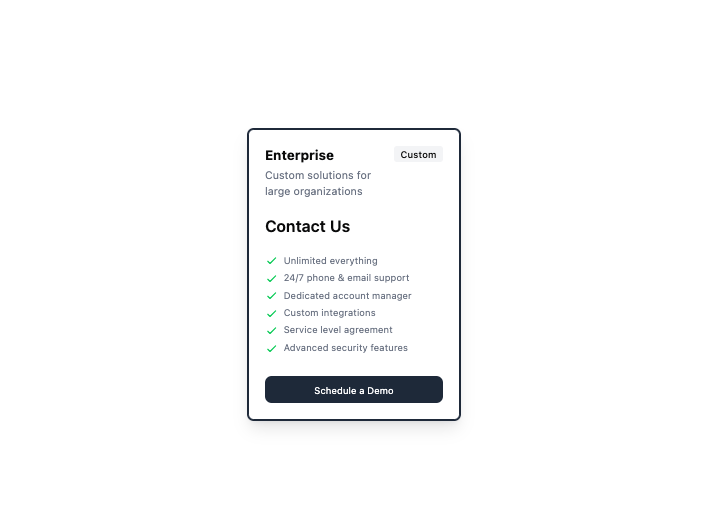
Here is Pricing Cards components
Built with React and Tailwind. Copy the prompt and paste it into Claude Code, Cursor or Lovable: your agent adds Pricing Cards to your project and fits it to your theme.
Code
How Pricing Cards is used: the demo's code. The component's own source comes with a free account.
Usage.tsx
export default function Example() {
    return (
        <div className="p-6 bg-white rounded-lg border-2 border-gray-800 w-80 shadow-lg">
            <div className="flex justify-between items-start">
                <div>
                    <h3 className="text-xl font-bold">Enterprise</h3>
                    <p className="text-gray-500 mt-1">Custom solutions for large organizations</p>
                </div>
                <span className="text-sm font-medium px-2.5 py-0.5 rounded bg-gray-100">Custom</span>
            </div>

            <div className="mt-6 flex items-baseline">
                <span className="text-2xl font-semibold">Contact Us</span>
            </div>

            <ul className="mt-6 space-y-1 text-gray-500 text-sm">
                <li className="flex items-start">
                    <svg className="h-5 w-5 text-green-500 mr-2 mt-0.5" xmlns="http://www.w3.org/2000/svg" fill="none" viewBox="0 0 24 24" stroke="currentColor">
                        <path strokeLinecap="round" strokeLinejoin="round" strokeWidth="2" d="M5 13l4 4L19 7" />
                    </svg>
                    <span>Unlimited everything</span>
                </li>
                <li className="flex items-start">
                    <svg className="h-5 w-5 text-green-500 mr-2 mt-0.5" xmlns="http://www.w3.org/2000/svg" fill="none" viewBox="0 0 24 24" stroke="currentColor">
                        <path strokeLinecap="round" strokeLinejoin="round" strokeWidth="2" d="M5 13l4 4L19 7" />
                    </svg>
                    <span>24/7 phone & email support</span>
                </li>
                <li className="flex items-start">
                    <svg className="h-5 w-5 text-green-500 mr-2 mt-0.5" xmlns="http://www.w3.org/2000/svg" fill="none" viewBox="0 0 24 24" stroke="currentColor">
                        <path strokeLinecap="round" strokeLinejoin="round" strokeWidth="2" d="M5 13l4 4L19 7" />
                    </svg>
                    <span>Dedicated account manager</span>
                </li>
                <li className="flex items-start">
                    <svg className="h-5 w-5 text-green-500 mr-2 mt-0.5" xmlns="http://www.w3.org/2000/svg" fill="none" viewBox="0 0 24 24" stroke="currentColor">
                        <path strokeLinecap="round" strokeLinejoin="round" strokeWidth="2" d="M5 13l4 4L19 7" />
                    </svg>
                    <span>Custom integrations</span>
                </li>
                <li className="flex items-start">
                    <svg className="h-5 w-5 text-green-500 mr-2 mt-0.5" xmlns="http://www.w3.org/2000/svg" fill="none" viewBox="0 0 24 24" stroke="currentColor">
                        <path strokeLinecap="round" strokeLinejoin="round" strokeWidth="2" d="M5 13l4 4L19 7" />
                    </svg>
                    <span>Service level agreement</span>
                </li>
                <li className="flex items-start">
                    <svg className="h-5 w-5 text-green-500 mr-2 mt-0.5" xmlns="http://www.w3.org/2000/svg" fill="none" viewBox="0 0 24 24" stroke="currentColor">
                        <path strokeLinecap="round" strokeLinejoin="round" strokeWidth="2" d="M5 13l4 4L19 7" />
                    </svg>
                    <span>Advanced security features</span>
                </li>
            </ul>

            <button className="mt-8 w-full py-2.5 px-4 bg-gray-800 text-white text-sm rounded-lg hover:bg-gray-900 transition-colors">
                Schedule a Demo
            </button>
        </div>
    );
};More by prebuiltui
View all

Image Gallery
1.3K
Hero Section
412
Feature Sections
344
Testimonial
303
Cards
231
FAQ Sections
177
Form
136
Login Form
125
More in Pricing
View all
Pricing Section
582

Pricing Section
173

Pricing Card
365
pricing section
158
Colorful-Pricing
85
Glowing Pricing Tiers
45

RuixenPricing05
102
Single Pricing Card
795


