
About
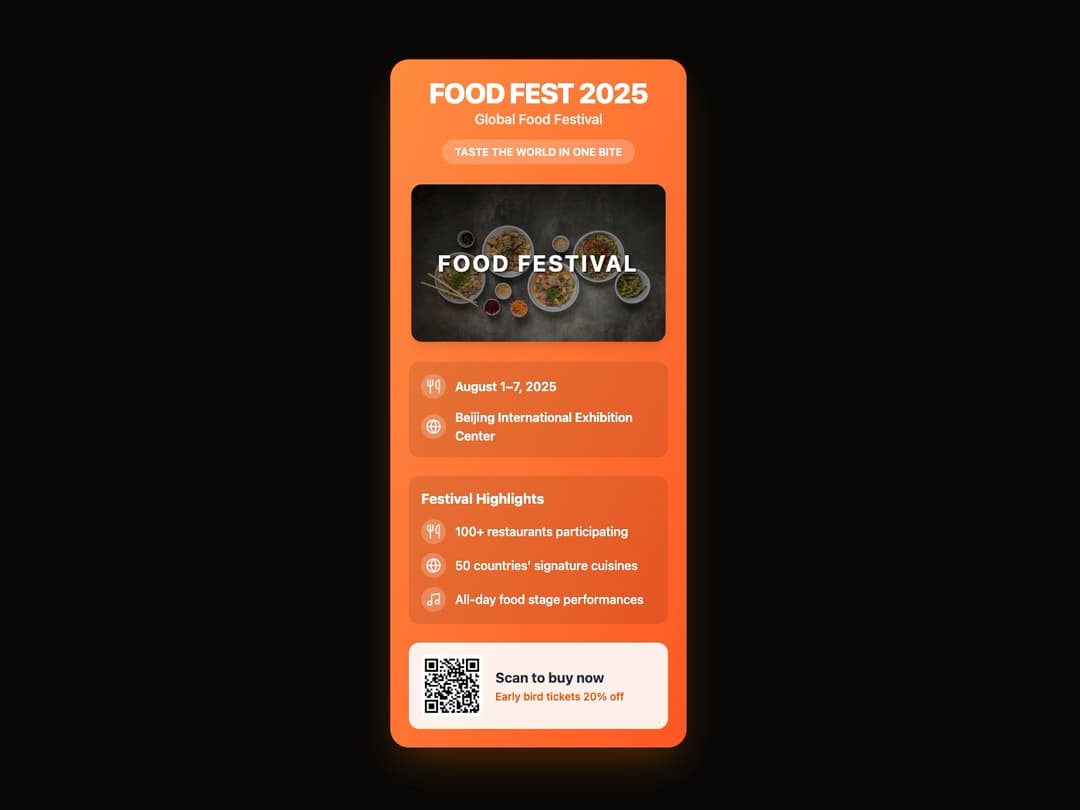
Event Card Component This component is designed to display event information in a visually appealing card format. It's built to be reusable, with all content and imagery passed in via props. It uses framer-motion for animations and is styled with Tailwind CSS using shadcn/ui theme variables for adaptability.
Built with React and Tailwind. Copy the prompt and paste it into Claude Code, Cursor or Lovable: your agent adds Event Card Component to your project and fits it to your theme.
Code
How Event Card Component is used: the demo's code. The component's own source comes with a free account.
Usage.tsx
import { EventCard, Highlight } from "@/components/ui/event-card-component";
import { Calendar, MapPin, Utensils, Globe, Music } from "lucide-react";

// Demo component to showcase EventCard usage
export default function EventCardDemo() {
  // Define the props for the event card based on the user's image
  const eventDetails = {
    title: "FOOD FEST 2025",
    subtitle: "Global Food Festival",
    tagline: "TASTE THE WORLD IN ONE BITE",
    imageUrl: "https://cdn.21st.dev/assets/mirror/34/344d2c86196234f4e9997498e79e9e475efe2f95046503ba3f82354df85ce88f.jpg", // Placeholder image link
    eventDate: "August 1–7, 2025",
    eventLocation: "Beijing International Exhibition Center",
    highlights: [
      {
        icon: <Utensils className="w-5 h-5 text-white" />,
        text: "100+ restaurants participating",
      },
      {
        icon: <Globe className="w-5 h-5 text-white" />,
        text: "50 countries' signature cuisines",
      },
      {
        icon: <Music className="w-5 h-5 text-white" />,
        text: "All-day food stage performances",
      },
    ],
    // Dummy QR code image link
    qrCodeUrl: "https://cdn.21st.dev/assets/mirror/3e/3e2cc9b7c90e06b0f88ec8290055284e8d05d755430b40cbf709bba4ee93750e.png",
    ctaText: "Scan to buy now",
    ctaSubtitle: "Early bird tickets 20% off",
  };

  // A simple mapping for date/location icons to pass into the component structure
  const locationHighlights: Highlight[] = [
    {
      icon: <Calendar className="w-5 h-5 text-white" />,
      text: eventDetails.eventDate
    },
    {
      icon: <MapPin className="w-5 h-5 text-white" />,
      text: eventDetails.eventLocation
    }
  ]

  return (
    <div className="flex h-full w-full items-center justify-center bg-background p-4">
      <EventCard
        title={eventDetails.title}
        subtitle={eventDetails.subtitle}
        tagline={eventDetails.tagline}
        imageUrl={eventDetails.imageUrl}
        eventDate={eventDetails.eventDate}
        eventLocation={eventDetails.eventLocation}
        highlights={eventDetails.highlights}
        // Pass location-specific icons separately if the component expects them this way
        // Here, I've modified the component to accept all highlights in one go
        qrCodeUrl={eventDetails.qrCodeUrl}
        ctaText={eventDetails.ctaText}
        ctaSubtitle={eventDetails.ctaSubtitle}
      />
    </div>
  );
}
Dependencies
More by Ravi Katiyar
View all

Animated Shader Hero
3.7K
Hero
3.1K
Circular Gallery
2.7K
Minimalist Hero
2.5K
Floating Icons Hero Section
1.9K
Glass Calendar
1.8K
Feature Carousel
1.7K
AI Image Generator Hero
1.4K
More in Cards
View all
Stats cards with links
33

Course Design Cards
1.1K

Card
70
Statistics Card 2
264
Statistics Card 10
263

Card
17

Card Studio
9
The Item one
3
