About
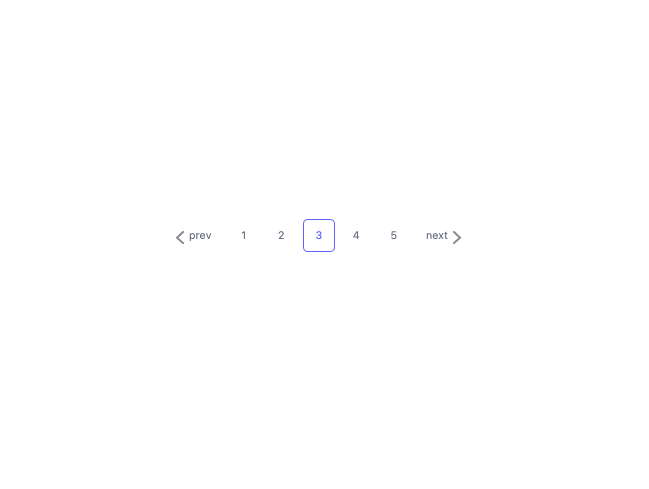
Here is Pagination component
Built with React and Tailwind. Copy the prompt and paste it into Claude Code, Cursor or Lovable: your agent adds Pagination to your project and fits it to your theme.
Code
How Pagination is used: the demo's code. The component's own source comes with a free account.
Usage.tsx
export default function Example() {
    return (
        <div className="flex items-center gap-2 text-gray-500">
            <button type="button" aria-label="prev" className="mr-4 flex items-center gap-2">
                <svg className="mt-1.5" width="9" height="13" viewBox="0 0 9 13" fill="none" xmlns="http://www.w3.org/2000/svg"><path d="M8 1 2 6.667 8 12" stroke="#111820" strokeOpacity=".5" strokeWidth="2" strokeLinecap="round"/></svg>
                <span>prev</span>
            </button>

            <div className="flex gap-2 text-sm md:text-base">
                <button type="button" className="flex items-center justify-center w-9 md:w-12 h-9 md:h-12 aspect-square rounded-md hover:bg-slate-100/80 transition-all">1</button>
                <button type="button" className="flex items-center justify-center w-9 md:w-12 h-9 md:h-12 aspect-square rounded-md hover:bg-slate-100/80 transition-all">2</button>
                <button type="button" className="flex items-center justify-center w-9 md:w-12 h-9 md:h-12 aspect-square rounded-md border border-indigo-500 text-indigo-500 transition-all">3</button>
                <button type="button" className="flex items-center justify-center w-9 md:w-12 h-9 md:h-12 aspect-square rounded-md hover:bg-slate-100/80 transition-all">4</button>
                <button type="button" className="flex items-center justify-center w-9 md:w-12 h-9 md:h-12 aspect-square rounded-md hover:bg-slate-100/80 transition-all">5</button>
            </div>

            <button type="button" aria-label="next" className="ml-4 flex items-center gap-2">
                <span>next</span>
                <svg className="mt-1.5" width="9" height="13" viewBox="0 0 9 13" fill="none" xmlns="http://www.w3.org/2000/svg" transform="scale(-1 1)"><path d="M8 1 2 6.667 8 12" stroke="#111820" strokeOpacity=".5" strokeWidth="2" strokeLinecap="round"/></svg>
            </button>
        </div>
    );
};More by reuno-ui
View all
Hero
3.2K
Background Paper Shaders
2.4K
Text Scroll animation
1.4K
Svg follow scroll
1.3K
Canvas Crowd
1.1K
Slide Button
1K
Shader Svg
691
Hero Section
675
More in Buttons
View all

Eclipse Button
2
Button Save
46

Button
4
Button Retro
62

App Store Button
455
Texture Button
92

Button
9
Button
67


