
About
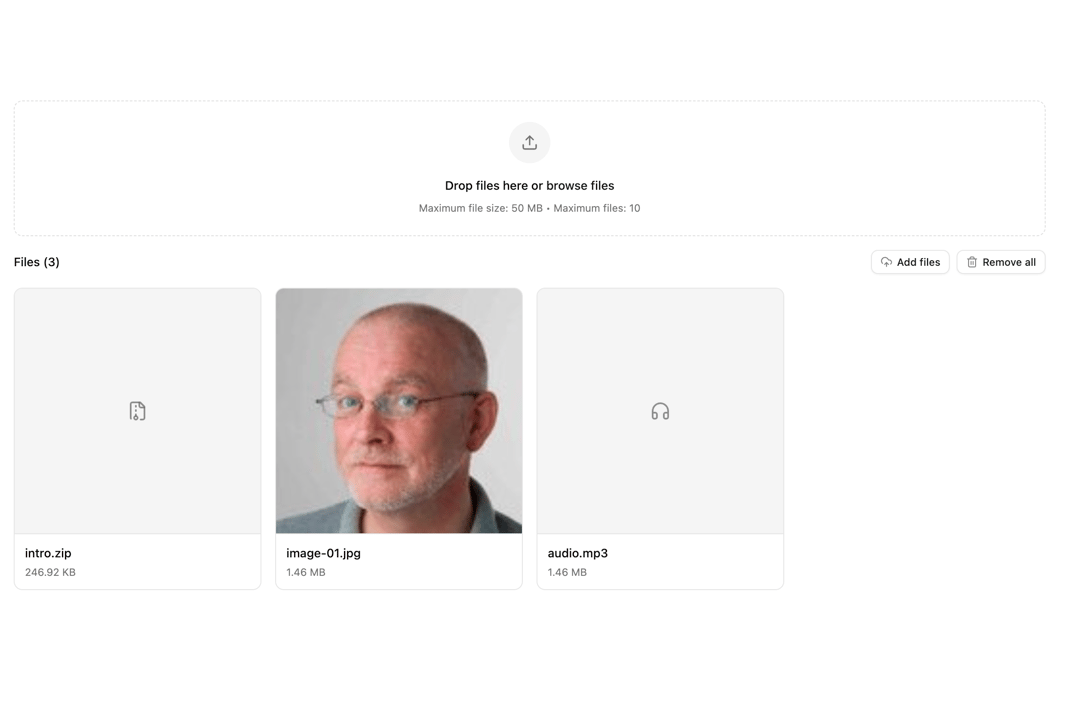
A file upload component for React.
Built with React and Tailwind. Copy the prompt and paste it into Claude Code, Cursor or Lovable: your agent adds File Upload to your project and fits it to your theme.
Code
How File Upload is used: the demo's code. The component's own source comes with a free account.
Usage.tsx
'use client';
import { useEffect, useState } from 'react';
import { useFileUpload } from '@/components/ui/file-upload';
import { Alert, AlertContent, AlertDescription, AlertIcon, AlertTitle } from '@/components/ui/alert-1';
import { Button } from '@/components/ui/button-1';
import { Tooltip, TooltipContent, TooltipTrigger } from '@/components/ui/tooltip';
import {
CloudUpload,
FileArchiveIcon,
FileSpreadsheetIcon,
FileTextIcon,
HeadphonesIcon,
ImageIcon,
RefreshCwIcon,
Trash2,
TriangleAlert,
Upload,
VideoIcon,
XIcon,
} from 'lucide-react';
import { cn } from '@/lib/utils';
/**
* Throttle function
* @param func - The function to throttle.
* @param delay - Delay in milliseconds.
*/
export const throttle = (func: Function, delay: number) => {
let lastCall = 0;
return function (...args: any[]) {
const now = new Date().getTime();
if (now - lastCall < delay) return;
lastCall = now;
return func(...args);
};
};
/**
* Debounces a function to delay its execution until after a specified delay.
*
* @param func - The function to debounce.
* @param wait - The delay in milliseconds.
* @returns A debounced version of the provided function.
*/
export function debounce<T extends (...args: unknown[]) => unknown>(
func: T,
wait: number,
): (...args: Parameters<T>) => void {
let timeout: NodeJS.Timeout | null = null;
return function (...args: Parameters<T>): void {
if (timeout) {
clearTimeout(timeout);
}
timeout = setTimeout(() => {
func(...args);
}, wait);
};
}
/**
* Generates a unique identifier using the current timestamp and a random number.
*
* @returns A string representing the unique ID.
*/
export function uid(): string {
return (Date.now() + Math.floor(Math.random() * 1000)).toString();
}
/**
* Extracts initials from a given name.
*
* @param name - The full name to extract initials from.
* @param count - The number of initials to return. Defaults to all initials.
* @returns A string of initials from the name.
*/
export const getInitials = (name: string | null | undefined, count?: number): string => {
if (!name || typeof name !== 'string') {
return '';
}
const initials = name
.split(' ')
.filter(Boolean)
.map((part) => part[0].toUpperCase());
return count && count > 0 ? initials.slice(0, count).join('') : initials.join('');
};
/**
* Formats a date as a readable string in "Month Day, Year" format.
*
* @param input - A date string or timestamp to format.
* @returns A string formatted as "Month Day, Year".
*/
export function formatDate(input: Date | string | number): string {
const date = new Date(input);
return date.toLocaleDateString('en-US', {
month: 'long',
day: 'numeric',
year: 'numeric',
});
}
/**
* Formats a date and time as a readable string in "Month Day, Year, Hour:Minute AM/PM" format.
*
* @param input - A date string or timestamp to format.
* @returns A string formatted as "Month Day, Year, Hour:Minute AM/PM".
*/
export function formatDateTime(input: Date | string | number): string {
const date = new Date(input);
return date.toLocaleString('en-US', {
month: 'long',
day: 'numeric',
year: 'numeric',
hour: 'numeric',
minute: 'numeric',
hour12: true,
});
}
/**
* Formats a number as a currency string.
*
* @param amount - The numeric value to format as currency.
* @param currency - The currency code (e.g., "USD", "EUR"). Defaults to "USD".
* @param locale - The locale for formatting (e.g., "en-US"). Defaults to "en-US".
* @returns A string formatted as currency.
*/
export function formatCurrency(amount: number, currency: string = 'USD', locale: string = 'en-US'): string {
return new Intl.NumberFormat(locale, {
style: 'currency',
currency,
}).format(amount);
}
/**
* Constructs an absolute URL based on the base application URL.
*
* @param path - The relative path to append to the base URL.
* @returns A string representing the absolute URL.
*/
export function absoluteUrl(path: string): string {
return `${process.env.NEXT_PUBLIC_APP_URL}${path}`;
}
/**
* Constructs an absolute URL for media assets.
*
* @param path - The relative path to the media asset (e.g., "/media/avatars/1.png").
* @returns A string representing the absolute URL to the media asset.
*/
export function toAbsoluteUrl(path: string): string {
// Remove leading slash if present to avoid double slashes
const cleanPath = path.startsWith('/') ? path.slice(1) : path;
return `/${cleanPath}`;
}
/**
Retrieves a list of supported time zones with their labels and values.
This function fetches the available time zones from the environment,
formats their offsets (e.g., "GMT+2"), and returns them in a sorted array.
*/
export const getTimeZones = (): { label: string; value: string }[] => {
// Fetch supported timezones
const timezones = Intl.supportedValuesOf('timeZone');
return timezones
.map((timezone) => {
const formatter = new Intl.DateTimeFormat('en', {
timeZone: timezone,
timeZoneName: 'shortOffset',
});
const parts = formatter.formatToParts(new Date());
const offset = parts.find((part) => part.type === 'timeZoneName')?.value || '';
const formattedOffset = offset === 'GMT' ? 'GMT+0' : offset;
return {
value: timezone,
label: `(${formattedOffset}) ${timezone.replace(/_/g, ' ')}`,
numericOffset: parseInt(formattedOffset.replace('GMT', '').replace('+', '') || '0'),
};
})
.sort((a, b) => a.numericOffset - b.numericOffset);
};
/**
* Generates a URL-friendly slug from a given title.
* @param title - The title to convert into a slug (e.g., "Write a Proposal")
* @returns A slug string (e.g., "write-a-proposal")
*/
export function getSlug(title: string): string {
// Return empty string for invalid input
if (!title || typeof title !== 'string') {
return '';
}
return title
.toLowerCase() // Convert to lowercase for consistency
.trim() // Remove leading/trailing whitespace
.normalize('NFD') // Normalize unicode (e.g., "é" -> "e")
.replace(/[\u0300-\u036f]/g, '') // Remove diacritics
.replace(/[^a-z0-9\s-]/g, '') // Remove special characters except spaces/hyphens
.replaceAll(/\s+/g, '-') // Replace spaces with single hyphen
.replace(/-+/g, '-') // Collapse multiple hyphens
.replace(/^-|-$/g, ''); // Remove leading/trailing hyphens
}
function formatBytes(bytes: number): string {
const sizes = ['Bytes', 'KB', 'MB', 'GB'];
if (bytes === 0) return '0 Byte';
const i = Math.floor(Math.log(bytes) / Math.log(1024));
return `${parseFloat((bytes / Math.pow(1024, i)).toFixed(2))} ${sizes[i]}`;
}
export function useCopyToClipboard() {
const [copied, setCopied] = useState(false);
const copy = async (text: string) => {
if (!navigator?.clipboard) return false;
try {
await navigator.clipboard.writeText(text);
setCopied(true);
setTimeout(() => setCopied(false), 2000);
return true;
} catch (error) {
console.error('Failed to copy:', error);
setCopied(false);
return false;
}
};
return { copy, copied };
}
// Extend FileWithPreview to include upload status and progress
interface FileUploadItem extends FileWithPreview {
progress: number;
status: 'uploading' | 'completed' | 'error';
error?: string;
}
interface CardUploadProps {
maxFiles?: number;
maxSize?: number;
accept?: string;
multiple?: boolean;
className?: string;
onFilesChange?: (files: FileUploadItem[]) => void;
simulateUpload?: boolean;
}
export default function CardUpload({
maxFiles = 10,
maxSize = 50 * 1024 * 1024, // 50MB
accept = '*',
multiple = true,
className,
onFilesChange,
simulateUpload = true,
}: CardUploadProps) {
// Create default files using FileMetadata type
const defaultFiles: FileMetadata[] = [
{
id: 'default-card-1',
name: 'intro.zip',
size: 252846,
type: 'application/zip',
url: '/media/files/intro.zip',
},
{
id: 'default-card-2',
name: 'image-01.jpg',
size: 1536000,
type: 'image/jpeg',
url: 'https://cdn.21st.dev/assets/mirror/35/3560ff7cbc9e86c333fccefe248e3ea5cdade4e46f6b2fc85d84755896cb2e5a.jpg',
},
{
id: 'default-card-3',
name: 'audio.mp3',
size: 1536000,
type: 'audio/mpeg',
url: '/media/files/intro.zip',
},
];
// Convert default files to FileUploadItem format
const defaultUploadFiles: FileUploadItem[] = defaultFiles.map((file) => ({
id: file.id,
file: {
id: file.id,
name: file.name,
size: file.size,
type: file.type,
} as unknown as File,
preview: file.url,
progress: 100,
status: 'completed' as const,
}));
const [uploadFiles, setUploadFiles] = useState<FileUploadItem[]>(defaultUploadFiles);
const [
{ isDragging, errors },
{
removeFile,
clearFiles,
handleDragEnter,
handleDragLeave,
handleDragOver,
handleDrop,
openFileDialog,
getInputProps,
},
] = useFileUpload({
maxFiles,
maxSize,
accept,
multiple,
initialFiles: defaultFiles,
onFilesChange: (newFiles) => {
// Convert to upload items when files change, preserving existing status
const newUploadFiles = newFiles.map((file) => {
// Check if this file already exists in uploadFiles
const existingFile = uploadFiles.find((existing) => existing.id === file.id);
if (existingFile) {
// Preserve existing file status and progress
return {
...existingFile,
...file, // Update any changed properties from the file
};
} else {
// New file - set to uploading
return {
...file,
progress: 0,
status: 'uploading' as const,
};
}
});
setUploadFiles(newUploadFiles);
onFilesChange?.(newUploadFiles);
},
});
// Simulate upload progress for new files
useEffect(() => {
if (!simulateUpload) return;
const uploadingFiles = uploadFiles.filter((file) => file.status === 'uploading');
if (uploadingFiles.length === 0) return;
const interval = setInterval(() => {
setUploadFiles((prev) =>
prev.map((file) => {
if (file.status !== 'uploading') return file;
const increment = Math.random() * 20 + 5; // Random increment between 5-25%
const newProgress = Math.min(file.progress + increment, 100);
if (newProgress >= 100) {
// Simulate occasional failures (10% chance)
const shouldFail = Math.random() < 0.1;
return {
...file,
progress: 100,
status: shouldFail ? ('error' as const) : ('completed' as const),
error: shouldFail ? 'Upload failed. Please try again.' : undefined,
};
}
return { ...file, progress: newProgress };
}),
);
}, 500);
return () => clearInterval(interval);
}, [uploadFiles, simulateUpload]);
const removeUploadFile = (fileId: string) => {
const fileToRemove = uploadFiles.find((f) => f.id === fileId);
if (fileToRemove) {
removeFile(fileToRemove.id);
}
};
const retryUpload = (fileId: string) => {
setUploadFiles((prev) =>
prev.map((file) =>
file.id === fileId ? { ...file, progress: 0, status: 'uploading' as const, error: undefined } : file,
),
);
};
const getFileIcon = (file: File | FileMetadata) => {
const type = file instanceof File ? file.type : file.type;
if (type.startsWith('image/')) return <ImageIcon className="size-6" />;
if (type.startsWith('video/')) return <VideoIcon className="size-6" />;
if (type.startsWith('audio/')) return <HeadphonesIcon className="size-6" />;
if (type.includes('pdf')) return <FileTextIcon className="size-6" />;
if (type.includes('word') || type.includes('doc')) return <FileTextIcon className="size-6" />;
if (type.includes('excel') || type.includes('sheet')) return <FileSpreadsheetIcon className="size-6" />;
if (type.includes('zip') || type.includes('rar')) return <FileArchiveIcon className="size-6" />;
return <FileTextIcon className="size-6" />;
};
return (
<div className="flex flex-col gap-5 p-10 w-full mx-auto h-screen justify-center items-center">
<div className={cn('w-full space-y-4', className)}>
{/* Upload Area */}
<div
className={cn(
'relative rounded-lg border border-dashed p-6 text-center transition-colors',
isDragging ? 'border-primary bg-primary/5' : 'border-muted-foreground/25 hover:border-muted-foreground/50',
)}
onDragEnter={handleDragEnter}
onDragLeave={handleDragLeave}
onDragOver={handleDragOver}
onDrop={handleDrop}
>
<input {...getInputProps()} className="sr-only" />
<div className="flex flex-col items-center gap-4">
<div
className={cn(
'flex h-12 w-12 items-center justify-center rounded-full bg-muted transition-colors',
isDragging ? 'border-primary bg-primary/10' : 'border-muted-foreground/25',
)}
>
<Upload className="h-5 w-5 text-muted-foreground" />
</div>
<div className="space-y-2">
<p className="text-sm font-medium">
Drop files here or{' '}
<button
type="button"
onClick={openFileDialog}
className="cursor-pointer text-primary underline-offset-4 hover:underline"
>
browse files
</button>
</p>
<p className="text-xs text-muted-foreground">
Maximum file size: {formatBytes(maxSize)} • Maximum files: {maxFiles}
</p>
</div>
</div>
</div>
{/* Files Grid */}
{uploadFiles.length > 0 && (
<div className="space-y-4">
<div className="flex items-center justify-between">
<h3 className="text-sm font-medium">Files ({uploadFiles.length})</h3>
<div className="flex gap-2">
<Button onClick={openFileDialog} variant="outline" size="sm">
<CloudUpload />
Add files
</Button>
<Button onClick={clearFiles} variant="outline" size="sm">
<Trash2 />
Remove all
</Button>
</div>
</div>
<div className="grid grid-cols-1 gap-4 sm:grid-cols-3 lg:grid-cols-4">
{uploadFiles.map((fileItem) => (
<div key={fileItem.id} className="relative group">
{/* Remove button */}
<Button
onClick={() => removeUploadFile(fileItem.id)}
variant="outline"
size="icon"
className="absolute -end-2 -top-2 z-10 size-6 rounded-full opacity-0 transition-opacity group-hover:opacity-100"
>
<XIcon className="size-3" />
</Button>
{/* Wrapper */}
<div className="relative overflow-hidden rounded-lg border bg-card transition-colors">
{/* Image preview or file icon area */}
<div className="relative aspect-square bg-muted border-b border-border">
{fileItem.file.type.startsWith('image/') && fileItem.preview ? (
<>
{/* Image cover */}
<img src={fileItem.preview} alt={fileItem.file.name} className="h-full w-full object-cover" />
{/* Progress overlay for uploading images */}
{fileItem.status === 'uploading' && (
<div className="absolute inset-0 flex items-center justify-center bg-black/50">
<div className="relative">
<svg className="size-12 -rotate-90" viewBox="0 0 48 48">
<circle
cx="24"
cy="24"
r="20"
fill="none"
stroke="currentColor"
strokeWidth="3"
className="text-muted/60"
/>
<circle
cx="24"
cy="24"
r="20"
fill="none"
stroke="currentColor"
strokeWidth="3"
strokeDasharray={`${2 * Math.PI * 20}`}
strokeDashoffset={`${2 * Math.PI * 20 * (1 - fileItem.progress / 100)}`}
className="text-white transition-all duration-300"
strokeLinecap="round"
/>
</svg>
</div>
</div>
)}
</>
) : (
/* File icon area for non-images */
<div className="flex h-full items-center justify-center text-muted-foreground/80">
{fileItem.status === 'uploading' ? (
<div className="relative">
<svg className="size-12 -rotate-90" viewBox="0 0 48 48">
<circle
cx="24"
cy="24"
r="20"
fill="none"
stroke="currentColor"
strokeWidth="3"
className="text-muted-foreground/20"
/>
<circle
cx="24"
cy="24"
r="20"
fill="none"
stroke="currentColor"
strokeWidth="3"
strokeDasharray={`${2 * Math.PI * 20}`}
strokeDashoffset={`${2 * Math.PI * 20 * (1 - fileItem.progress / 100)}`}
className="text-primary transition-all duration-300"
strokeLinecap="round"
/>
</svg>
<div className="absolute inset-0 flex items-center justify-center">
{getFileIcon(fileItem.file)}
</div>
</div>
) : (
<div className="text-4xl">{getFileIcon(fileItem.file)}</div>
)}
</div>
)}
</div>
{/* File info footer */}
<div className="p-3">
<div className="space-y-1">
<p className="truncate text-sm font-medium">{fileItem.file.name}</p>
<div className="relative flex items-center justify-between gap-2">
<span className="text-xs text-muted-foreground">{formatBytes(fileItem.file.size)}</span>
{fileItem.status === 'error' && fileItem.error && (
<Tooltip>
<TooltipTrigger asChild>
<Button
onClick={() => retryUpload(fileItem.id)}
variant="ghost"
size="icon"
className="absolute end-0 -top-1.25 size-6 text-destructive hover:bg-destructive/10 hover:text-destructive"
>
<RefreshCwIcon className="size-3 opacity-100" />
</Button>
</TooltipTrigger>
<TooltipContent>Upload failed. Retry</TooltipContent>
</Tooltip>
)}
</div>
</div>
</div>
</div>
</div>
))}
</div>
</div>
)}
{/* Error Messages */}
{errors.length > 0 && (
<Alert variant="destructive" appearance="light" className="mt-5">
<AlertIcon>
<TriangleAlert />
</AlertIcon>
<AlertContent>
<AlertTitle>File upload error(s)</AlertTitle>
<AlertDescription>
{errors.map((error, index) => (
<p key={index} className="last:mb-0">
{error}
</p>
))}
</AlertDescription>
</AlertContent>
</Alert>
)}
</div>
</div>
);
}
More by Sean Hello
View all

3D Testimonails
3.3K
Line Charts 9
637
Alert
492
Area Charts 1
385
Line Charts 6
384
Scroll Area
376
Area Charts 2
317
Navigation Menu
305