
About
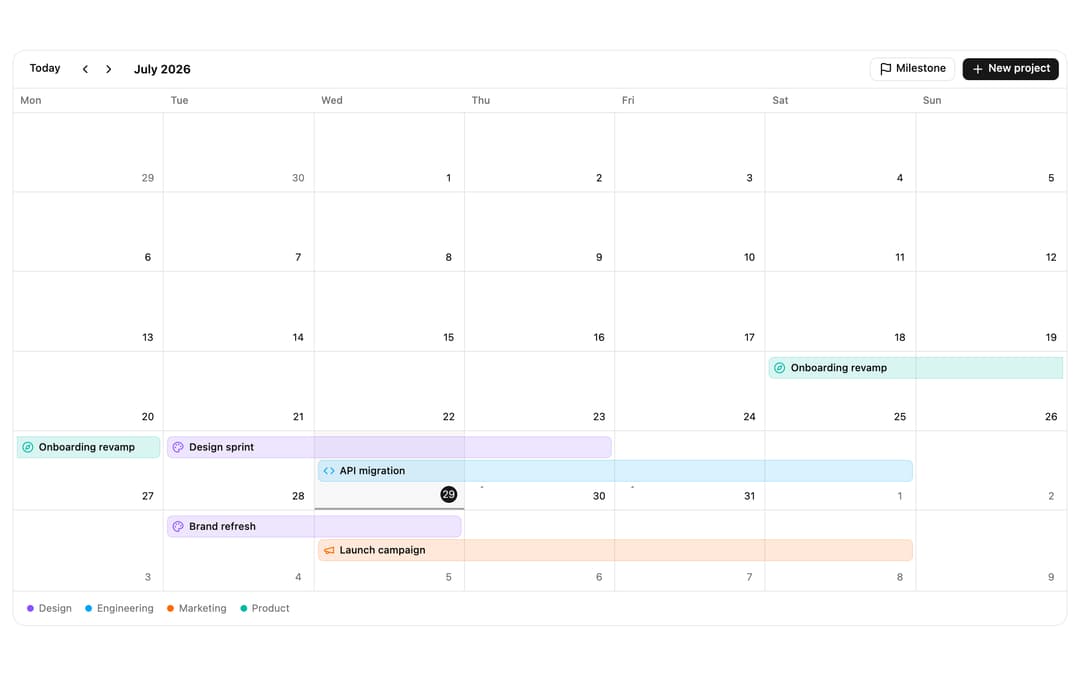
ReUI Event Calendar with the first 5 official ReUI examples, preserved from the MIT-licensed source registry.
Built with React and Tailwind. Copy the prompt and paste it into Claude Code, Cursor or Lovable: your agent adds ReUI Event Calendar to your project and fits it to your theme.
Code
How ReUI Event Calendar is used: the demo's code. The component's own source comes with a free account.
Usage.tsx
import { PaletteIcon, CodeIcon, MegaphoneIcon, CompassIcon, FlagIcon, PlusIcon } from "lucide-react"
"use client"

import { useMemo, useRef, type ReactNode } from "react"
import {
  EventCalendar,
  type EventCalendarApi,
  type EventCalendarRenderEventProps,
} from "@/components/ui/reui-event-calendar"
import { EventCalendarContent } from "@/components/ui/reui-event-calendar-utils/event-calendar-content"
import {
  EventCalendarNav,
  EventCalendarToolbar,
} from "@/components/ui/reui-event-calendar-utils/event-calendar-nav"
import type { CalendarEvent } from "@/components/ui/reui-event-calendar-utils/event-calendar-types"
import { addDays, startOfDay, startOfWeek } from "date-fns"

import { Button } from "@/components/ui/reui-event-calendar-utils/button"
import { Card, CardContent } from "@/components/ui/reui-event-calendar-utils/card"

type Category = "design" | "engineering" | "marketing" | "product"

/** One source of truth per track: the bar color, its legend label, and the
 *  leading icon. IconPlaceholder props stay static string literals here (a rule
 *  the `shadcn add` transform relies on) - the map just picks which prebuilt
 *  element to render. */
const CATEGORY: Record<
  Category,
  { label: string; color: string; icon: ReactNode }
> = {
  design: {
    label: "Design",
    color: "var(--color-violet-500)",
    icon: (
      <PaletteIcon className="size-3.5" aria-hidden="true" />
    ),
  },
  engineering: {
    label: "Engineering",
    color: "var(--color-sky-500)",
    icon: (
      <CodeIcon className="size-3.5" aria-hidden="true" />
    ),
  },
  marketing: {
    label: "Marketing",
    color: "var(--color-orange-500)",
    icon: (
      <MegaphoneIcon className="size-3.5" aria-hidden="true" />
    ),
  },
  product: {
    label: "Product",
    color: "var(--color-teal-500)",
    icon: (
      <CompassIcon className="size-3.5" aria-hidden="true" />
    ),
  },
}

interface EventData {
  category: Category
}

/** A month of cross-functional work: multi-day project bars you can drag to
 *  reschedule and resize by the edge to span more or fewer days. Anchored to
 *  the current week so the month opens full. */
function buildEvents(anchor: Date): CalendarEvent<EventData>[] {
  const week = startOfWeek(startOfDay(anchor), { weekStartsOn: 1 })
  const day = (offset: number) => addDays(week, offset)

  const span = (
    id: string,
    title: string,
    startOffset: number,
    endOffset: number,
    category: Category
  ): CalendarEvent<EventData> => ({
    id,
    title,
    // all-day, end-exclusive: [startOffset, endOffset) covers whole days
    start: day(startOffset),
    end: day(endOffset),
    allDay: true,
    color: CATEGORY[category].color,
    data: { category },
  })

  return [
    span("onboarding", "Onboarding revamp", -2, 1, "product"),
    span("design-sprint", "Design sprint", 1, 4, "design"),
    span("api-migration", "API migration", 2, 6, "engineering"),
    span("user-research", "User research", 3, 5, "product"),
    span("brand-refresh", "Brand refresh", 8, 10, "design"),
    span("launch", "Launch campaign", 9, 13, "marketing"),
    span("roadmap", "Roadmap review", 15, 16, "engineering"),
  ]
}

/** Fully custom chip via `renderEvent`: a compact single-row bar with an inline
 *  category icon (no container) and the title. The icon and title share one
 *  `flex items-center` row so the bar stays slim at any span. */
function renderChip({ occurrence }: EventCalendarRenderEventProps<EventData>) {
  const category = occurrence.event.data?.category
  if (!category) return undefined

  return (
    <span className="flex w-full min-w-0 items-center gap-1.5">
      <span className="flex shrink-0 text-(--ec-event-color)">
        {CATEGORY[category].icon}
      </span>
      <span className="truncate font-medium">{occurrence.event.title}</span>
    </span>
  )
}

/** Hover tooltip: the title and its track. */
function renderTooltip({
  occurrence,
}: {
  occurrence: { event: CalendarEvent<EventData> }
}) {
  const category = occurrence.event.data?.category
  if (!category) return undefined
  return (
    <div className="space-y-0.5">
      <p className="font-medium">{occurrence.event.title}</p>
      <p className="text-muted-foreground text-xs">
        {CATEGORY[category].label}
      </p>
    </div>
  )
}

export default function Pattern() {
  const events = useMemo(() => buildEvents(new Date()), [])
  const apiRef = useRef<EventCalendarApi | null>(null)
  const counter = useRef(0)

  // Add a multi-day design project starting today and jump to it - a minimal
  // stand-in for a real "new project" flow.
  const addProject = () => {
    const api = apiRef.current
    if (!api) return
    const start = startOfDay(new Date())
    api.addEvent({
      id: `project-${counter.current++}`,
      title: "New project",
      start,
      end: addDays(start, 3),
      allDay: true,
      color: CATEGORY.design.color,
      data: { category: "design" },
    })
    api.goTo(start)
  }

  // Add a single-day product milestone today.
  const addMilestone = () => {
    const api = apiRef.current
    if (!api) return
    const start = startOfDay(new Date())
    api.addEvent({
      id: `milestone-${counter.current++}`,
      title: "Milestone",
      start,
      end: addDays(start, 1),
      allDay: true,
      color: CATEGORY.product.color,
      data: { category: "product" },
    })
    api.goTo(start)
  }

  return (
    <div className="w-full p-4">
      <Card className="w-full py-0">
        <CardContent className="p-0">
          <EventCalendar
            defaultEvents={events}
            defaultView="month"
            weekStartsOn={1}
            apiRef={apiRef}
            renderEvent={renderChip}
            renderEventTooltip={renderTooltip}
            eventTooltip={{ side: "top" }}
            // drag to reschedule a project, resize the edge to change how many
            // days it spans; slot-drag creation stays off (it's a chip showcase)
            interactions={{ drag: true, resize: true, selectSlot: false }}
            className="h-[640px] w-full"
          >
            <div className="flex flex-wrap items-center gap-2 pe-2">
              <EventCalendarNav
                className="min-w-0 flex-1"
                showViewSwitcher={false}
              />
              <EventCalendarToolbar>
                <Button variant="outline" size="sm" onClick={addMilestone}>
                  <FlagIcon className="size-4" aria-hidden="true" />
                  Milestone
                </Button>
                <Button size="sm" onClick={addProject}>
                  <PlusIcon className="size-4" aria-hidden="true" />
                  New project
                </Button>
              </EventCalendarToolbar>
            </div>
            <EventCalendarContent />
          </EventCalendar>
          {/* Track legend - runtime var(--color-*) swatches ride inline styles
              rather than synthesized utility classes. */}
          <div className="text-muted-foreground flex flex-wrap items-center gap-x-4 gap-y-2 border-t px-4 py-3 text-xs">
            {(Object.keys(CATEGORY) as Category[]).map((key) => (
              <span key={key} className="flex items-center gap-1.5">
                <span
                  aria-hidden
                  className="size-2 rounded-full"
                  style={{ backgroundColor: CATEGORY[key].color }}
                />
                {CATEGORY[key].label}
              </span>
            ))}
          </div>
        </CardContent>
      </Card>
    </div>
  )
}
Dependencies
More by Sean Hello
View all

3D Testimonails
3.3K
Line Charts 9
637
Alert
492
Area Charts 1
385
Line Charts 6
384
Scroll Area
376
Area Charts 2
317
Navigation Menu
305