
About
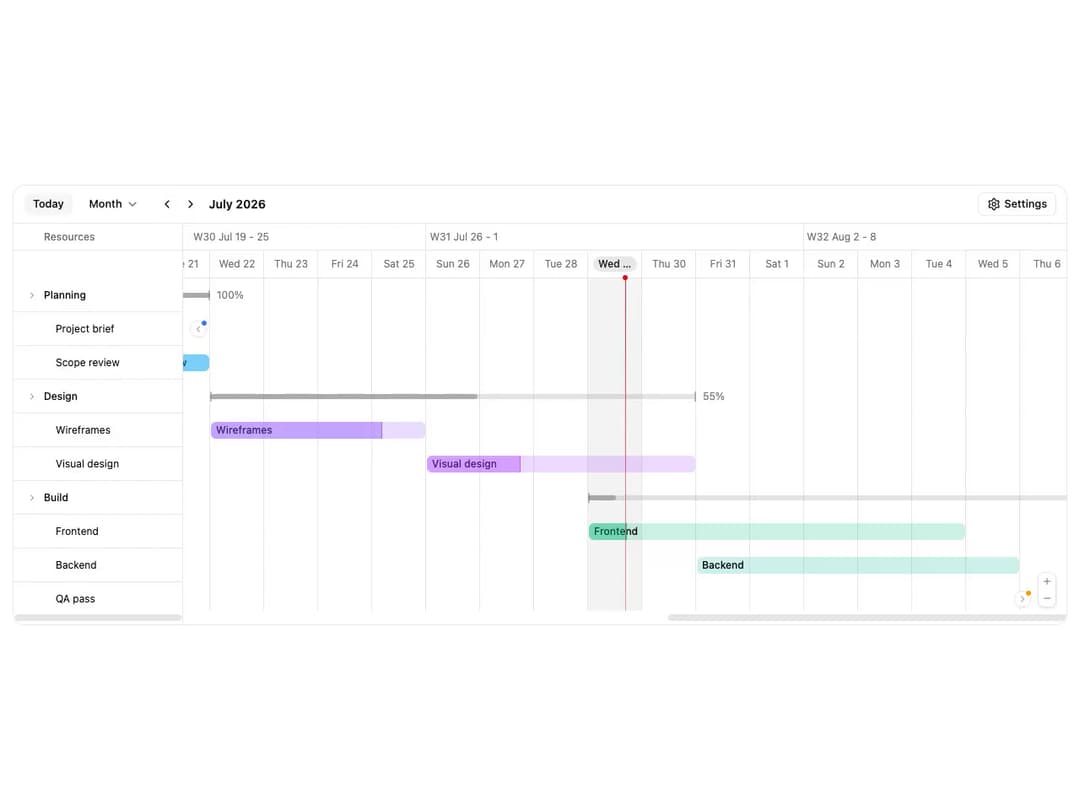
ReUI Gantt with the first 5 official ReUI examples, preserved from the MIT-licensed source registry.
Built with React and Tailwind. Copy the prompt and paste it into Claude Code, Cursor or Lovable: your agent adds ReUI Gantt to your project and fits it to your theme.
Code
How ReUI Gantt is used: the demo's code. The component's own source comes with a free account.
Usage.tsx
import { SettingsIcon, RotateCcwIcon } from "lucide-react"
"use client"
import { useMemo, useRef, useState } from "react"
import {
Gantt,
type GanttApi,
} from "@/components/ui/reui-gantt"
import type { GanttI18nOverrides } from "@/components/ui/reui-gantt-utils/gantt-i18n"
import {
GanttNav,
GanttToolbar,
} from "@/components/ui/reui-gantt-utils/gantt-nav"
import type {
GanttEvent,
GanttInteractions,
GanttResource,
GanttSlotDraft,
} from "@/components/ui/reui-gantt-utils/gantt-types"
import { GanttView } from "@/components/ui/reui-gantt-utils/gantt-view"
import { addDays, startOfDay, startOfWeek, type Locale } from "date-fns"
import { ar, de, es, fr, ja } from "date-fns/locale"
import { Button } from "@/components/ui/reui-gantt-utils/button"
import { Card, CardContent } from "@/components/ui/reui-gantt-utils/card"
import { Label } from "@/components/ui/reui-gantt-utils/label"
import {
Popover,
PopoverContent,
PopoverTrigger,
} from "@/components/ui/reui-gantt-utils/popover"
import {
RadioGroup,
RadioGroupItem,
} from "@/components/ui/reui-gantt-utils/radio-group"
import {
Select,
SelectContent,
SelectItem,
SelectTrigger,
SelectValue,
} from "@/components/ui/reui-gantt-utils/select"
import { Switch } from "@/components/ui/reui-gantt-utils/switch"
import {
Tabs,
TabsContent,
TabsList,
TabsTrigger,
} from "@/components/ui/reui-gantt-utils/tabs"
/**
* White-label task tree, tall enough that the panes scroll vertically. The
* Launch group and "Release prep" ship UNSCHEDULED: hover their empty rows
* and click the hint tile (or drag a range) to schedule them.
*/
const RESOURCES: GanttResource[] = [
{
id: "planning",
title: "Planning",
children: [
{ id: "brief", title: "Project brief" },
{ id: "scope", title: "Scope review" },
],
},
{
id: "design",
title: "Design",
children: [
{ id: "wireframes", title: "Wireframes" },
{ id: "visual-design", title: "Visual design" },
],
},
{
id: "build",
title: "Build",
children: [
{ id: "frontend", title: "Frontend" },
{ id: "backend", title: "Backend" },
{ id: "qa", title: "QA pass" },
{ id: "release-prep", title: "Release prep" },
],
},
{
id: "launch",
title: "Launch",
children: [
{ id: "docs", title: "Docs" },
{ id: "marketing-site", title: "Marketing site" },
{ id: "announcement", title: "Announcement" },
],
},
]
/** Leaf id -> title, for naming bars scheduled from empty rows. */
const RESOURCE_TITLES = new Map(
RESOURCES.flatMap((group) => group.children ?? []).map((leaf) => [
leaf.id,
leaf.title,
])
)
/** Small white-label fixture built around the current week. */
function buildBars(anchor: Date): GanttEvent[] {
const week = startOfWeek(startOfDay(anchor), { weekStartsOn: 0 })
const day = (dayOffset: number) => addDays(week, dayOffset)
const bar = (
resourceId: string,
title: string,
startOffset: number,
days: number,
color: string,
progress?: number
): GanttEvent => ({
id: `bar-${resourceId}`,
title,
start: day(startOffset),
end: day(startOffset + days),
allDay: true,
color,
resourceId,
progress,
})
return [
bar("brief", "Project brief", -9, 3, "var(--color-blue-500)", 100),
bar("scope", "Scope review", -6, 2, "var(--color-sky-500)", 100),
bar("wireframes", "Wireframes", -4, 4, "var(--color-violet-500)", 80),
bar("visual-design", "Visual design", 0, 5, "var(--color-purple-500)", 35),
bar("frontend", "Frontend", 3, 7, "var(--color-emerald-500)", 10),
bar("backend", "Backend", 5, 6, "var(--color-teal-500)"),
bar("qa", "QA pass", 12, 4, "var(--color-amber-500)"),
]
}
/**
* i18n presets - each language ships a date-fns `locale` (localizes the axis
* headers, the nav title, and bar date labels; it also drives the default
* week start, so a German timeline starts Monday) plus an `i18n` override map
* for the static strings the locale can't reach (Today, the scale names, the
* schedule hint). Arabic also flips the chart to right-to-left. English is the
* built-in default, so it leaves both undefined.
*/
interface DemoLocale {
id: string
/** Native language name, shown in the picker. */
label: string
locale: Locale | undefined
dir: "ltr" | "rtl"
i18n: GanttI18nOverrides | undefined
}
const LOCALES: DemoLocale[] = [
{
id: "en",
label: "English",
locale: undefined,
dir: "ltr",
i18n: undefined,
},
{
id: "de",
label: "Deutsch",
locale: de,
dir: "ltr",
i18n: {
labels: {
today: "Heute",
scheduleHint: "Zum Planen klicken",
reorder: "Neu anordnen",
scales: {
day: "Tag",
week: "Woche",
month: "Monat",
quarter: "Quartal",
year: "Jahr",
},
},
},
},
{
id: "fr",
label: "Français",
locale: fr,
dir: "ltr",
i18n: {
labels: {
today: "Aujourd'hui",
scheduleHint: "Cliquer pour planifier",
reorder: "Réorganiser",
scales: {
day: "Jour",
week: "Semaine",
month: "Mois",
quarter: "Trimestre",
year: "Année",
},
},
},
},
{
id: "es",
label: "Español",
locale: es,
dir: "ltr",
i18n: {
labels: {
today: "Hoy",
scheduleHint: "Clic para programar",
reorder: "Reordenar",
scales: {
day: "Día",
week: "Semana",
month: "Mes",
quarter: "Trimestre",
year: "Año",
},
},
},
},
{
id: "ja",
label: "日本語",
locale: ja,
dir: "ltr",
i18n: {
labels: {
today: "今日",
scheduleHint: "クリックして予定を追加",
reorder: "並べ替え",
scales: {
day: "日",
week: "週",
month: "月",
quarter: "四半期",
year: "年",
},
},
},
},
{
id: "ar",
label: "العربية",
locale: ar,
dir: "rtl",
i18n: {
labels: {
today: "اليوم",
scheduleHint: "انقر لإضافة جدول",
reorder: "إعادة ترتيب",
scales: {
day: "يوم",
week: "أسبوع",
month: "شهر",
quarter: "ربع سنوي",
year: "سنة",
},
},
},
},
]
/** Display time zones - all timeline math and rendering happen in the chosen
* zone, so switching it re-anchors every bar to that zone's calendar days. */
const TIME_ZONES: Array<{ id: string; label: string; value?: string }> = [
{ id: "local", label: "Browser" },
{ id: "ny", label: "New York", value: "America/New_York" },
{ id: "london", label: "London", value: "Europe/London" },
{ id: "tokyo", label: "Tokyo", value: "Asia/Tokyo" },
{ id: "kolkata", label: "Kolkata", value: "Asia/Kolkata" },
]
/** Every toggle's default; the Reset button returns the demo here. */
const SETTINGS_DEFAULTS = {
rowCheckboxes: true,
summaryBars: true,
zoomControl: true,
offscreenIndicators: true,
infiniteScroll: true,
nowIndicator: true,
offDays: false,
dragCreate: true,
displayScheduleHint: true,
barLabel: "inside" as "inside" | "outside" | "auto",
timelineLines: "vertical" as "vertical" | "both" | "none",
interactions: { drag: true, resize: true, selectSlot: true },
localeId: "en",
timeZoneId: "local",
}
/** One labeled switch row inside a settings tab. */
function SettingSwitch({
id,
label,
checked,
onCheckedChange,
}: {
id: string
label: string
checked: boolean
onCheckedChange: (value: boolean) => void
}) {
return (
<div className="flex items-center justify-between gap-4 py-1">
<Label htmlFor={id} className="font-normal">
{label}
</Label>
<Switch id={id} checked={checked} onCheckedChange={onCheckedChange} />
</div>
)
}
/** One labeled radio row inside a settings tab. */
function SettingRadio({
id,
value,
label,
}: {
id: string
value: string
label: string
}) {
return (
<div className="flex items-center gap-2 py-0.5">
<RadioGroupItem value={value} id={id} />
<Label htmlFor={id} className="font-normal">
{label}
</Label>
</div>
)
}
/** One labeled select row - the language and time-zone pickers. */
function SettingSelect({
id,
label,
value,
options,
onValueChange,
}: {
id: string
label: string
value: string
options: Array<{ value: string; label: string }>
onValueChange: (value: string) => void
}) {
return (
<div className="flex items-center justify-between gap-4 py-1">
<Label htmlFor={id} className="font-normal">
{label}
</Label>
<Select value={value} onValueChange={onValueChange}>
<SelectTrigger id={id} size="sm" className="w-36">
{/* Base UI's Value renders the raw value string by default; the
selected option's label reads better here. */}
<SelectValue>
{options.find((option) => option.value === value)?.label}
</SelectValue>
</SelectTrigger>
<SelectContent>
{options.map((option) => (
<SelectItem key={option.value} value={option.value}>
{option.label}
</SelectItem>
))}
</SelectContent>
</Select>
</div>
)
}
interface SettingsMenuProps {
rowCheckboxes: boolean
onRowCheckboxesChange: (value: boolean) => void
summaryBars: boolean
onSummaryBarsChange: (value: boolean) => void
zoomControl: boolean
onZoomControlChange: (value: boolean) => void
offscreenIndicators: boolean
onOffscreenIndicatorsChange: (value: boolean) => void
infiniteScroll: boolean
onInfiniteScrollChange: (value: boolean) => void
nowIndicator: boolean
onNowIndicatorChange: (value: boolean) => void
offDays: boolean
onOffDaysChange: (value: boolean) => void
dragCreate: boolean
onDragCreateChange: (value: boolean) => void
displayScheduleHint: boolean
onDisplayScheduleHintChange: (value: boolean) => void
barLabel: "inside" | "outside" | "auto"
onBarLabelChange: (value: "inside" | "outside" | "auto") => void
timelineLines: "vertical" | "both" | "none"
onTimelineLinesChange: (value: "vertical" | "both" | "none") => void
interactions: GanttInteractions
onInteractionsChange: (value: GanttInteractions) => void
localeId: string
onLocaleChange: (value: string) => void
timeZoneId: string
onTimeZoneChange: (value: string) => void
onReset: () => void
}
function SettingsMenu({
rowCheckboxes,
onRowCheckboxesChange,
summaryBars,
onSummaryBarsChange,
zoomControl,
onZoomControlChange,
offscreenIndicators,
onOffscreenIndicatorsChange,
infiniteScroll,
onInfiniteScrollChange,
nowIndicator,
onNowIndicatorChange,
offDays,
onOffDaysChange,
dragCreate,
onDragCreateChange,
displayScheduleHint,
onDisplayScheduleHintChange,
barLabel,
onBarLabelChange,
timelineLines,
onTimelineLinesChange,
interactions,
onInteractionsChange,
localeId,
onLocaleChange,
timeZoneId,
onTimeZoneChange,
onReset,
}: SettingsMenuProps) {
return (
<Popover>
<PopoverTrigger
render={
<Button variant="outline" size="sm">
<SettingsIcon className="size-4" aria-hidden="true" />
Settings
</Button>
}
/>
<PopoverContent align="end" className="w-80 p-0">
{/* Tabs keep every group one screen tall - no menu scrolling */}
<Tabs defaultValue="display">
<div className="border-b p-2">
<TabsList className="grid w-full grid-cols-4">
<TabsTrigger value="display">Display</TabsTrigger>
<TabsTrigger value="behavior">Behavior</TabsTrigger>
<TabsTrigger value="style">Style</TabsTrigger>
<TabsTrigger value="region">Region</TabsTrigger>
</TabsList>
</div>
<TabsContent value="display" className="space-y-0.5 p-3">
<SettingSwitch
id="gantt1-row-checkboxes"
label="Row checkboxes"
checked={rowCheckboxes}
onCheckedChange={onRowCheckboxesChange}
/>
<SettingSwitch
id="gantt1-summary-bars"
label="Summary bars"
checked={summaryBars}
onCheckedChange={onSummaryBarsChange}
/>
<SettingSwitch
id="gantt1-zoom-control"
label="Zoom control"
checked={zoomControl}
onCheckedChange={onZoomControlChange}
/>
<SettingSwitch
id="gantt1-offscreen-chips"
label="Off-screen chips"
checked={offscreenIndicators}
onCheckedChange={onOffscreenIndicatorsChange}
/>
<SettingSwitch
id="gantt1-infinite-scroll"
label="Infinite scroll"
checked={infiniteScroll}
onCheckedChange={onInfiniteScrollChange}
/>
<SettingSwitch
id="gantt1-now-indicator"
label="Now indicator"
checked={nowIndicator}
onCheckedChange={onNowIndicatorChange}
/>
<SettingSwitch
id="gantt1-off-days"
label="Mark off days"
checked={offDays}
onCheckedChange={onOffDaysChange}
/>
</TabsContent>
<TabsContent value="behavior" className="space-y-0.5 p-3">
<SettingSwitch
id="gantt1-drag"
label="Drag to move"
checked={interactions.drag}
onCheckedChange={(checked) =>
onInteractionsChange({ ...interactions, drag: checked })
}
/>
<SettingSwitch
id="gantt1-resize"
label="Resize"
checked={interactions.resize}
onCheckedChange={(checked) =>
onInteractionsChange({ ...interactions, resize: checked })
}
/>
<SettingSwitch
id="gantt1-select-slot"
label="Select slot"
checked={interactions.selectSlot}
onCheckedChange={(checked) =>
onInteractionsChange({ ...interactions, selectSlot: checked })
}
/>
<SettingSwitch
id="gantt1-drag-create"
label="Drag to create"
checked={dragCreate}
onCheckedChange={onDragCreateChange}
/>
<SettingSwitch
id="gantt1-schedule-hint"
label="Schedule hint"
checked={displayScheduleHint}
onCheckedChange={onDisplayScheduleHintChange}
/>
</TabsContent>
<TabsContent value="style" className="space-y-4 p-3">
<div className="space-y-1.5">
<div className="text-muted-foreground text-xs font-medium">
Bar label
</div>
<RadioGroup
value={barLabel}
onValueChange={(value) =>
onBarLabelChange(value as "inside" | "outside" | "auto")
}
>
<SettingRadio
id="gantt1-label-inside"
value="inside"
label="Inside"
/>
<SettingRadio
id="gantt1-label-outside"
value="outside"
label="Outside"
/>
<SettingRadio
id="gantt1-label-auto"
value="auto"
label="Auto"
/>
</RadioGroup>
</div>
<div className="space-y-1.5">
<div className="text-muted-foreground text-xs font-medium">
Grid lines
</div>
<RadioGroup
value={timelineLines}
onValueChange={(value) =>
onTimelineLinesChange(value as "vertical" | "both" | "none")
}
>
<SettingRadio
id="gantt1-lines-vertical"
value="vertical"
label="Vertical"
/>
<SettingRadio
id="gantt1-lines-both"
value="both"
label="Both"
/>
<SettingRadio
id="gantt1-lines-none"
value="none"
label="None"
/>
</RadioGroup>
</div>
</TabsContent>
<TabsContent value="region" className="space-y-2 p-3">
<SettingSelect
id="gantt1-language"
label="Language"
value={localeId}
options={LOCALES.map((entry) => ({
value: entry.id,
label: entry.label,
}))}
onValueChange={onLocaleChange}
/>
<SettingSelect
id="gantt1-timezone"
label="Time zone"
value={timeZoneId}
options={TIME_ZONES.map((entry) => ({
value: entry.id,
label: entry.label,
}))}
onValueChange={onTimeZoneChange}
/>
<p className="text-muted-foreground text-xs leading-relaxed">
Language switches the date-fns locale, the scale names, and the
week start. Time zone re-anchors every bar. Arabic also flips the
chart to right-to-left.
</p>
</TabsContent>
</Tabs>
<div className="border-t p-2">
<Button
variant="outline"
size="sm"
className="w-full"
onClick={onReset}
>
<RotateCcwIcon className="size-3.5" aria-hidden="true" />
Reset to defaults
</Button>
</div>
</PopoverContent>
</Popover>
)
}
export default function Pattern() {
const bars = useMemo(() => buildBars(new Date()), [])
const apiRef = useRef<GanttApi | null>(null)
const [rowCheckboxes, setRowCheckboxes] = useState(
SETTINGS_DEFAULTS.rowCheckboxes
)
const [summaryBars, setSummaryBars] = useState(SETTINGS_DEFAULTS.summaryBars)
const [zoomControl, setZoomControl] = useState(SETTINGS_DEFAULTS.zoomControl)
const [offscreenIndicators, setOffscreenIndicators] = useState(
SETTINGS_DEFAULTS.offscreenIndicators
)
const [infiniteScroll, setInfiniteScroll] = useState(
SETTINGS_DEFAULTS.infiniteScroll
)
const [nowIndicator, setNowIndicator] = useState(
SETTINGS_DEFAULTS.nowIndicator
)
const [offDays, setOffDays] = useState(SETTINGS_DEFAULTS.offDays)
const [dragCreate, setDragCreate] = useState(SETTINGS_DEFAULTS.dragCreate)
const [displayScheduleHint, setDisplayScheduleHint] = useState(
SETTINGS_DEFAULTS.displayScheduleHint
)
const [barLabel, setBarLabel] = useState<"inside" | "outside" | "auto">(
SETTINGS_DEFAULTS.barLabel
)
const [timelineLines, setTimelineLines] = useState<
"vertical" | "both" | "none"
>(SETTINGS_DEFAULTS.timelineLines)
const [interactions, setInteractions] = useState<GanttInteractions>(
SETTINGS_DEFAULTS.interactions
)
const [localeId, setLocaleId] = useState(SETTINGS_DEFAULTS.localeId)
const [timeZoneId, setTimeZoneId] = useState(SETTINGS_DEFAULTS.timeZoneId)
const activeLocale =
LOCALES.find((entry) => entry.id === localeId) ?? LOCALES[0]
const activeTimeZone =
TIME_ZONES.find((entry) => entry.id === timeZoneId) ?? TIME_ZONES[0]
const resetSettings = () => {
setRowCheckboxes(SETTINGS_DEFAULTS.rowCheckboxes)
setSummaryBars(SETTINGS_DEFAULTS.summaryBars)
setZoomControl(SETTINGS_DEFAULTS.zoomControl)
setOffscreenIndicators(SETTINGS_DEFAULTS.offscreenIndicators)
setInfiniteScroll(SETTINGS_DEFAULTS.infiniteScroll)
setNowIndicator(SETTINGS_DEFAULTS.nowIndicator)
setOffDays(SETTINGS_DEFAULTS.offDays)
setDragCreate(SETTINGS_DEFAULTS.dragCreate)
setDisplayScheduleHint(SETTINGS_DEFAULTS.displayScheduleHint)
setBarLabel(SETTINGS_DEFAULTS.barLabel)
setTimelineLines(SETTINGS_DEFAULTS.timelineLines)
setInteractions(SETTINGS_DEFAULTS.interactions)
setLocaleId(SETTINGS_DEFAULTS.localeId)
setTimeZoneId(SETTINGS_DEFAULTS.timeZoneId)
}
// Unscheduled rows accept ONE schedule: the hint tile (or a drag-create
// range) proposes a slot, and the handler turns it into a real bar.
const canSelectSlot = (slot: GanttSlotDraft) =>
!!slot.resourceId &&
!(apiRef.current?.getEvents() ?? []).some(
(event) => event.resourceId === slot.resourceId
)
const handleSelectSlot = (slot: GanttSlotDraft) => {
const api = apiRef.current
if (!api || !slot.resourceId) return
api.addEvent({
id: `scheduled-${slot.resourceId}`,
title: RESOURCE_TITLES.get(slot.resourceId) ?? "New schedule",
start: slot.start,
end: slot.end,
allDay: true,
color: "var(--color-indigo-500)",
resourceId: slot.resourceId,
})
}
return (
<div className="w-full p-4" dir={activeLocale.dir}>
<Card className="w-full py-0">
<CardContent className="p-0">
<Gantt
defaultEvents={bars}
resources={RESOURCES}
defaultScale="month"
apiRef={apiRef}
locale={activeLocale.locale}
i18n={activeLocale.i18n}
timeZone={activeTimeZone.value}
treePanel={{ width: 200 }}
rowCheckboxes={rowCheckboxes}
summaryBars={summaryBars}
zoomControl={zoomControl}
offscreenIndicators={offscreenIndicators}
infiniteScroll={infiniteScroll}
nowIndicator={nowIndicator}
offDays={offDays}
dragCreate={dragCreate}
displayScheduleHint={displayScheduleHint}
barLabel={barLabel}
timelineLines={timelineLines}
interactions={interactions}
onInteractionsChange={setInteractions}
canSelectSlot={canSelectSlot}
onSelectSlot={handleSelectSlot}
className="h-[520px] w-full"
>
{/* one bordered header row, same look as the plain GanttNav:
the row owns the border and end padding so the toolbar never
sits glued to the edge */}
<div className="flex flex-wrap items-center gap-2 border-b pe-3">
<GanttNav className="min-w-0 flex-1 border-b-0" />
<GanttToolbar>
<SettingsMenu
rowCheckboxes={rowCheckboxes}
onRowCheckboxesChange={setRowCheckboxes}
summaryBars={summaryBars}
onSummaryBarsChange={setSummaryBars}
zoomControl={zoomControl}
onZoomControlChange={setZoomControl}
offscreenIndicators={offscreenIndicators}
onOffscreenIndicatorsChange={setOffscreenIndicators}
infiniteScroll={infiniteScroll}
onInfiniteScrollChange={setInfiniteScroll}
nowIndicator={nowIndicator}
onNowIndicatorChange={setNowIndicator}
offDays={offDays}
onOffDaysChange={setOffDays}
dragCreate={dragCreate}
onDragCreateChange={setDragCreate}
displayScheduleHint={displayScheduleHint}
onDisplayScheduleHintChange={setDisplayScheduleHint}
barLabel={barLabel}
onBarLabelChange={setBarLabel}
timelineLines={timelineLines}
onTimelineLinesChange={setTimelineLines}
interactions={interactions}
onInteractionsChange={setInteractions}
localeId={localeId}
onLocaleChange={setLocaleId}
timeZoneId={timeZoneId}
onTimeZoneChange={setTimeZoneId}
onReset={resetSettings}
/>
</GanttToolbar>
</div>
<GanttView />
</Gantt>
</CardContent>
</Card>
</div>
)
}Dependencies
More by Sean Hello
View all

3D Testimonails
3.3K
Line Charts 9
637
Alert
492
Area Charts 1
385
Line Charts 6
384
Scroll Area
376
Area Charts 2
317
Navigation Menu
305