
About
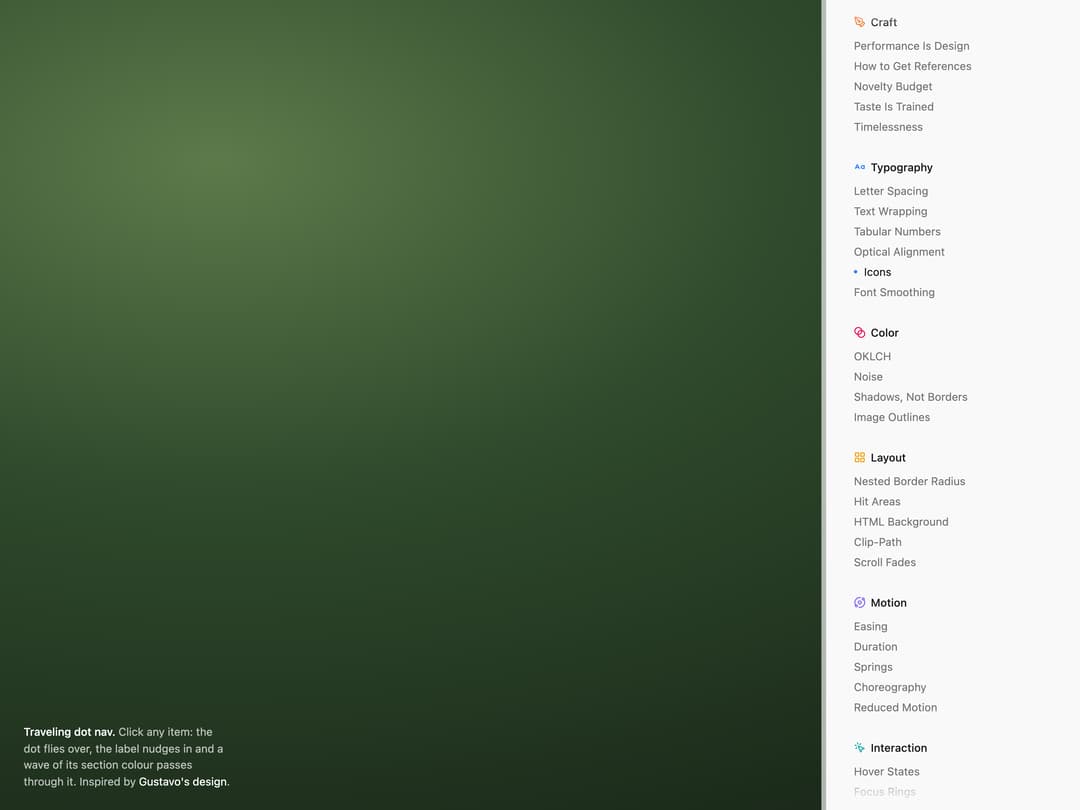
Sidebar table of contents where one indicator dot flies to the clicked item, docks, nudges the label right and paints a wave of the section colour through it before it settles back to dark. Inspired by Gustavo's design (@heyimgustavo on X): https://x.com/heyimgustavo/status/2095140394296123570
Built with React and Tailwind. Copy the prompt and paste it into Claude Code, Cursor or Lovable: your agent adds Traveling Dot Nav to your project and fits it to your theme.
Code
How Traveling Dot Nav is used: the demo's code. The component's own source comes with a free account.
Usage.tsx
"use client"
import * as React from "react"
import {
AlignLeft,
Blend,
CaseSensitive,
LayoutGrid,
MousePointerClick,
Orbit,
PenTool,
Sparkles,
} from "lucide-react"
import {
TravelingDotNav,
type TravelingDotNavSection,
} from "@/components/ui/traveling-dot-nav"
const items = (labels: string[]) =>
labels.map((label) => ({
id: label.toLowerCase().replace(/[^a-z0-9]+/g, "-"),
label,
}))
export const GUIDELINE_SECTIONS: TravelingDotNavSection[] = [
{
id: "craft",
label: "Craft",
color: "#f25e04",
icon: <PenTool strokeWidth={2} />,
items: items([
"Performance Is Design",
"How to Get References",
"Novelty Budget",
"Taste Is Trained",
"Timelessness",
]),
},
{
id: "typography",
label: "Typography",
color: "#337efa",
icon: <CaseSensitive strokeWidth={2} />,
items: items([
"Letter Spacing",
"Text Wrapping",
"Tabular Numbers",
"Optical Alignment",
"Icons",
"Font Smoothing",
]),
},
{
id: "color",
label: "Color",
color: "#eb0753",
icon: <Blend strokeWidth={2} />,
items: items(["OKLCH", "Noise", "Shadows, Not Borders", "Image Outlines"]),
},
{
id: "layout",
label: "Layout",
color: "#f49904",
icon: <LayoutGrid strokeWidth={2} />,
items: items([
"Nested Border Radius",
"Hit Areas",
"HTML Background",
"Clip-Path",
"Scroll Fades",
]),
},
{
id: "motion",
label: "Motion",
color: "#7c5cf6",
icon: <Orbit strokeWidth={2} />,
items: items([
"Easing",
"Duration",
"Springs",
"Choreography",
"Reduced Motion",
]),
},
{
id: "interaction",
label: "Interaction",
color: "#0ea5a4",
icon: <MousePointerClick strokeWidth={2} />,
items: items([
"Hover States",
"Focus Rings",
"Cursors",
"Drag Affordance",
"Keyboard First",
]),
},
{
id: "copy",
label: "Copy",
color: "#6b7280",
icon: <AlignLeft strokeWidth={2} />,
items: items(["Sentence Case", "Numbers", "Ellipsis", "Empty States"]),
},
{
id: "details",
label: "Details",
color: "#d946ef",
icon: <Sparkles strokeWidth={2} />,
items: items([
"Favicons",
"Selection Color",
"Loading",
"Dark Mode",
"Print",
]),
},
]
/**
* The nav as it sits on a docs page: a scrollable panel with soft top and
* bottom fades and a light left edge, floating over a page background.
* Inspired by Gustavo's design (@heyimgustavo):
* https://x.com/heyimgustavo/status/2095140394296123570
*/
export default function TravelingDotNavDemo() {
return (
<div
className="relative flex h-dvh min-h-[480px] w-full justify-end overflow-hidden font-[-apple-system,system-ui,Inter,sans-serif] text-[13px]"
style={{
background:
"radial-gradient(120% 90% at 20% 20%, #5d7a4b 0%, #2f4a2c 45%, #1b2a1a 100%)",
}}
>
<p className="absolute bottom-6 left-7 max-w-[30ch] leading-normal text-white/70 max-sm:hidden">
<span className="font-medium text-white">Traveling dot nav.</span> Click
any item: the dot flies over, the label nudges in and a wave of its
section colour passes through it. Inspired by{" "}
<a
href="https://x.com/heyimgustavo/status/2095140394296123570"
target="_blank"
rel="noreferrer"
className="text-white underline-offset-2 hover:underline"
>
Gustavo's design
</a>
.
</p>
<aside className="w-[300px] bg-[#f9f9f9] shadow-[-1px_0_0_#f2f2f2,-6.5px_0_0_rgba(255,255,255,0.65)] dark:bg-neutral-950 dark:shadow-[-1px_0_0_#1f1f21,-6.5px_0_0_rgba(255,255,255,0.08)] max-sm:w-full">
<div
className="h-full overflow-y-auto py-3.5 pl-8 pr-6 [scrollbar-width:none] [&::-webkit-scrollbar]:hidden"
style={{
// scroll fades as measured: 35px linear at the top, ~40px at the
// bottom with a fast drop and a long tail
maskImage:
"linear-gradient(to bottom, transparent 0, #000 35px, #000 calc(100% - 40px), rgba(0,0,0,0.76) calc(100% - 32px), rgba(0,0,0,0.49) calc(100% - 27px), rgba(0,0,0,0.33) calc(100% - 23px), rgba(0,0,0,0.11) calc(100% - 9px), transparent 100%)",
}}
>
<TravelingDotNav sections={GUIDELINE_SECTIONS} defaultValue="icons" />
</div>
</aside>
</div>
)
}
More by Serafim
View all
Spline Scene
9.4K
Testimonials with Marquee
2.3K
Gradient Button
1.9K
Pixel Canvas
900
Animated Blur Number
830
Empty State
774
Balloons
755
Status Badge
643
More in Navigation
View all

Sidebar
226

Tabs
52
Navbar with Theme Toggle
42

Breadcrumb
12
Nav List Card
32
Pagination Ant
3

Pagination
85
Pagination
9


