
About
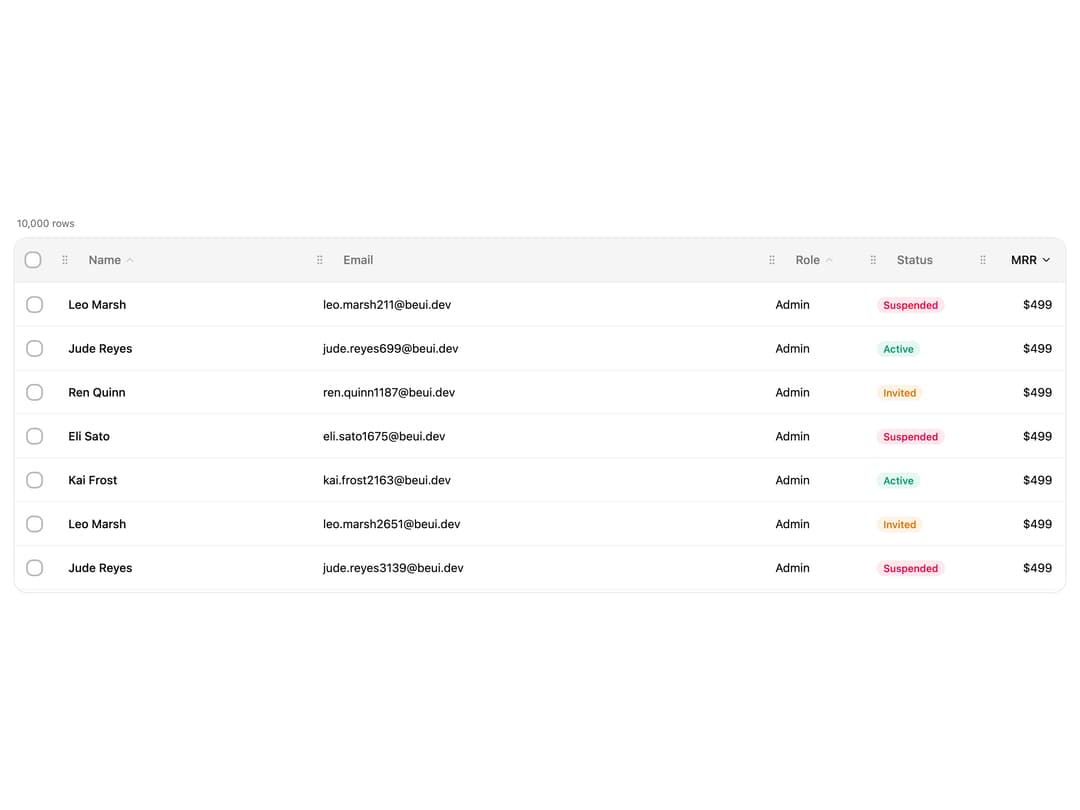
A virtualized data table for editing cells inline and inserting or deleting rows and columns via border handles, with sortable headers, row selection, and column resize/reorder.
Built with React and Tailwind. Copy the prompt and paste it into Claude Code, Cursor or Lovable: your agent adds Editable Data Table to your project and fits it to your theme.
Code
How Editable Data Table is used: the demo's code. The component's own source comes with a free account.
Usage.tsx
"use client";

import { Table, type TableColumn } from "@/components/ui/table-editable";
import { useMemo, useState } from "react";
import { cn } from "@/lib/utils";

type Person = {
  id: string;
  name: string;
  email: string;
  role: string;
  status: "active" | "invited" | "suspended";
  mrr: number;
};

const FIRST = [
  "Ava",
  "Leo",
  "Mia",
  "Kai",
  "Zoe",
  "Eli",
  "Noa",
  "Ren",
  "Ivy",
  "Jude",
];
const LAST = [
  "Cole",
  "Frost",
  "Vale",
  "Reyes",
  "Okafor",
  "Sato",
  "Lund",
  "Marsh",
  "Bose",
  "Quinn",
];
const ROLES = ["Owner", "Admin", "Member", "Viewer"];
const STATUSES: Person["status"][] = ["active", "invited", "suspended"];

// Deterministic so SSR and client render the same rows (no hydration drift).
function buildPeople(count: number): Person[] {
  const out: Person[] = [];
  for (let i = 0; i < count; i++) {
    const first = FIRST[i % FIRST.length];
    const last = LAST[(i * 7) % LAST.length];
    out.push({
      id: String(i),
      name: `${first} ${last}`,
      email: `${first.toLowerCase()}.${last.toLowerCase()}${i}@beui.dev`,
      role: ROLES[(i * 3) % ROLES.length],
      status: STATUSES[(i * 5) % STATUSES.length],
      mrr: 12 + ((i * 37) % 488),
    });
  }
  return out;
}

const STATUS_STYLES: Record<Person["status"], string> = {
  active: "bg-emerald-500/10 text-emerald-600 dark:text-emerald-400",
  invited: "bg-amber-500/10 text-amber-600 dark:text-amber-400",
  suspended: "bg-rose-500/10 text-rose-600 dark:text-rose-400",
};

function StatusBadge({ status }: { status: Person["status"] }) {
  return (
    <span
      className={cn(
        "rounded-full px-2 py-0.5 font-medium text-xs capitalize",
        STATUS_STYLES[status],
      )}
    >
      {status}
    </span>
  );
}

export default function TableEditableDemo() {
  const data = useMemo(() => buildPeople(10_000), []);
  const [selected, setSelected] = useState<string[]>([]);

  const columns = useMemo<TableColumn<Person>[]>(
    () => [
      {
        key: "name",
        header: "Name",
        sortable: true,
        width: "1.4fr",
        cell: (row) => <span className="font-medium">{row.name}</span>,
      },
      { key: "email", header: "Email", width: "1.8fr" },
      { key: "role", header: "Role", sortable: true, width: "120px" },
      {
        key: "status",
        header: "Status",
        width: "130px",
        cell: (row) => <StatusBadge status={row.status} />,
      },
      {
        key: "mrr",
        header: "MRR",
        sortable: true,
        align: "right",
        width: "110px",
        cell: (row) => (
          <span className="tabular-nums">${row.mrr.toLocaleString()}</span>
        ),
      },
    ],
    [],
  );

  return (
    <div className="flex w-full justify-center p-4">
      <div className="flex w-full flex-col gap-2">
        <div className="flex items-center justify-between px-1 text-muted-foreground text-xs">
          <span>{data.length.toLocaleString()} rows</span>
          {selected.length > 0 ? (
            <span>{selected.length.toLocaleString()} selected</span>
          ) : null}
        </div>
        <Table
          data={data}
          columns={columns}
          selectable
          resizable
          reorderable
          selectedRowIds={selected}
          onSelectionChange={setSelected}
          defaultSort={{ key: "mrr", direction: "desc" }}
          height={420}
          rowHeight={52}
          className="rounded-2xl"
        />
      </div>
    </div>
  );
}
Dependencies
More by Saurabh
View all
BeUI Tilt Card
369
BeUI Expandable Tabs
345
BeUI File Upload
293
BeUI Bouncy Accordion
200
BeUI Create Menu
199
BeUI Expanable Action Bar
184
Loader
173
BeUI 404 / Not Found
166