About
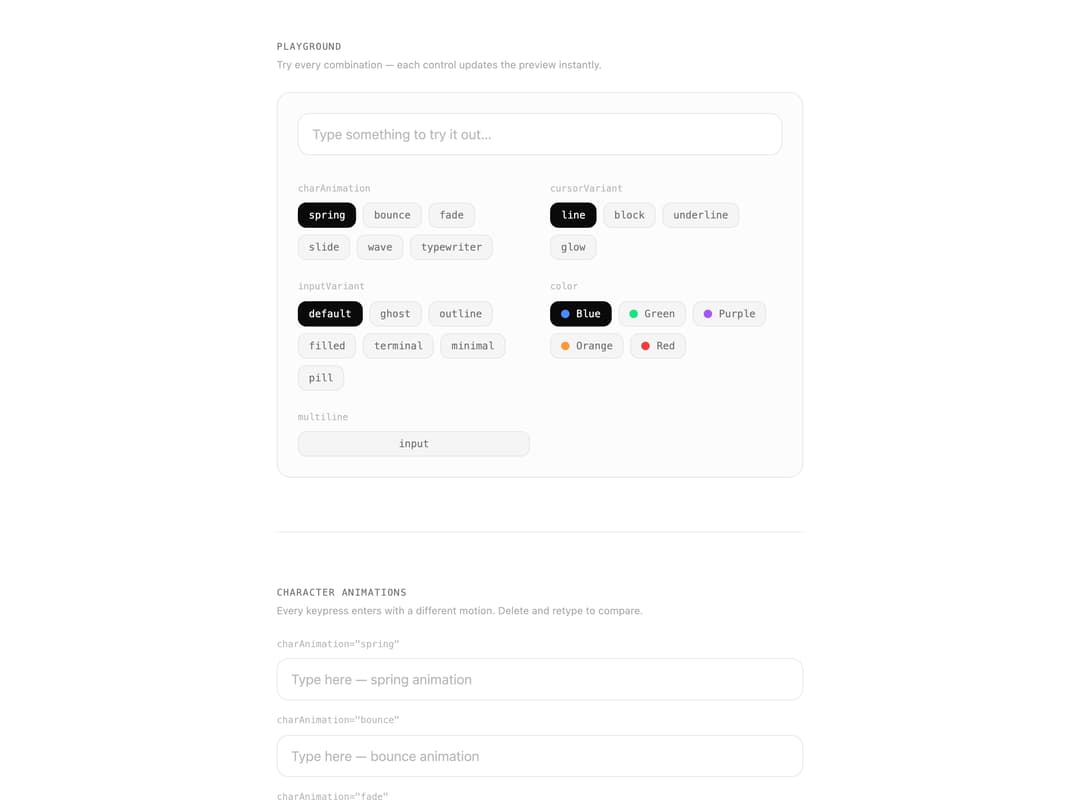
An animated text input and textarea with per-character motion effects and a smooth custom cursor overlay, supporting multiple animation presets, cursor variants, and input styles.
Built with React and Tailwind. Copy the prompt and paste it into Claude Code, Cursor or Lovable: your agent adds Animate Text Input Typing to your project and fits it to your theme.
Code
How Animate Text Input Typing is used: the demo's code. The component's own source comes with a free account.
Usage.tsx
"use client";
import * as React from "react";
import {
TextCursorTypingInput,
type CharAnimation,
type CursorVariant,
type InputVariant,
} from "@/components/ui/animate-text-input-typing";
// ---------------------------------------------------------------------------
// Section
// ---------------------------------------------------------------------------
function Section({
title,
description,
children,
}: {
title: string;
description?: string;
children: React.ReactNode;
}) {
return (
<section className="flex flex-col gap-6">
<div className="flex flex-col gap-1">
<h2 className="text-[11px] font-mono uppercase tracking-widest text-muted-foreground">
{title}
</h2>
{description && (
<p className="text-xs text-muted-foreground/60 max-w-lg">
{description}
</p>
)}
</div>
{children}
</section>
);
}
// ---------------------------------------------------------------------------
// Row
// ---------------------------------------------------------------------------
function Row({
label,
children,
}: {
label: string;
children: React.ReactNode;
}) {
return (
<div className="flex flex-col gap-2">
<span className="text-[11px] font-mono text-muted-foreground/50">
{label}
</span>
{children}
</div>
);
}
// ---------------------------------------------------------------------------
// Chip
// ---------------------------------------------------------------------------
function Chip({
active,
onClick,
children,
}: {
active: boolean;
onClick: () => void;
children: React.ReactNode;
}) {
return (
<button
onClick={onClick}
className={`px-3 py-1.5 rounded-lg text-xs font-mono transition-all border ${
active
? "border-foreground/20 bg-foreground text-background"
: "border-border bg-muted text-muted-foreground hover:text-foreground"
}`}
>
{children}
</button>
);
}
// ---------------------------------------------------------------------------
// Controlled example (sub-component)
// ---------------------------------------------------------------------------
function ControlledExample() {
const [value, setValue] = React.useState("Edit me — I'm controlled");
return (
<div className="flex flex-col gap-4">
<TextCursorTypingInput
value={value}
onChange={setValue}
inputVariant="outline"
charAnimation="bounce"
color="hsl(150, 80%, 50%)"
className="w-full"
placeholder="Controlled input"
/>
<div className="flex gap-2 flex-wrap">
{["Hello world", "Unlumen UI ✦", "Controlled mode"].map((preset) => (
<button
key={preset}
onClick={() => setValue(preset)}
className="rounded-lg border border-border bg-muted px-3 py-1.5 text-xs font-mono text-muted-foreground hover:text-foreground transition-colors"
>
“{preset}”
</button>
))}
<button
onClick={() => setValue("")}
className="rounded-lg border border-border bg-muted px-3 py-1.5 text-xs font-mono text-muted-foreground hover:text-foreground transition-colors"
>
Clear
</button>
</div>
<p className="font-mono text-[11px] text-muted-foreground/40">
value: “{value}”
</p>
</div>
);
}
// ---------------------------------------------------------------------------
// Playground
// ---------------------------------------------------------------------------
const CHAR_ANIMS: CharAnimation[] = [
"spring",
"bounce",
"fade",
"slide",
"wave",
"typewriter",
];
const CURSOR_VARIANTS: CursorVariant[] = ["line", "block", "underline", "glow"];
const INPUT_VARIANTS: InputVariant[] = [
"default",
"ghost",
"outline",
"filled",
"terminal",
"minimal",
"pill",
];
const CURSOR_COLORS = [
{ label: "Blue", value: "hsl(220, 100%, 65%)" },
{ label: "Green", value: "hsl(150, 80%, 50%)" },
{ label: "Purple", value: "hsl(270, 90%, 65%)" },
{ label: "Orange", value: "hsl(30, 100%, 60%)" },
{ label: "Red", value: "hsl(0, 90%, 60%)" },
];
function Playground() {
const [charAnim, setCharAnim] = React.useState<CharAnimation>("spring");
const [cursorVariant, setCursorVariant] =
React.useState<CursorVariant>("line");
const [inputVariant, setInputVariant] =
React.useState<InputVariant>("default");
const [color, setColor] = React.useState(CURSOR_COLORS[0].value);
const [multiline, setMultiline] = React.useState(false);
return (
<div className="flex flex-col gap-8 rounded-2xl border border-border bg-muted/30 p-6">
<TextCursorTypingInput
key={`${multiline}-${inputVariant}`}
charAnimation={charAnim}
cursorVariant={cursorVariant}
inputVariant={inputVariant}
color={color}
multiline={multiline}
className="w-full"
fieldClassName={multiline ? "min-h-[100px]" : ""}
placeholder={
multiline ? "Type multiple lines…" : "Type something to try it out…"
}
/>
<div className="grid grid-cols-1 gap-6 sm:grid-cols-2">
<div className="flex flex-col gap-2">
<span className="text-[11px] font-mono text-muted-foreground/50">
charAnimation
</span>
<div className="flex flex-wrap gap-2">
{CHAR_ANIMS.map((a) => (
<Chip
key={a}
active={charAnim === a}
onClick={() => setCharAnim(a)}
>
{a}
</Chip>
))}
</div>
</div>
<div className="flex flex-col gap-2">
<span className="text-[11px] font-mono text-muted-foreground/50">
cursorVariant
</span>
<div className="flex flex-wrap gap-2">
{CURSOR_VARIANTS.map((v) => (
<Chip
key={v}
active={cursorVariant === v}
onClick={() => setCursorVariant(v)}
>
{v}
</Chip>
))}
</div>
</div>
<div className="flex flex-col gap-2">
<span className="text-[11px] font-mono text-muted-foreground/50">
inputVariant
</span>
<div className="flex flex-wrap gap-2">
{INPUT_VARIANTS.map((v) => (
<Chip
key={v}
active={inputVariant === v}
onClick={() => setInputVariant(v)}
>
{v}
</Chip>
))}
</div>
</div>
<div className="flex flex-col gap-2">
<span className="text-[11px] font-mono text-muted-foreground/50">
color
</span>
<div className="flex flex-wrap gap-2">
{CURSOR_COLORS.map((c) => (
<button
key={c.value}
onClick={() => setColor(c.value)}
className={`flex items-center gap-2 px-3 py-1.5 rounded-lg text-xs font-mono transition-all border ${
color === c.value
? "border-foreground/20 bg-foreground text-background"
: "border-border bg-muted text-muted-foreground hover:text-foreground"
}`}
>
<span
className="inline-block h-2.5 w-2.5 rounded-full"
style={{ backgroundColor: c.value }}
/>
{c.label}
</button>
))}
</div>
</div>
<div className="flex flex-col gap-2">
<span className="text-[11px] font-mono text-muted-foreground/50">
multiline
</span>
<Chip active={multiline} onClick={() => setMultiline((v) => !v)}>
{multiline ? "textarea" : "input"}
</Chip>
</div>
</div>
</div>
);
}
// ---------------------------------------------------------------------------
// Demo root
// ---------------------------------------------------------------------------
export default function AnimateTextInputTypingDemo() {
return (
<div className="mx-auto flex max-w-2xl flex-col gap-16 px-6 py-12">
{/* Playground */}
<Section
title="Playground"
description="Try every combination — each control updates the preview instantly."
>
<Playground />
</Section>
<div className="h-px bg-border" />
{/* Character animations */}
<Section
title="Character animations"
description="Every keypress enters with a different motion. Delete and retype to compare."
>
<div className="flex flex-col gap-4">
{CHAR_ANIMS.map((anim) => (
<Row key={anim} label={`charAnimation=\"${anim}\"`}>
<TextCursorTypingInput
charAnimation={anim}
inputVariant="default"
color="hsl(220, 100%, 65%)"
className="w-full"
placeholder={`Type here — ${anim} animation`}
/>
</Row>
))}
</div>
</Section>
<div className="h-px bg-border" />
{/* Cursor variants */}
<Section
title="Cursor variants"
description="The cursor shape morphs smoothly between caret and selection."
>
<div className="flex flex-col gap-4">
{(
[
{ v: "line" as CursorVariant, color: "hsl(220, 100%, 65%)" },
{ v: "block" as CursorVariant, color: "hsl(150, 80%, 50%)" },
{ v: "underline" as CursorVariant, color: "hsl(270, 90%, 65%)" },
{ v: "glow" as CursorVariant, color: "hsl(30, 100%, 60%)" },
] as const
).map(({ v, color }) => (
<Row key={v} label={`cursorVariant=\"${v}\"`}>
<TextCursorTypingInput
cursorVariant={v}
inputVariant="default"
color={color}
className="w-full"
placeholder={`Click and type — ${v} cursor`}
/>
</Row>
))}
</div>
</Section>
<div className="h-px bg-border" />
{/* Input variants */}
<Section
title="Input variants"
description="Pre-built visual styles, each fully composable with fieldClassName."
>
<div className="flex flex-col gap-4">
{INPUT_VARIANTS.map((variant) => (
<Row key={variant} label={`inputVariant=\"${variant}\"`}>
<TextCursorTypingInput
inputVariant={variant}
color={
variant === "terminal"
? "hsl(150, 80%, 50%)"
: "hsl(220, 100%, 65%)"
}
charAnimation={variant === "terminal" ? "typewriter" : "spring"}
className="w-full"
placeholder={
variant === "terminal" ? "$ _" : `${variant} — click to type`
}
/>
</Row>
))}
</div>
</Section>
<div className="h-px bg-border" />
{/* Multiline */}
<Section
title="Multiline"
description="Pass multiline to render a textarea. Selection spans multiple lines correctly."
>
<div className="flex flex-col gap-4">
<Row label='multiline charAnimation="wave"'>
<TextCursorTypingInput
multiline
charAnimation="wave"
inputVariant="default"
color="hsl(270, 90%, 65%)"
className="w-full"
fieldClassName="min-h-[120px]"
defaultValue={
"Wave animation on every character.\nSelect across lines to see the cursor morph."
}
/>
</Row>
<Row label='multiline inputVariant="terminal"'>
<TextCursorTypingInput
multiline
charAnimation="typewriter"
inputVariant="terminal"
color="hsl(150, 80%, 50%)"
className="w-full"
fieldClassName="min-h-[100px]"
placeholder="$ _"
/>
</Row>
</div>
</Section>
<div className="h-px bg-border" />
{/* Controlled */}
<Section
title="Controlled value"
description="Use value + onChange for controlled mode. The reconciler preserves char IDs across external updates."
>
<ControlledExample />
</Section>
<div className="h-px bg-border" />
{/* Blink speed */}
<Section
title="Blink speed"
description="blinkSpeed controls the caret interval in ms."
>
<div className="flex flex-col gap-4">
{[200, 530, 1200].map((ms) => (
<Row key={ms} label={`blinkSpeed={${ms}}`}>
<TextCursorTypingInput
inputVariant="default"
color="hsl(220, 100%, 65%)"
blinkSpeed={ms}
className="w-full"
placeholder={`Blink every ${ms}ms`}
/>
</Row>
))}
</div>
</Section>
</div>
);
}
Dependencies
More by unlumen
View all
Motion Navigation Menu
271
Side By Side Slide
228
Scroll Reveal Image
222
Count Up
145
Pixel Liquid Background
106
Glow Button
97
Animated Sidebar
95
Horizontal Depth Fade
78
More in Text
View all

Vertical Cut Reveal Characters
103
Motion Blur Text
36

NeonRGBTextEffect
144
Text Reveal
27
Random Letter Swap
46

Rainbow Text Effect
47

Blur Reveal
300
Text Color
545