About
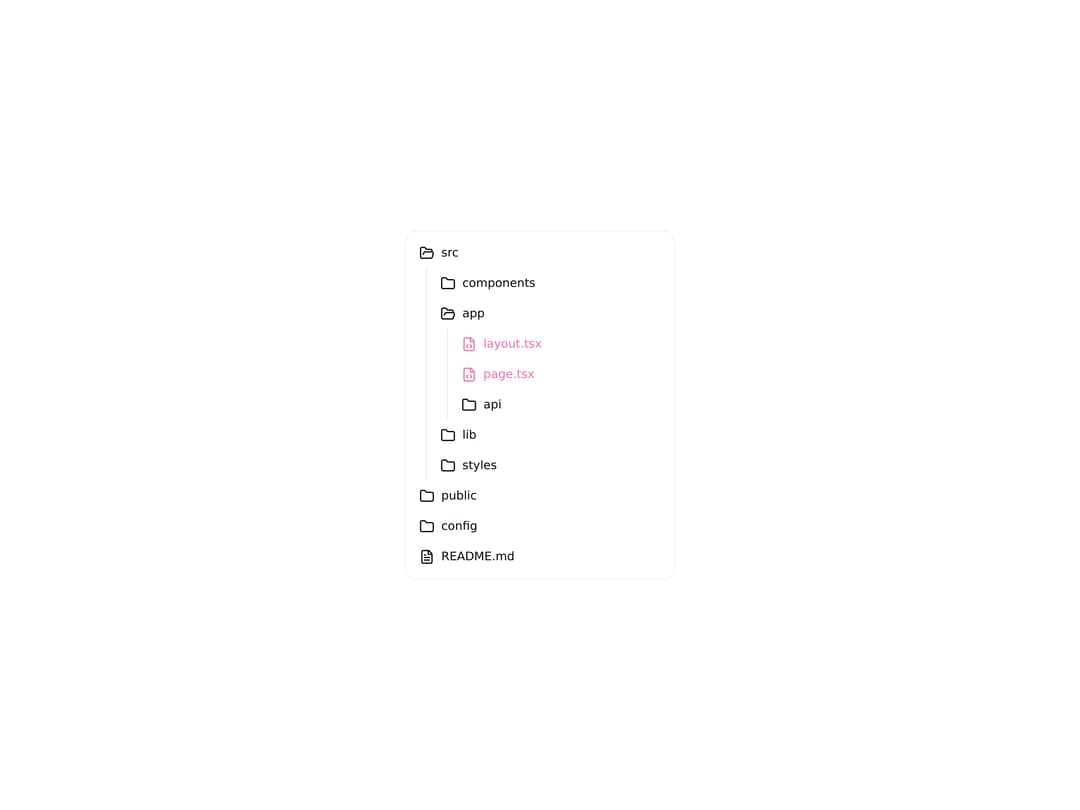
Composable, unstyled file-tree primitives with an animated hover highlight, spring folder expand and collapse, and an animated open/close folder icon swap.
Built with React and Tailwind. Copy the prompt and paste it into Claude Code, Cursor or Lovable: your agent adds Animated File Tree Primitives to your project and fits it to your theme.
Code
How Animated File Tree Primitives is used: the demo's code. The component's own source comes with a free account.
Usage.tsx
"use client";

import * as React from "react";
import {
  Files,
  FilesHighlight,
  FolderItem,
  FolderHeader,
  FolderTrigger,
  FolderHighlight,
  FolderIcon,
  FileLabel,
  FolderContent,
  FileHighlight,
  File,
  FileIcon,
} from "@/components/ui/primitives-animate-files";
import {
  Folder as FolderClosedIcon,
  FolderOpen,
  FileCode,
  FileJson,
  FileText,
  FileImage,
} from "lucide-react";

const rowClass =
  "flex items-center gap-2 rounded-lg p-2 text-sm text-foreground";

function FolderRow({
  value,
  label,
  defaultOpen = false,
  highlight = false,
  children,
}: {
  value: string;
  label: string;
  defaultOpen?: boolean;
  highlight?: boolean;
  children: React.ReactNode;
}) {
  return (
    <FolderItem value={value} defaultOpen={defaultOpen}>
      <FolderHeader>
        <FolderTrigger className="w-full cursor-pointer text-start">
          <FolderHighlight>
            <div className={rowClass}>
              <FolderIcon
                openIcon={<FolderOpen className="size-[1.125rem]" />}
                closeIcon={<FolderClosedIcon className="size-[1.125rem]" />}
              />
              <FileLabel style={highlight ? { color: "#f472b6" } : undefined}>
                {label}
              </FileLabel>
            </div>
          </FolderHighlight>
        </FolderTrigger>
      </FolderHeader>
      <FolderContent className="ml-4 border-l border-border pl-2">
        {children}
      </FolderContent>
    </FolderItem>
  );
}

function FileRow({
  icon,
  name,
  highlight = false,
}: {
  icon: React.ReactNode;
  name: string;
  highlight?: boolean;
}) {
  return (
    <FileHighlight>
      <File>
        <div
          className={rowClass}
          style={highlight ? { color: "#f472b6" } : undefined}
        >
          <FileIcon>{icon}</FileIcon>
          <FileLabel>{name}</FileLabel>
        </div>
      </File>
    </FileHighlight>
  );
}

export default function FilesDemo() {
  return (
    <div className="flex w-full items-center justify-center p-8">
      <Files className="relative isolate w-full max-w-xs rounded-xl border border-border/60 bg-background p-2">
        <FilesHighlight className="rounded-lg border border-accent/45 bg-accent/55">
          <FolderRow value="src" label="src" defaultOpen>
            <FolderRow value="components" label="components">
              <FileRow
                icon={<FileCode className="size-4.5" />}
                name="button.tsx"
              />
            </FolderRow>
            <FolderRow value="app" label="app" defaultOpen>
              <FileRow
                icon={<FileCode className="size-4.5" />}
                name="layout.tsx"
                highlight
              />
              <FileRow
                icon={<FileCode className="size-4.5" />}
                name="page.tsx"
                highlight
              />
              <FolderRow value="api" label="api">
                <FileRow
                  icon={<FileCode className="size-4.5" />}
                  name="route.ts"
                />
              </FolderRow>
            </FolderRow>
            <FolderRow value="lib" label="lib">
              <FileRow
                icon={<FileCode className="size-4.5" />}
                name="utils.ts"
              />
            </FolderRow>
            <FolderRow value="styles" label="styles">
              <FileRow
                icon={<FileImage className="size-4.5" />}
                name="globals.css"
              />
            </FolderRow>
          </FolderRow>
          <FolderRow value="public" label="public">
            <FileRow
              icon={<FileImage className="size-4.5" />}
              name="logo.svg"
            />
          </FolderRow>
          <FolderRow value="config" label="config">
            <FileRow
              icon={<FileJson className="size-4.5" />}
              name="tsconfig.json"
            />
          </FolderRow>
          <FileRow icon={<FileText className="size-4.5" />} name="README.md" />
        </FilesHighlight>
      </Files>
    </div>
  );
}
Dependencies
More by unlumen
View all
Motion Navigation Menu
271
Side By Side Slide
228
Scroll Reveal Image
222
Count Up
145
Pixel Liquid Background
106
Glow Button
97
Animated Sidebar
95
Horizontal Depth Fade
78