
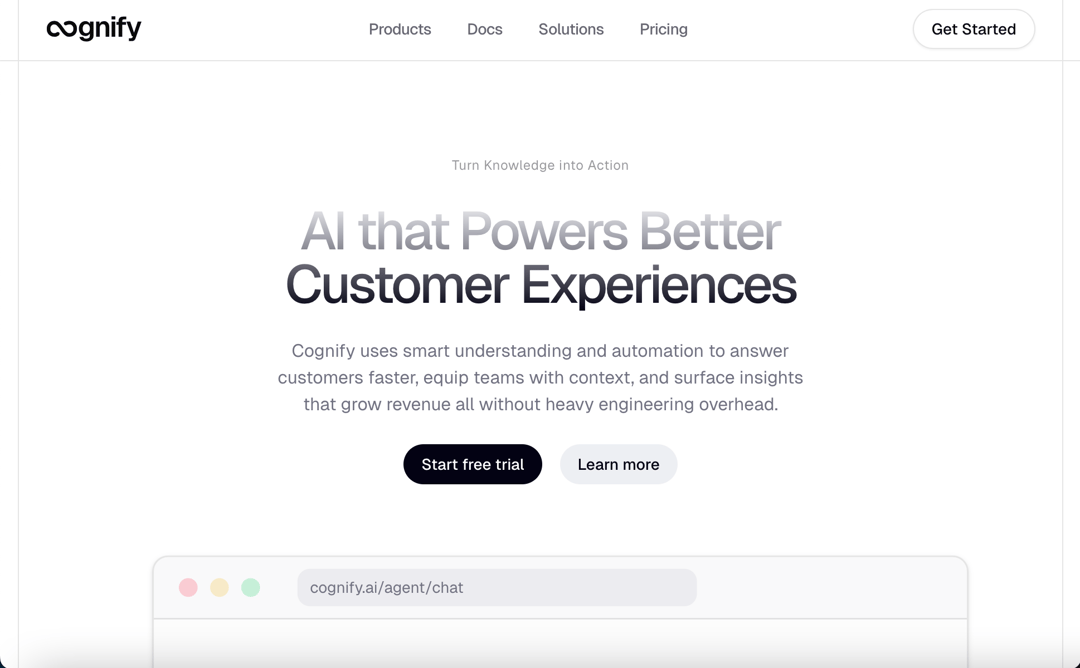
About
- Sequence animation triggered on scroll shows a process steps one at a time depending on current scroll position, fully responsive and optimized for mobile.
Built with React and Tailwind. Copy the prompt and paste it into Claude Code, Cursor or Lovable: your agent adds Animation Sequence to your project and fits it to your theme.
Code
How Animation Sequence is used: the demo's code. The component's own source comes with a free account.
Usage.tsx
import { AiAnswer,
  AiAvatar,
  AiSource,
  AiStatus,
  UserMessage,BrowserHeader, CardMockupBody } from "@/components/ui/animation-sequence";
import { Button } from "@/components/ui/button";
import { BrainCircuitIcon, LogInIcon, WorkflowIcon } from "lucide-react";
import {
  motion,
  useMotionTemplate,
  useScroll,
  useTransform,
} from "motion/react";
import React from "react";
import { cn } from "@/lib/utils";

function useIsMobile(break_point: number = 768) {
  const [isMobile, setIsMobile] = React.useState<boolean | undefined>(
    undefined,
  );

  React.useEffect(() => {
    const mql = window.matchMedia(`(max-width: ${break_point - 1}px)`);
    const onChange = () => {
      setIsMobile(window.innerWidth < break_point);
    };
    mql.addEventListener('change', onChange);
    setIsMobile(window.innerWidth < break_point);
    return () => mql.removeEventListener('change', onChange);
  }, []);

  return !!isMobile;
}
interface ProcessCardProps extends React.HTMLAttributes<HTMLDivElement> {
  icon: React.ElementType;
  title: string;
  description: string;
}

function ProcessCard({
  icon,
  title,
  description,
  className,
  children,
  ...props
}: ProcessCardProps) {
  const Icon = icon;
  return (
    <div className={cn("space-y-4", className)} {...props}>
      <div className="flex items-center gap-2">
        <Icon className="size-5" />
        <h2 className="text-xl font-semibold">{title}</h2>
      </div>
      <p className="text-muted-foreground">{description}</p>
      {children}
    </div>
  );
}

function ProcessScreen({
  className,
  ...props
}: React.HTMLAttributes<HTMLDivElement>) {
  return (
    <CardMockupBody className={cn("rounded-lg", className)} {...props}>
      <BrowserHeader>
        <div className="ml-4 h-6 w-64 bg-muted rounded-md text-[10px] flex items-center px-2 text-muted-foreground">
          cognify.ai/agent/chat
        </div>
      </BrowserHeader>

      <div className="relative z-2 flex-1 p-8 flex flex-col place-content-center gap-8 bg-stone-50/50 dark:bg-stone-950/50">
        <UserMessage className="max-w-[80%] place-self-end">
          How do I configure the SSO for my enterprise team?
        </UserMessage>

        <div className="flex items-start gap-3">
          <AiAvatar imageUrl="/cognify.png" />

          <div className="flex flex-col gap-4 max-w-10/12">
            <AiStatus />
            <AiSource />

            <AiAnswer />
          </div>
        </div>
      </div>
    </CardMockupBody>
  );
}
function ProcessDesktop() {
  const containerRef = React.useRef<HTMLDivElement>(null);
  const { scrollYProgress } = useScroll({
    target: containerRef,
    offset: ["10% end", "center end"],
  });

  const screenX = useTransform(
    scrollYProgress,
    [0, 0.2, 0.8, 1],
    ["10%", "20%", "0%", "20%"]
  );
  const screenScale = useTransform(scrollYProgress, [0, 0.3], [1.4, 1]);
  const screenTransform = useMotionTemplate`scale(${screenScale}) translateX(${screenX})`;
  const text1Opacity = useTransform(scrollYProgress, [0, 0.4, 0.6], [0, 1, 0]);
  const text2Opacity = useTransform(scrollYProgress, [0.5, 0.9, 1], [0, 1, 0]);
  const text3Opacity = useTransform(scrollYProgress, [0.8, 1], [0, 1]);

  return (
    <section ref={containerRef} className=" relative h-[350vh]">
      <div className="sticky top-0 left-0 h-screen w-full">
        <div className="overflow-hidden py-16 h-full">
          <motion.div
            className="h-full mx-auto origin-top px-8 place-content-center"
            style={{ transform: screenTransform }}
          >
            <ProcessScreen className="w-4/5 max-h-full aspect-video min-h-full" />
          </motion.div>
        </div>
        <motion.div
          style={{ opacity: text1Opacity }}
          className="pl-8 absolute top-1/5 left-0 max-w-1/3 space-y-4"
        >
          <ProcessCard
            icon={LogInIcon}
            title="Connect"
            description="Sync your knowledge sources and support tools in a few clicks."
          />
        </motion.div>
        <motion.div
          style={{ opacity: text2Opacity }}
          className="pr-8 absolute top-1/5 right-0 max-w-1/3 space-y-2 "
        >
          <ProcessCard
            icon={BrainCircuitIcon}
            title="Train"
            description="Add domain examples or fine-tune responses with your tone and policies."
          />
        </motion.div>
        <motion.div
          style={{ opacity: text3Opacity }}
          className="pl-8 absolute top-1/5 left-0 max-w-1/3 space-y-2"
        >
          <ProcessCard
            icon={WorkflowIcon}
            title="Automate"
            description="Route tickets, suggest replies, and serve customers through chat, email, or internal tools."
          >
            <Button variant={"secondary"}>Setup your workflows</Button>
          </ProcessCard>
        </motion.div>
      </div>
    </section>
  );
}

function ProcessMobile() {
  return (
    <section className="py-12 px-8">
      <div className="flex flex-col justify-center items-center gap-6">
        <ProcessScreen className="min-w-2xs max-w-xl " />
        <div className="flex flex-wrap gap-4">
          <div className="space-y-2">
            <div className="flex items-center gap-2">
              <LogInIcon className="size-5 text-muted-foreground" />{" "}
              <h2 className="font-semibold text-xl tracking-tight">Connect</h2>
            </div>
            <p>
              Sync your knowledge sources and support tools in a few clicks.
            </p>
          </div>
          <div className="space-y-2">
            <div className="flex items-center gap-2">
              <BrainCircuitIcon className="size-5 text-muted-foreground" />{" "}
              <h2 className="font-semibold text-xl tracking-tight">Train</h2>
            </div>
            <p>
              Add domain examples or fine-tune responses with your tone and
              policies.
            </p>
          </div>
          <div className="space-y-2">
            <div className="flex items-center gap-2">
              <WorkflowIcon className="size-5 text-muted-foreground" />
              <h2 className="font-semibold text-xl tracking-tight">Automate</h2>
            </div>
            <p>
              Route tickets, suggest replies, and serve customers through chat,
              email, or internal tools.
            </p>
            <Button variant={"secondary"} size={"sm"}>
              Setup your workflows
            </Button>
          </div>
        </div>
      </div>
    </section>
  );
}

export default function DemoOne() {
  const isMobile = useIsMobile();
  return (<section className="pt-20">
    <div
        className="max-w-3xl mx-auto w-full flex flex-col space-y-6 items-center text-center justify-center"
      >
          <h1
            className="text-4xl md:text-5xl lg:text-6xl xl:text-7xl font-medium tracking-tighter text-balance bg-clip-text text-transparent bg-linear-to-b from-secondary to bg-secondary-foreground"
          >
            AI that Powers Better Customer Experiences
          </h1>
          <p
            className="text-muted-foreground max-w-[47ch]"
          >
            Cognify uses smart understanding and automation to answer customers
            faster, equip teams with context, and surface insights that grow
            revenue all without heavy engineering overhead.
          </p>
        <div
          className="flex gap-4 flex-wrap">
            <Button>Start free trial</Button>
            <Button variant="secondary">Learn more</Button>
      </div>
    </div>
  {isMobile ? <ProcessMobile /> : <ProcessDesktop />}
  </section>)
}
Dependencies
More by YoucefBnm Bnm
View all

Animated Slideshow
2.2K
Hero Gallery Scroll Animation
1.5K
Animated Gallery
1.4K
Animated Video on Scroll
1.4K
Animated Cards Stack
1.3K
Cards Stack
1.1K
cta section with gallery
672
Hero Video
538
More in Heroes
View all

SaaS Template
2.4K

Responsive Hero Banner
2K

Hero
1.2K
Centered Hero with Image Fan
932
Editorial Collage Hero
431
Glass Fold
213

HeroSectionWithGradient
336

Minimalist Hero Fashion
285
