
About
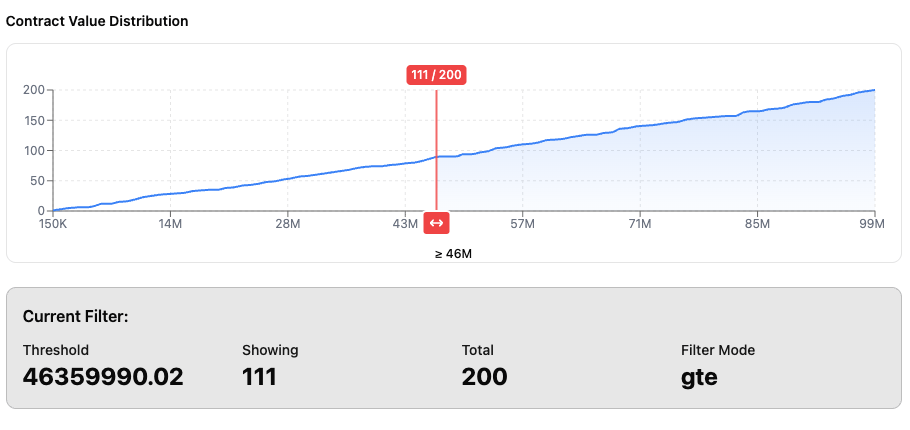
A cumulative density filter which allows viewing the number of a certain metric which is selected when varying the equality operator. Supports log transform.
Built with React and Tailwind. Copy the prompt and paste it into Claude Code, Cursor or Lovable: your agent adds Cumulative Density Filter to your project and fits it to your theme.
Code
How Cumulative Density Filter is used: the demo's code. The component's own source comes with a free account.
Usage.tsx
"use client"
import { useState } from "react"
import { Button } from "../components/ui/button"
import { Component } from "../components/ui/cumulative-density-filter"
import { ThemeSwitch } from "../components/ui/theme-switch-button"
import { RefreshCw } from "lucide-react"
export default function Page() {
const [threshold, setThreshold] = useState<number>(50_000_000)
const [count, setCount] = useState<number>(0)
const [filterMode, setFilterMode] = useState<'lt' | 'lte' | 'gt' | 'gte'>('lte')
const [logScale, setLogScale] = useState<boolean>(false)
const [xAxisTicks, setXAxisTicks] = useState<number | undefined>(undefined)
const [dataPointsCount, setDataPointsCount] = useState<number>(200)
// Mock data generator and state (only changes via button)
const generateData = (count: number = dataPointsCount) => Array.from({ length: count }, () => Math.random() * 100_000_000)
const [data, setData] = useState<number[]>(() => generateData(200))
const handleThresholdChange = (newThreshold: number, newCount: number) => {
setThreshold(newThreshold)
setCount(newCount)
// Here you can update your filter state, trigger API calls, etc.
console.log('Filter updated:', { threshold: newThreshold, count: newCount, mode: filterMode })
}
return (
<div className="container mx-auto py-8">
<div className="max-w-4xl mx-auto space-y-8">
<div className="flex items-start justify-between">
<div>
<h1 className="text-3xl font-bold mb-2">Component Library Demo</h1>
<p className="text-muted-foreground">
Examples of components from @contractrabbit/ui
</p>
<p className="text-blue-500">
<a href="https://github.com/contractrabbit/cr-components" target="_blank">Github: https://github.com/contractrabbit/cr-components</a>
</p>
</div>
<ThemeSwitch />
</div>
<div className="space-y-4">
<div>
<h2 className="text-2xl font-semibold mb-2">Cumulative Density Filter</h2>
<p className="text-sm text-muted-foreground mb-6">
Drag the red handle to filter values. Toggle filter mode to see different highlighting.
</p>
<div className="space-y-6">
{/* Mock data controls */}
<div>
<div className="text-sm font-semibold mb-3">Mock data controls</div>
<div className="flex items-center gap-4 flex-wrap">
<div className="flex items-center gap-2">
<label htmlFor="dataPoints" className="text-sm font-medium whitespace-nowrap">
Data points:
</label>
<input
id="dataPoints"
type="number"
min="3"
max="1000"
value={dataPointsCount}
onChange={(e) => setDataPointsCount(Math.max(3, Math.min(1000, parseInt(e.target.value) || 200)))}
className="w-20 px-2 py-1 text-sm border rounded"
/>
</div>
<Button
variant="outline"
size="sm"
onClick={() => setData(generateData(dataPointsCount))}
>
<RefreshCw className="h-4 w-4 mr-2" />
Regenerate mock data
</Button>
</div>
</div>
{/* Filter Mode Toggle */}
<div>
<h3 className="text-sm font-semibold mb-2">Filter Mode:</h3>
<div className="flex gap-2 flex-wrap">
{(['lt', 'lte', 'gt', 'gte'] as const).map((mode) => (
<Button
key={mode}
onClick={() => setFilterMode(mode)}
variant={filterMode === mode ? "default" : "outline"}
size="sm"
>
{mode === 'lt' && '< (less than)'}
{mode === 'lte' && '≤ (less than or equal)'}
{mode === 'gt' && '> (greater than)'}
{mode === 'gte' && '≥ (greater than or equal)'}
</Button>
))}
</div>
</div>
{/* Log Scale */}
<div className="flex flex-wrap items-center gap-4">
<label className="flex items-center gap-2 text-sm font-medium cursor-pointer">
<input
type="checkbox"
checked={logScale}
onChange={(e) => setLogScale(e.target.checked)}
className="w-4 h-4 rounded border-input"
/>
Use logarithmic scale
</label>
</div>
{/* X-Axis Ticks Control */}
<div>
<label className="text-sm font-medium block mb-2">
X-Axis Ticks: {xAxisTicks || 'Auto'}
</label>
<div className="flex gap-2 items-center">
<input
type="range"
placeholder="ticks"
min="3"
max="20"
value={xAxisTicks || 10}
onChange={(e) => {
const value = parseInt(e.target.value)
setXAxisTicks(value)
// Update CSS variable for slider fill
const progress = ((value - 3) / (20 - 3)) * 100
e.currentTarget.style.setProperty('--range-progress', `${progress}%`)
}}
onInput={(e) => {
// Also update on input for smooth tracking
const value = parseInt(e.currentTarget.value)
const progress = ((value - 3) / (20 - 3)) * 100
e.currentTarget.style.setProperty('--range-progress', `${progress}%`)
}}
style={{
'--range-progress': `${((xAxisTicks || 10) - 3) / (20 - 3) * 100}%`
} as React.CSSProperties}
className="flex-1"
/>
<Button
onClick={() => setXAxisTicks(undefined)}
variant="outline"
size="sm"
>
Auto
</Button>
</div>
</div>
<div>
<h2 className="text-sm font-semibold mb-3">
Contract Value Distribution
</h2>
<Component
values={data}
initialThreshold={50_000_000}
filterMode={filterMode}
logScale={logScale}
xAxisTicks={xAxisTicks}
thresholdColor="#ef4444"
onThresholdChange={handleThresholdChange}
height={220}
className="border rounded-lg p-4 bg-card"
/>
</div>
<div className="bg-primary/10 border border-primary/20 rounded-lg p-4">
<h3 className="font-semibold mb-3">Current Filter:</h3>
<div className="grid grid-cols-4 gap-4 text-sm">
<div>
<div className="text-primary font-medium">Threshold</div>
<div className="text-2xl font-bold">
{threshold.toFixed(2)}
</div>
</div>
<div>
<div className="text-primary font-medium">Showing</div>
<div className="text-2xl font-bold">
{count}
</div>
</div>
<div>
<div className="text-primary font-medium">Total</div>
<div className="text-2xl font-bold">
{data.length}
</div>
</div>
<div>
<div className="text-primary font-medium">Filter Mode</div>
<div className="text-2xl font-bold">
{filterMode}
</div>
</div>
</div>
</div>
</div>
</div>
</div>
{/* Multiple examples showing different modes */}
<div className="space-y-4">
<div>
<h2 className="text-lg font-semibold mb-4">
All Filter Modes (Compact)
</h2>
<div className="flex gap-4 flex-wrap">
<div className="flex-1 min-w-[200px]">
<h3 className="text-xs font-medium text-muted-foreground mb-2">Less Than or Equal (≤)</h3>
<Component
values={data}
initialThreshold={threshold}
filterMode="lte"
logScale={logScale}
thresholdColor="#ef4444"
onThresholdChange={handleThresholdChange}
height={150}
className="border rounded p-3 bg-muted/30"
/>
</div>
<div className="w-[200px]">
<h3 className="text-xs font-medium text-muted-foreground mb-2">Greater Than (>) - 200px wide</h3>
<Component
values={data}
initialThreshold={threshold}
filterMode="gt"
logScale={logScale}
thresholdColor="#ef4444"
onThresholdChange={handleThresholdChange}
height={150}
className="border rounded px-0 py-3 bg-muted/30"
/>
</div>
</div>
</div>
</div>
<div className="bg-muted/50 rounded-lg p-4 text-sm">
<p className="font-medium mb-2">✨ Features:</p>
<ul className="space-y-1 ml-4 text-muted-foreground">
<li>• Smooth cumulative distribution curve</li>
<li>• Draggable threshold with real-time updates</li>
<li>• Shows count at threshold point</li>
<li>• Conditional fill based on filter mode (lt/lte/gt/gte)</li>
<li>• Fully responsive and optimized for small sizes</li>
<li>• Callback support for state management</li>
<li>• Logarithmic scale support</li>
<li>• Customizable threshold color</li>
</ul>
</div>
</div>
</div>
)
}Dependencies
More in Cards
View all
Stats cards with links
33

Course Design Cards
1.1K

Card
70
Statistics Card 2
264
Statistics Card 10
263

Card
17

Card Studio
9
The Item one
3
