
About
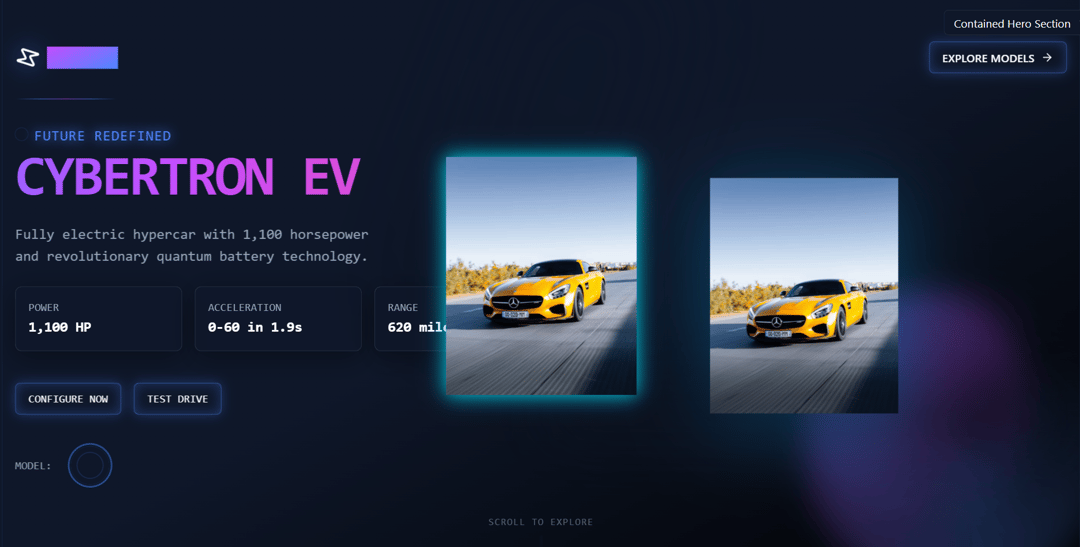
This Hero Section is designed for a futuristic car website. It includes a stylish heading, animated subheading, a 3D car mockup with subtle tilt animation, and dynamic call-to-action buttons. The layout is responsive, accessible, and uses modern animation utilities such as scroll-based fades, hover scale, and keyframe motion.
Built with React and Tailwind. Copy the prompt and paste it into Claude Code, Cursor or Lovable: your agent adds Hero-section to your project and fits it to your theme.
Code
How Hero-section is used: the demo's code. The component's own source comes with a free account.
Usage.tsx
import * as React from "react"
import { HeroSection } from "@/components/ui/hero-section"
import { Button } from "@/components/ui/button"
import { Input } from "@/components/ui/input"

// Basic demo showing the default HeroSection with full-width
export const BasicHeroSection = () => {
  return (
    <div className="w-full h-screen">
      <HeroSection />
    </div>
  )
}

// Demo showing HeroSection inside a container
export const ContainedHeroSection = () => {
  const [variant, setVariant] = React.useState<string>("default")
  const [showControls, setShowControls] = React.useState<boolean>(false)
  const [error, setError] = React.useState<string | null>(null)
  const [carImageUrl, setCarImageUrl] = React.useState<string>("https://cdn.21st.dev/assets/mirror/8d/8df9572acf9ed3ff6e51a038bda5d6a1de95febf677456ee6989e2ba33025d9f.jpg")
  const [fullscreen, setFullscreen] = React.useState<boolean>(false)
  const heroSectionRef = React.useRef<HTMLDivElement>(null)

  // Apply the image directly using a useEffect hook
  React.useEffect(() => {
    if (!heroSectionRef.current) return;

    // First try: Find the image element within the component
    const imageElements = heroSectionRef.current.querySelectorAll('img');
    if (imageElements.length > 0) {
      imageElements.forEach(img => {
        // Backup original src for reset
        if (!img.dataset.originalSrc) {
          img.dataset.originalSrc = img.src;
        }

        if (carImageUrl) {
          img.src = carImageUrl;
          img.style.maxHeight = '300px';
          img.style.objectFit = 'contain';
        } else if (img.dataset.originalSrc) {
          img.src = img.dataset.originalSrc;
        }
      });
    } else {
      // Second try: If no images found, insert one in appropriate container
      const carContainer = heroSectionRef.current.querySelector('.car-container, [class*="car"]') as HTMLElement;
      if (carContainer && carImageUrl) {
        // Check if we already added our custom image
        const existingCustomImage = carContainer.querySelector('.custom-car-image');
        if (!existingCustomImage) {
          const img = document.createElement('img');
          img.src = carImageUrl;
          img.alt = "Custom Car Model";
          img.className = "custom-car-image w-full h-auto max-h-80 object-contain z-10 relative";
          img.style.maxHeight = '300px';
          carContainer.appendChild(img);
        } else if (existingCustomImage instanceof HTMLImageElement) {
          existingCustomImage.src = carImageUrl;
        }
      }
    }
  }, [carImageUrl, heroSectionRef.current]);

  // Use a wrapped version of HeroSection to add our ref
  const CustomHeroSection = () => {
    return (
      <div ref={heroSectionRef} className="hero-section-wrapper w-full h-full">
        <HeroSection
          {...(variant ? { variant } : {})}
          {...(showControls !== undefined ? { showControls } : {})}
        />
        {carImageUrl && (
          <div className="absolute inset-0 flex items-center justify-center pointer-events-none">
            <img
              src={carImageUrl}
              alt="CYBERTRON EV car model"
              className="w-auto h-auto max-w-full max-h-[300px] object-contain z-50"
              style={{
                filter: 'drop-shadow(0 0 10px rgba(0, 255, 255, 0.5))',
              }}
            />
          </div>
        )}
      </div>
    );
  };

  return (
    <div className={`${fullscreen ? 'w-screen h-screen p-0 m-0 border-0' : 'container mx-auto px-4 py-8 border border-muted rounded-lg'} overflow-hidden`}>
      {!fullscreen && (
        <>
          <h2 className="text-2xl font-bold mb-4">Hero Section Component</h2>
          <p className="text-muted-foreground mb-8">
            A futuristic cyberpunk-themed hero section with animated elements,
            interactive car models, and responsive design.
          </p>

          <div className="mb-4 space-y-3">
            <div className="flex flex-wrap gap-2">
              <Button
                variant={variant === "default" ? "default" : "outline"}
                size="sm"
                onClick={() => setVariant("default")}
              >
                Default Theme
              </Button>
              <Button
                variant={variant === "alternative" ? "default" : "outline"}
                size="sm"
                onClick={() => setVariant("alternative")}
              >
                Alternative Theme
              </Button>
              <Button
                variant="outline"
                size="sm"
                onClick={() => setShowControls(!showControls)}
              >
                {showControls ? "Hide Controls" : "Show Controls"}
              </Button>
              <Button
                variant="outline"
                size="sm"
                onClick={() => setFullscreen(!fullscreen)}
                className="ml-auto"
              >
                {fullscreen ? "Exit Fullscreen" : "View Fullscreen"}
              </Button>
            </div>

            <div className="flex items-center gap-2">
              <Input
                type="text"
                placeholder="Enter custom car image URL"
                value={carImageUrl}
                onChange={(e) => setCarImageUrl(e.target.value)}
                className="flex-grow"
              />
              <Button
                size="sm"
                onClick={() => setCarImageUrl("https://cdn.21st.dev/assets/mirror/8d/8df9572acf9ed3ff6e51a038bda5d6a1de95febf677456ee6989e2ba33025d9f.jpg")}
                variant="default"
              >
                Set Default Image
              </Button>
              <Button
                size="sm"
                onClick={() => setCarImageUrl("")}
                variant="outline"
              >
                Reset Image
              </Button>
            </div>

            <div className="text-sm text-muted-foreground">
              Current image URL: {carImageUrl ? carImageUrl : "(none)"}
            </div>
          </div>

          {error && (
            <div className="mb-4 p-3 bg-red-50 text-red-500 rounded-md">
              {error}
            </div>
          )}
        </>
      )}

      <div className={`${fullscreen ? 'w-screen h-screen' : 'border border-muted rounded-lg'} overflow-hidden relative`}>
        <CustomHeroSection />

        {/* Fallback image overlay if all other methods fail */}
        {carImageUrl && (
          <div className="absolute inset-0 flex items-center justify-center pointer-events-none" style={{ zIndex: 20 }}>
            <img
              src={carImageUrl}
              alt="CYBERTRON EV car model overlay"
              className="w-auto h-auto max-w-full max-h-[300px] object-contain opacity-90"
              style={{
                filter: 'drop-shadow(0 0 15px rgba(0, 200, 255, 0.7))',
              }}
            />
          </div>
        )}
      </div>

      {!fullscreen && (
        <>
          <div className="mt-6 space-y-4">
            <h3 className="text-xl font-semibold">Component Features</h3>
            <ul className="list-disc list-inside space-y-2 text-muted-foreground">
              <li>Animated neon effects and cyberpunk aesthetics</li>
              <li>Interactive 3D-like car models with hover effects</li>
              <li>Multiple car model variants with smooth transitions</li>
              <li>Responsive design for all screen sizes</li>
              <li>Framer Motion animations for enhanced user experience</li>
            </ul>
          </div>

          <div className="mt-6">
            <h3 className="text-xl font-semibold mb-2">Interactive Demo</h3>
            <div className="flex gap-2 flex-wrap">
              <Button onClick={() => alert("Car model selected!")}>
                Select Car Model
              </Button>
              <Button variant="outline" onClick={() => alert("Customization panel opened!")}>
                Customize Car
              </Button>
            </div>
          </div>
        </>
      )}

      {fullscreen && (
        <Button
          variant="secondary"
          className="fixed top-4 right-4 z-50"
          onClick={() => setFullscreen(false)}
        >
          Exit Fullscreen
        </Button>
      )}
    </div>
  )
}

// Export all demo variants
export { BasicHeroSection, ContainedHeroSection }
Dependencies
More by nakulgupta2004
View all
amazing-header
More in Heroes
View all

SaaS Template
2.4K

Responsive Hero Banner
2K

Hero
1.2K
Centered Hero with Image Fan
932
Editorial Collage Hero
431
Glass Fold
213

HeroSectionWithGradient
336

Minimalist Hero Fashion
285
