
About
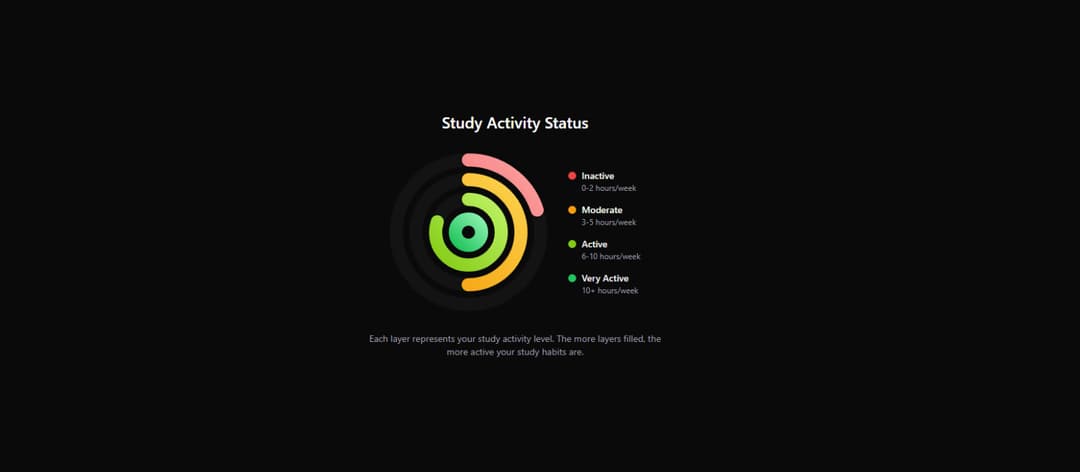
A nice circle chart for study or success lookup
Built with React and Tailwind. Copy the prompt and paste it into Claude Code, Cursor or Lovable: your agent adds Study Chart to your project and fits it to your theme.
Code
How Study Chart is used: the demo's code. The component's own source comes with a free account.
Usage.tsx
import * as React from "react";
import { motion } from "framer-motion";
import { cn } from "@/lib/utils";

interface OnionLayerData {
  label: string;
  value: number;
  color: string;
  size: number;
  description: string;
}

interface OnionLayerProps {
  data: OnionLayerData;
  index: number;
}

const studyLevels: OnionLayerData[] = [
  {
    label: "Inactive",
    value: 20,
    color: "#ef4444",
    size: 240,
    description: "0-2 hours/week",
  },
  {
    label: "Moderate",
    value: 50,
    color: "#f59e0b",
    size: 180,
    description: "3-5 hours/week",
  },
  {
    label: "Active",
    value: 80,
    color: "#84cc16",
    size: 120,
    description: "6-10 hours/week",
  },
  {
    label: "Very Active",
    value: 100,
    color: "#22c55e",
    size: 60,
    description: "10+ hours/week",
  },
];

const OnionLayer = ({ data, index }: OnionLayerProps) => {
  const strokeWidth = 20;
  const radius = (data.size - strokeWidth) / 2;
  const circumference = radius * 2 * Math.PI;
  const progress = ((100 - data.value) / 100) * circumference;

  const gradientId = `gradient-${data.label.toLowerCase().replace(/\s+/g, "-")}`;
  const gradientUrl = `url(#${gradientId})`;

  const getGradientEndColor = (color: string) => {
    const colorMap: Record<string, string> = {
      "#ef4444": "#fca5a5",
      "#f59e0b": "#fcd34d",
      "#84cc16": "#bef264",
      "#22c55e": "#86efac",
    };
    return colorMap[color] || color;
  };

  return (
    <motion.div
      className="absolute inset-0 flex items-center justify-center"
      initial={{ opacity: 0, scale: 0.5 }}
      animate={{ opacity: 1, scale: 1 }}
      transition={{ duration: 0.8, delay: index * 0.15, ease: "easeOut" }}
    >
      <div className="relative">
        <svg
          width={data.size}
          height={data.size}
          viewBox={`0 0 ${data.size} ${data.size}`}
          className="transform -rotate-90"
          aria-label={`${data.label} Study Activity - ${data.value}%`}
        >
          <title>{`${data.label} Study Activity - ${data.value}%`}</title>

          <defs>
            <linearGradient
              id={gradientId}
              x1="0%"
              y1="0%"
              x2="100%"
              y2="100%"
            >
              <stop
                offset="0%"
                style={{
                  stopColor: data.color,
                  stopOpacity: 1,
                }}
              />
              <stop
                offset="100%"
                style={{
                  stopColor: getGradientEndColor(data.color),
                  stopOpacity: 1,
                }}
              />
            </linearGradient>
          </defs>

          <circle
            cx={data.size / 2}
            cy={data.size / 2}
            r={radius}
            fill="none"
            stroke="currentColor"
            strokeWidth={strokeWidth}
            className="text-zinc-200/30 dark:text-zinc-800/30"
          />

          <motion.circle
            cx={data.size / 2}
            cy={data.size / 2}
            r={radius}
            fill="none"
            stroke={gradientUrl}
            strokeWidth={strokeWidth}
            strokeDasharray={circumference}
            initial={{ strokeDashoffset: circumference }}
            animate={{ strokeDashoffset: progress }}
            transition={{
              duration: 1.5,
              delay: index * 0.15,
              ease: "easeInOut",
            }}
            strokeLinecap="round"
            style={{
              filter: "drop-shadow(0 0 8px rgba(0,0,0,0.2))",
            }}
          />
        </svg>
      </div>
    </motion.div>
  );
};

const DetailedStudyInfo = () => {
  return (
    <motion.div
      className="flex flex-col gap-4 ml-8"
      initial={{ opacity: 0, x: 20 }}
      animate={{ opacity: 1, x: 0 }}
      transition={{ duration: 0.5, delay: 0.4 }}
    >
      {studyLevels.map((level) => (
        <motion.div key={level.label} className="flex flex-col">
          <div className="flex items-center gap-2">
            <div
              className="w-3 h-3 rounded-full"
              style={{ backgroundColor: level.color }}
            />
            <span className="text-sm font-medium text-zinc-900 dark:text-zinc-100">
              {level.label}
            </span>
          </div>
          <span className="text-xs text-zinc-600 dark:text-zinc-400 ml-5">
            {level.description}
          </span>
        </motion.div>
      ))}
    </motion.div>
  );
};

export function StudyOnionStatus({
  title = "Study Activity Status",
  className,
}: {
  title?: string;
  className?: string;
}) {
  return (
    <div
      className={cn(
        "relative w-full max-w-3xl mx-auto p-8 rounded-3xl",
        "text-zinc-900 dark:text-white",
        className
      )}
    >
      <div className="flex flex-col items-center gap-8">
        <motion.h2
          className="text-2xl font-semibold text-zinc-900 dark:text-white"
          initial={{ opacity: 0, y: -20 }}
          animate={{ opacity: 1, y: 0 }}
          transition={{ duration: 0.5 }}
        >
          {title}
        </motion.h2>

        <div className="flex items-center">
          <div className="relative w-[240px] h-[240px]">
            {studyLevels.map((level, index) => (
              <OnionLayer key={level.label} data={level} index={index} />
            ))}
          </div>
          <DetailedStudyInfo />
        </div>

        <motion.p
          className="text-sm text-center text-zinc-600 dark:text-zinc-400 max-w-md"
          initial={{ opacity: 0 }}
          animate={{ opacity: 1 }}
          transition={{ duration: 0.5, delay: 0.6 }}
        >
          Each layer represents your study activity level. The more layers filled,
          the more active your study habits are.
        </motion.p>
      </div>
    </div>
  );
}

export default function StudyOnionStatusDemo() {
  return (
    <div className="min-h-screen w-full flex items-center justify-center bg-background">
      <StudyOnionStatus />
    </div>
  );
}
Dependencies
More in Cards
View all
Stats cards with links
33

Course Design Cards
1.1K

Card
70
Statistics Card 2
264
Statistics Card 10
263

Card
17

Card Studio
9
The Item one
3
