About
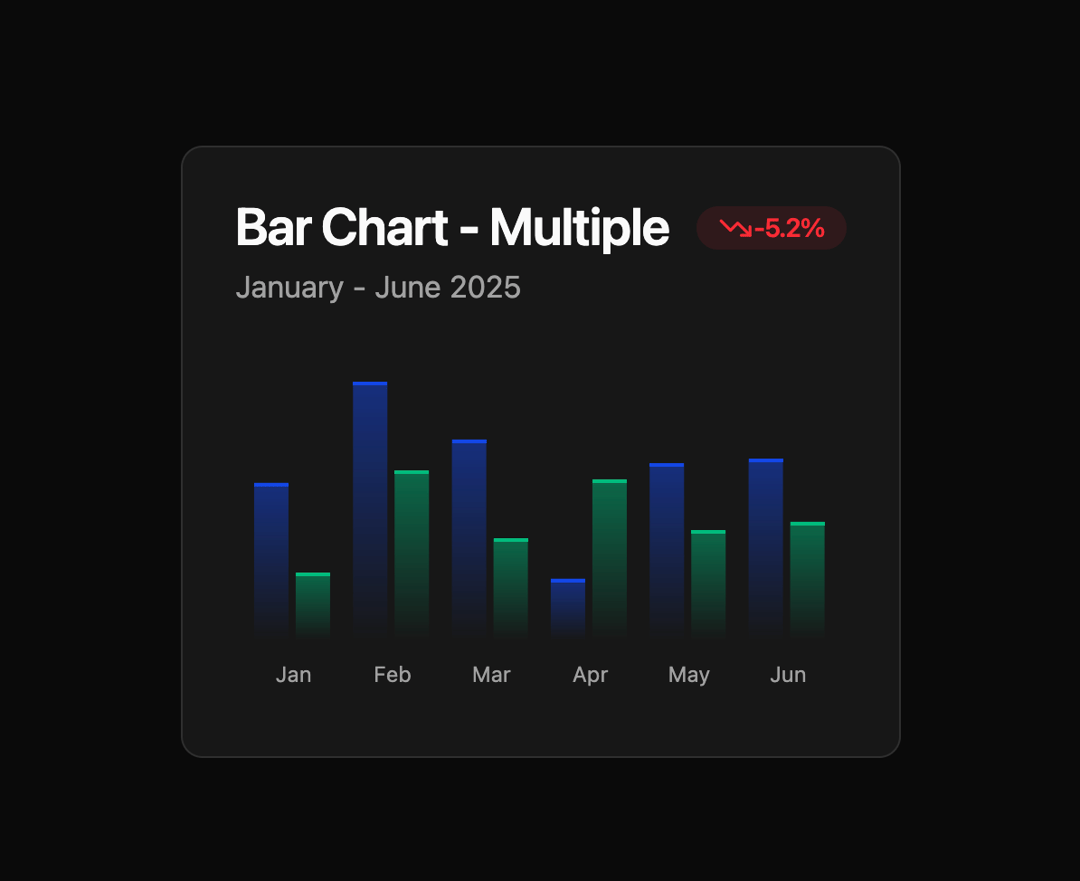
Here is Bar Chart component
Built with React and Tailwind. Copy the prompt and paste it into Claude Code, Cursor or Lovable: your agent adds Bar Chart to your project and fits it to your theme.
Code
How Bar Chart is used: the demo's code. The component's own source comes with a free account.
Usage.tsx
"use client";

import { Bar, BarChart, XAxis } from "recharts";

import {
  Card,
  CardContent,
  CardDescription,
  CardHeader,
  CardTitle,
} from "@/components/ui/card";
import {
  ChartConfig,
  ChartContainer,
  ChartTooltip,
  ChartTooltipContent,
} from "@/components/ui/bar-chart";
import { Badge } from "@/components/ui/badge";
import { TrendingDown } from "lucide-react";

const chartData = [
  { month: "January", desktop: 186, mobile: 80 },
  { month: "February", desktop: 305, mobile: 200 },
  { month: "March", desktop: 237, mobile: 120 },
  { month: "April", desktop: 73, mobile: 190 },
  { month: "May", desktop: 209, mobile: 130 },
  { month: "June", desktop: 214, mobile: 140 },
];

const chartConfig = {
  desktop: {
    label: "Desktop",
    color: "var(--chart-1)",
  },
  mobile: {
    label: "Mobile",
    color: "var(--chart-2)",
  },
} satisfies ChartConfig;

export default function GradientBarMultipleChart() {
  return (
    <Card>
      <CardHeader>
        <CardTitle>
          Bar Chart - Multiple{" "}
          <Badge
            variant="outline"
            className="text-red-500 bg-red-500/10 border-none ml-2"
          >
            <TrendingDown className="h-4 w-4" />
            <span>-5.2%</span>
          </Badge>
        </CardTitle>
        <CardDescription>January - June 2025</CardDescription>
      </CardHeader>
      <CardContent>
        <ChartContainer config={chartConfig}>
          <BarChart accessibilityLayer data={chartData}>
            <XAxis
              dataKey="month"
              tickLine={false}
              tickMargin={10}
              axisLine={false}
              tickFormatter={(value) => value.slice(0, 3)}
            />
            <ChartTooltip
              cursor={false}
              content={<ChartTooltipContent indicator="dashed" hideLabel />}
            />
            <Bar
              dataKey="desktop"
              shape={<CustomGradientBar />}
              fill="var(--color-desktop)"
            />
            <Bar
              dataKey="mobile"
              shape={<CustomGradientBar />}
              fill="var(--color-mobile)"
            />
          </BarChart>
        </ChartContainer>
      </CardContent>
    </Card>
  );
}

const CustomGradientBar = (
  props: React.SVGProps<SVGRectElement> & { dataKey?: string }
) => {
  const { fill, x, y, width, height, dataKey } = props;

  return (
    <>
      <rect
        x={x}
        y={y}
        width={width}
        height={height}
        stroke="none"
        fill={`url(#gradient-multiple-bar-pattern-${dataKey})`}
      />
      <rect x={x} y={y} width={width} height={2} stroke="none" fill={fill} />
      <defs>
        <linearGradient
          id={`gradient-multiple-bar-pattern-${dataKey}`}
          x1="0"
          y1="0"
          x2="0"
          y2="1"
        >
          <stop offset="0%" stopColor={fill} stopOpacity={0.5} />
          <stop offset="100%" stopColor={fill} stopOpacity={0} />
        </linearGradient>
      </defs>
    </>
  );
};
Dependencies
More by Legion Dev
View all
CPU Architecture
1.9K
Database With REST API
1.2K
Radar Chart
352
Pie Chart
222
Line Chart
127
Area Chart
110
LegionWebDev
86
Hover Trace Bar Chart
60
More in Cards
View all

Statistics Card 2
264

Course Design Cards
1.1K
Card
70
Stats cards with links
39
The Item one
3

Card Studio
7
Statistics Card 7
292

Item
10
