
About
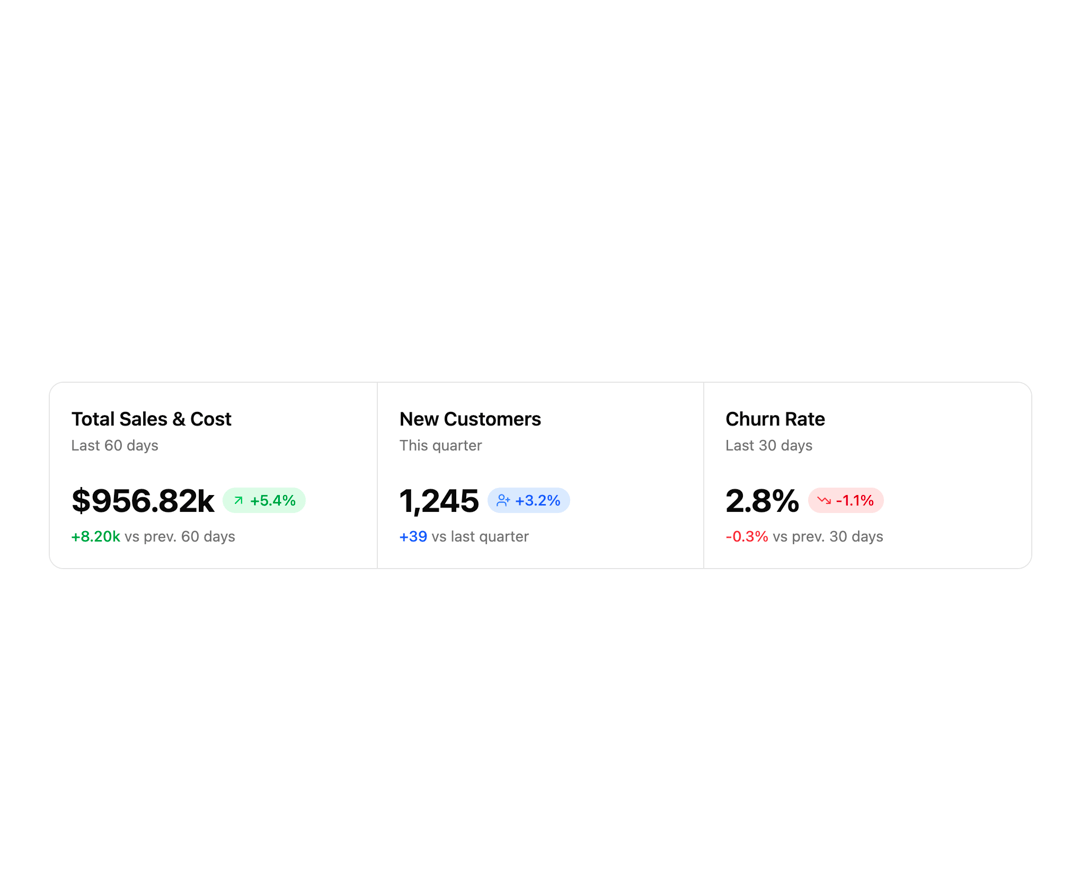
Statistics Card is designed to present key metrics and insights featuring unique layouts, data visualizations, and styling options. Perfect for dashboards, admin panels, and analytics pages.
Built with React and Tailwind. Copy the prompt and paste it into Claude Code, Cursor or Lovable: your agent adds Statistics Card 7 to your project and fits it to your theme.
Code
How Statistics Card 7 is used: the demo's code. The component's own source comes with a free account.
Usage.tsx
import { Badge } from '@/components/ui/badge-2';
import { Card, CardContent } from '@/components/ui/card';
import { ArrowUpRight, TrendingDown, UserPlus } from 'lucide-react';

const cards = [
  {
    title: 'Total Sales & Cost',
    subtitle: 'Last 60 days',
    value: '$956.82k',
    valueColor: 'text-green-600',
    badge: {
      color: 'bg-green-100 text-green-600 dark:bg-green-950 dark:text-green-400',
      icon: ArrowUpRight,
      iconColor: 'text-green-500',
      text: '+5.4%',
    },
    subtext: (
      <span className="text-green-600 font-medium">
        +8.20k <span className="text-muted-foreground font-normal">vs prev. 60 days</span>
      </span>
    ),
  },
  {
    title: 'New Customers',
    subtitle: 'This quarter',
    value: '1,245',
    valueColor: 'text-blue-600',
    badge: {
      color: 'bg-blue-100 text-blue-600 dark:bg-blue-950 dark:text-blue-400',
      icon: UserPlus,
      iconColor: 'text-blue-500',
      text: '+3.2%',
    },
    subtext: (
      <span className="text-blue-600 font-medium">
        +39 <span className="text-muted-foreground font-normal">vs last quarter</span>
      </span>
    ),
  },
  {
    title: 'Churn Rate',
    subtitle: 'Last 30 days',
    value: '2.8%',
    valueColor: 'text-red-500',
    badge: {
      color: 'bg-red-100 text-red-600 dark:bg-red-950 dark:text-red-400',
      icon: TrendingDown,
      iconColor: 'text-red-500',
      text: '-1.1%',
    },
    subtext: (
      <span className="text-red-500 font-medium">
        -0.3% <span className="text-muted-foreground font-normal">vs prev. 30 days</span>
      </span>
    ),
  },
];

export default function StatisticCard7() {
  return (
    <div className="w-full max-w-5xl min-h-screen flex items-center justify-center p-6 lg:p-12">
      <div className="@container grow w-full">
        <div className="grid grid-cols-1 @3xl:grid-cols-3 bg-background overflow-hidden rounded-xl border border-border">
          {cards.map((card, i) => (
            <Card
              key={i}
              className="border-0 shadow-none rounded-none border-y @3xl:border-x @3xl:border-y-0 border-border last:border-0 first:border-0"
            >
              <CardContent className="flex flex-col h-full space-y-6 justify-between">
                {/* Title & Subtitle */}
                <div className="space-y-0.25">
                  <div className="text-lg font-semibold text-foreground">{card.title}</div>
                  <div className="text-sm text-muted-foreground">{card.subtitle}</div>
                </div>

                {/* Information */}
                <div className="flex-1 flex flex-col gap-1.5 justify-between grow">
                  {/* Value & Delta */}
                  <div className="flex items-center gap-2">
                    <span className="text-3xl font-bold tracking-tight">{card.value}</span>
                    <Badge
                      className={`${card.badge.color} px-2 py-1 rounded-full text-sm font-medium flex items-center gap-1 shadow-none`}
                    >
                      <card.badge.icon className={`w-3 h-3 ${card.badge.iconColor}`} />
                      {card.badge.text}
                    </Badge>
                  </div>
                  {/* Subtext */}
                  <div className="text-sm">{card.subtext}</div>
                </div>
              </CardContent>
            </Card>
          ))}
        </div>
      </div>
    </div>
  );
}
More by Sean Hello
View all

3D Testimonails
3.3K
Line Charts 9
637
Alert
492
Area Charts 1
385
Line Charts 6
384
Scroll Area
376
Area Charts 2
317
Navigation Menu
305
More in Cards
View all
Statistics Card 2
264

Course Design Cards
1.1K
Card
70
Stats cards with links
39
The Item one
3

Card Studio
7

Item
10
Dashboard with Collapsible Sidebar
2.4K

