
About
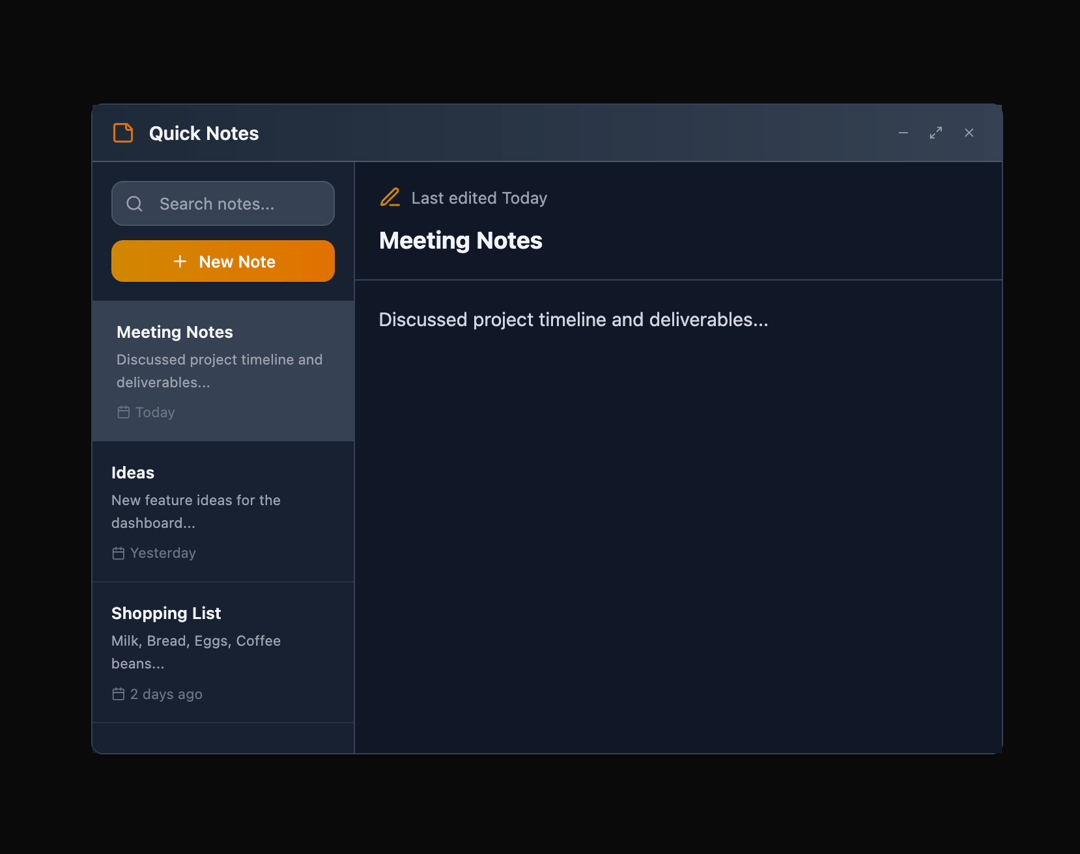
Here is Floating Panel component
Built with React and Tailwind. Copy the prompt and paste it into Claude Code, Cursor or Lovable: your agent adds Floating Panel to your project and fits it to your theme.
Code
How Floating Panel is used: the demo's code. The component's own source comes with a free account.
Usage.tsx
"use client";

import { FloatingPanel } from "@ark-ui/react/floating-panel";
import { Portal } from "@ark-ui/react/portal";
import {
  StickyNote,
  X,
  Plus,
  Search,
  Maximize2,
  Minus,
  ArrowDownLeft,
  Edit3,
  Calendar,
} from "lucide-react";
import { useState } from "react";

export default function NotesPanel() {
  const [notes, setNotes] = useState([
    {
      id: 1,
      title: "Meeting Notes",
      content: "Discussed project timeline and deliverables...",
      date: "Today",
    },
    {
      id: 2,
      title: "Ideas",
      content: "New feature ideas for the dashboard...",
      date: "Yesterday",
    },
    {
      id: 3,
      title: "Shopping List",
      content: "Milk, Bread, Eggs, Coffee beans...",
      date: "2 days ago",
    },
  ]);
  const [activeNote, setActiveNote] = useState(notes[0]);
  const [searchTerm, setSearchTerm] = useState("");

  const filteredNotes = notes.filter(
    (note) =>
      note.title.toLowerCase().includes(searchTerm.toLowerCase()) ||
      note.content.toLowerCase().includes(searchTerm.toLowerCase())
  );

  const addNewNote = () => {
    const newNote = {
      id: notes.length + 1,
      title: "New Note",
      content: "Start typing...",
      date: "Just now",
    };
    setNotes([newNote, ...notes]);
    setActiveNote(newNote);
  };

  return (
    <FloatingPanel.Root
      defaultSize={{ width: 700, height: 500 }}
      minSize={{ width: 400, height: 450 }}
    >
      <FloatingPanel.Trigger className="px-4 py-2 bg-linear-to-r from-yellow-600 to-amber-600 text-white text-sm font-medium rounded-lg hover:from-yellow-700 hover:to-amber-700 focus:outline-hidden focus:ring-2 focus:ring-yellow-500 focus:ring-offset-2 shadow-md flex items-center gap-2 transition-all">
        <StickyNote className="w-4 h-4" />
        Quick Notes
      </FloatingPanel.Trigger>

      <Portal>
        <FloatingPanel.Positioner className="z-50">
          <FloatingPanel.Content className="flex flex-col bg-white dark:bg-gray-900 rounded-lg data-maximized:rounded-none border border-gray-200 dark:border-gray-700 w-full shadow-md">
            <FloatingPanel.DragTrigger>
              <FloatingPanel.Header className="py-3 px-4 bg-linear-to-r from-amber-50 to-yellow-50 dark:from-gray-800 dark:to-gray-700 border-b border-amber-200 dark:border-gray-600 flex justify-between items-center cursor-move">
                <div className="flex items-center gap-3">
                  <StickyNote className="w-5 h-5 text-amber-600" />
                  <FloatingPanel.Title className="font-semibold text-gray-800 dark:text-gray-100">
                    Quick Notes
                  </FloatingPanel.Title>
                </div>
                <FloatingPanel.Control className="flex items-center gap-1">
                  <FloatingPanel.StageTrigger
                    stage="minimized"
                    className="w-6 h-6 flex items-center justify-center text-gray-500 dark:text-gray-400 hover:text-gray-700 dark:hover:text-gray-200 hover:bg-gray-100 dark:hover:bg-gray-700 rounded transition-colors"
                  >
                    <Minus className="w-3 h-3" />
                  </FloatingPanel.StageTrigger>
                  <FloatingPanel.StageTrigger
                    stage="maximized"
                    className="w-6 h-6 flex items-center justify-center text-gray-500 dark:text-gray-400 hover:text-gray-700 dark:hover:text-gray-200 hover:bg-gray-100 dark:hover:bg-gray-700 rounded transition-colors"
                  >
                    <Maximize2 className="w-3 h-3" />
                  </FloatingPanel.StageTrigger>
                  <FloatingPanel.StageTrigger
                    stage="default"
                    className="w-6 h-6 flex items-center justify-center text-gray-500 dark:text-gray-400 hover:text-gray-700 dark:hover:text-gray-200 hover:bg-gray-100 dark:hover:bg-gray-700 rounded transition-colors"
                  >
                    <ArrowDownLeft className="w-3 h-3" />
                  </FloatingPanel.StageTrigger>
                  <FloatingPanel.CloseTrigger className="w-6 h-6 flex items-center justify-center text-gray-500 dark:text-gray-400 hover:text-red-600 dark:hover:text-red-400 hover:bg-red-50 dark:hover:bg-red-900/20 rounded transition-colors">
                    <X className="w-3 h-3" />
                  </FloatingPanel.CloseTrigger>
                </FloatingPanel.Control>
              </FloatingPanel.Header>
            </FloatingPanel.DragTrigger>

            <FloatingPanel.Body className="flex h-full overflow-hidden">
              {/* Notes Sidebar */}
              <div className="w-56 border-r border-gray-200 dark:border-gray-700 flex flex-col bg-gray-50 dark:bg-gray-800/50">
                {/* Search & Add */}
                <div className="p-4 space-y-3">
                  <div className="relative">
                    <Search className="absolute left-3 top-1/2 transform -translate-y-1/2 w-4 h-4 text-gray-400" />
                    <input
                      type="text"
                      placeholder="Search notes..."
                      value={searchTerm}
                      onChange={(e) => setSearchTerm(e.target.value)}
                      className="w-full pl-10 pr-3 py-2 text-sm border border-gray-300 dark:border-gray-600 rounded-lg focus:outline-hidden focus:ring-2 focus:ring-yellow-500 focus:border-transparent bg-white dark:bg-gray-700 text-gray-900 dark:text-gray-100 placeholder-gray-400"
                    />
                  </div>
                  <button
                    onClick={addNewNote}
                    className="w-full flex items-center justify-center gap-2 px-3 py-2 bg-linear-to-r from-yellow-600 to-amber-600 text-white text-sm font-medium rounded-lg hover:from-yellow-700 hover:to-amber-700 transition-all shadow-xs"
                  >
                    <Plus className="w-4 h-4" />
                    New Note
                  </button>
                </div>

                {/* Notes List */}
                <div className="flex-1 overflow-y-auto">
                  {filteredNotes.map((note) => (
                    <button
                      key={note.id}
                      onClick={() => setActiveNote(note)}
                      className={`w-full p-4 text-left border-b border-gray-200 dark:border-gray-700/50 hover:bg-white dark:hover:bg-gray-700/50 transition-colors ${
                        activeNote.id === note.id
                          ? "bg-white dark:bg-gray-700 shadow-xs border-l-4 border-l-yellow-500"
                          : ""
                      }`}
                    >
                      <div className="text-sm font-semibold text-gray-900 dark:text-gray-100 truncate mb-1">
                        {note.title}
                      </div>
                      <div className="text-xs text-gray-600 dark:text-gray-400 line-clamp-2 leading-relaxed mb-2">
                        {note.content}
                      </div>
                      <div className="flex items-center gap-1 text-xs text-gray-400 dark:text-gray-500">
                        <Calendar className="w-3 h-3" />
                        {note.date}
                      </div>
                    </button>
                  ))}
                </div>
              </div>

              {/* Note Editor */}
              <div className="flex-1 flex flex-col">
                {activeNote ? (
                  <>
                    {/* Note Header */}
                    <div className="p-5 border-b border-gray-200 dark:border-gray-700 bg-white dark:bg-gray-900">
                      <div className="flex items-center gap-2 mb-3">
                        <Edit3 className="w-5 h-5 text-yellow-600" />
                        <span className="text-sm text-gray-500 dark:text-gray-400">
                          Last edited {activeNote.date}
                        </span>
                      </div>
                      <input
                        type="text"
                        value={activeNote.title}
                        onChange={(e) => {
                          const updatedNote = {
                            ...activeNote,
                            title: e.target.value,
                          };
                          setActiveNote(updatedNote);
                          setNotes(
                            notes.map((n) =>
                              n.id === activeNote.id ? updatedNote : n
                            )
                          );
                        }}
                        className="w-full text-xl font-bold bg-transparent border-none outline-hidden text-gray-900 dark:text-gray-100 placeholder-gray-400"
                        placeholder="Note title..."
                      />
                    </div>

                    {/* Note Content */}
                    <div className="flex-1 p-5 bg-white dark:bg-gray-900">
                      <textarea
                        value={activeNote.content}
                        onChange={(e) => {
                          const updatedNote = {
                            ...activeNote,
                            content: e.target.value,
                          };
                          setActiveNote(updatedNote);
                          setNotes(
                            notes.map((n) =>
                              n.id === activeNote.id ? updatedNote : n
                            )
                          );
                        }}
                        placeholder="Start writing your note..."
                        className="w-full h-full resize-none border-none outline-hidden text-base text-gray-700 dark:text-gray-300 bg-transparent placeholder-gray-400 leading-relaxed"
                      />
                    </div>
                  </>
                ) : (
                  <div className="flex-1 flex items-center justify-center bg-white dark:bg-gray-900">
                    <div className="text-center">
                      <StickyNote className="w-12 h-12 text-gray-400 mx-auto mb-3" />
                      <p className="text-gray-500 dark:text-gray-400">
                        Select a note to start editing
                      </p>
                    </div>
                  </div>
                )}
              </div>
            </FloatingPanel.Body>

            {/* Resize handles */}
            <FloatingPanel.ResizeTrigger
              axis="n"
              className="absolute top-0 left-2 right-2 h-1 cursor-n-resize"
            />
            <FloatingPanel.ResizeTrigger
              axis="e"
              className="absolute top-2 right-0 bottom-2 w-1 cursor-e-resize"
            />
            <FloatingPanel.ResizeTrigger
              axis="w"
              className="absolute top-2 left-0 bottom-2 w-1 cursor-w-resize"
            />
            <FloatingPanel.ResizeTrigger
              axis="s"
              className="absolute bottom-0 left-2 right-2 h-1 cursor-s-resize"
            />
            <FloatingPanel.ResizeTrigger
              axis="ne"
              className="absolute top-0 right-0 w-2 h-2 cursor-ne-resize"
            />
            <FloatingPanel.ResizeTrigger
              axis="se"
              className="absolute bottom-0 right-0 w-2 h-2 cursor-se-resize"
            />
            <FloatingPanel.ResizeTrigger
              axis="sw"
              className="absolute bottom-0 left-0 w-2 h-2 cursor-sw-resize"
            />
            <FloatingPanel.ResizeTrigger
              axis="nw"
              className="absolute top-0 left-0 w-2 h-2 cursor-nw-resize"
            />
          </FloatingPanel.Content>
        </FloatingPanel.Positioner>
      </Portal>
    </FloatingPanel.Root>
  );
}
Dependencies
More by Abraham
View all

Signature Pad
106
Carousel
81
timeline-animation
65
Basic Toast
56
Calendar
54
QR Code
51
Menu
50
Steps
43
More in Dashboards
View all
Dashboard with Collapsible Sidebar
2.4K

Sidebar
234

SaaS Template
2.4K

Chat template
598
Stats Bento
1.1K

Financial Bento Grid
71

Statistics Card 2
264

Course Design Cards
1.1K

