
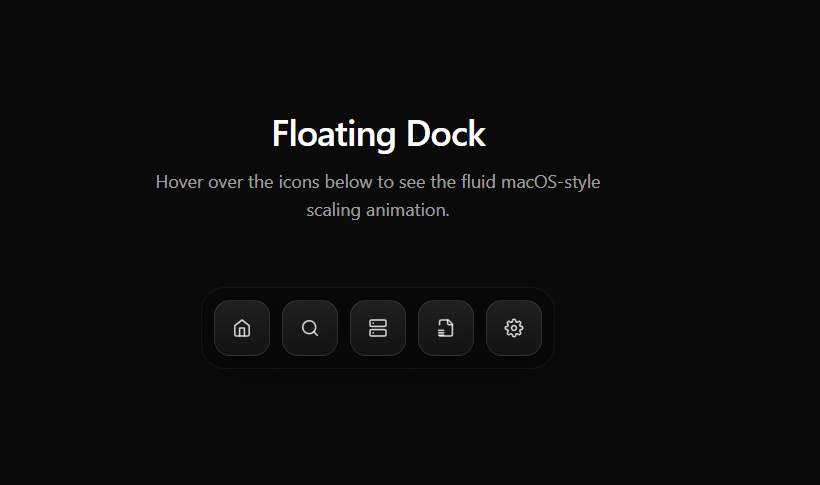
About
A premium macOS-style floating dock featuring smooth fluid magnification and physics-based scaling animations on hover. Includes elegant tooltip micro-labels and custom icon container formatting. The perfect minimalist navigation shell for SaaS platforms, tools, and AI desktop wr
Built with React and Tailwind. Copy the prompt and paste it into Claude Code, Cursor or Lovable: your agent adds macOS Fluid Floating Dock to your project and fits it to your theme.
Code
How macOS Fluid Floating Dock is used: the demo's code. The component's own source comes with a free account.
Usage.tsx
import React, { useRef, useState, useEffect } from 'react';

interface DockItemProps {
  icon: React.ReactNode;
  label: string;
  mouseX: number | null;
  index: number;
}

const DockItem = ({ icon, label, mouseX, index }: DockItemProps) => {
  const ref = useRef<HTMLButtonElement>(null);
  const [scale, setScale] = useState(1);
  const targetScale = useRef(1);
  const [isHovered, setIsHovered] = useState(false);


  useEffect(() => {
    let animationFrameId: number;
    const animate = () => {
      setScale((prev) => {
        const next = prev + (targetScale.current - prev) * 0.2;
        if (Math.abs(targetScale.current - next) < 0.001) return targetScale.current;
        return next;
      });
      animationFrameId = requestAnimationFrame(animate);
    };
    animate();
    return () => cancelAnimationFrame(animationFrameId);
  }, []);


  useEffect(() => {
    if (!ref.current || mouseX === null) {
      targetScale.current = 1;
      return;
    }

    const rect = ref.current.getBoundingClientRect();
    const centerX = rect.left + rect.width / 2;
    const distance = Math.abs(mouseX - centerX);

    const maxDistance = 150;

    if (distance < maxDistance) {

      const newScale = 1 + 0.6 * Math.cos((distance / maxDistance) * (Math.PI / 2));
      targetScale.current = newScale;
    } else {
      targetScale.current = 1;
    }
  }, [mouseX]);

  return (
    <div className="relative flex flex-col items-center group">

      <div
        className={`absolute -top-14 px-4 py-2 bg-black/90 backdrop-blur-xl text-white text-xs font-medium rounded-lg whitespace-nowrap border border-white/10 shadow-[0_4px_20px_rgba(0,0,0,0.5)] transition-all duration-300 pointer-events-none ${isHovered ? 'opacity-100 translate-y-0 scale-100' : 'opacity-0 translate-y-2 scale-95'}`}
      >
        {label}
      </div>

      <button
        ref={ref}
        onMouseEnter={() => setIsHovered(true)}
        onMouseLeave={() => setIsHovered(false)}
        style={{
          width: `${56 * scale}px`,
          height: `${56 * scale}px`,
        }}
        className="flex items-center justify-center rounded-2xl bg-gradient-to-b from-white/10 to-white/5 border border-white/10 backdrop-blur-xl shadow-[0_8px_30px_rgba(0,0,0,0.3)] transition-colors duration-300 hover:bg-white/10 hover:border-white/20 cursor-pointer overflow-hidden"
      >
        <div style={{ transform: `scale(${scale * 0.8})` }} className="text-white/80 group-hover:text-white transition-colors duration-300">
          {icon}
        </div>
      </button>
    </div>
  );
};

export default function FloatingDockPreview() {
  const [mouseX, setMouseX] = useState<number | null>(null);

  const icons = [
    { label: "Home", icon: <svg xmlns="http://www.w3.org/2000/svg" width="24" height="24" viewBox="0 0 24 24" fill="none" stroke="currentColor" strokeWidth="2" strokeLinecap="round" strokeLinejoin="round"><path d="m3 9 9-7 9 7v11a2 2 0 0 1-2 2H5a2 2 0 0 1-2-2z"/><polyline points="9 22 9 12 15 12 15 22"/></svg> },
    { label: "Search", icon: <svg xmlns="http://www.w3.org/2000/svg" width="24" height="24" viewBox="0 0 24 24" fill="none" stroke="currentColor" strokeWidth="2" strokeLinecap="round" strokeLinejoin="round"><circle cx="11" cy="11" r="8"/><line x1="21" y1="21" x2="16.65" y2="16.65"/></svg> },
    { label: "Agents", icon: <svg xmlns="http://www.w3.org/2000/svg" width="24" height="24" viewBox="0 0 24 24" fill="none" stroke="currentColor" strokeWidth="2" strokeLinecap="round" strokeLinejoin="round"><rect x="2" y="2" width="20" height="8" rx="2" ry="2"/><rect x="2" y="14" width="20" height="8" rx="2" ry="2"/><line x1="6" y1="6" x2="6.01" y2="6"/><line x1="6" y1="18" x2="6.01" y2="18"/></svg> },
    { label: "Memory", icon: <svg xmlns="http://www.w3.org/2000/svg" width="24" height="24" viewBox="0 0 24 24" fill="none" stroke="currentColor" strokeWidth="2" strokeLinecap="round" strokeLinejoin="round"><path d="M4 22h14a2 2 0 0 0 2-2V7l-5-5H6a2 2 0 0 0-2 2v4"/><path d="M14 2v4a2 2 0 0 0 2 2h4"/><path d="M3 15h6"/><path d="M3 18h6"/><path d="M3 21h6"/></svg> },
    { label: "Settings", icon: <svg xmlns="http://www.w3.org/2000/svg" width="24" height="24" viewBox="0 0 24 24" fill="none" stroke="currentColor" strokeWidth="2" strokeLinecap="round" strokeLinejoin="round"><circle cx="12" cy="12" r="3"/><path d="M19.4 15a1.65 1.65 0 0 0 .33 1.82l.06.06a2 2 0 0 1 0 2.83 2 2 0 0 1-2.83 0l-.06-.06a1.65 1.65 0 0 0-1.82-.33 1.65 1.65 0 0 0-1 1.51V21a2 2 0 0 1-2 2 2 2 0 0 1-2-2v-.09A1.65 1.65 0 0 0 9 19.4a1.65 1.65 0 0 0-1.82.33l-.06.06a2 2 0 0 1-2.83 0 2 2 0 0 1 0-2.83l.06-.06a1.65 1.65 0 0 0 .33-1.82 1.65 1.65 0 0 0-1.51-1H3a2 2 0 0 1-2-2 2 2 0 0 1 2-2h.09A1.65 1.65 0 0 0 4.6 9a1.65 1.65 0 0 0-.33-1.82l-.06-.06a2 2 0 0 1 0-2.83 2 2 0 0 1 2.83 0l.06.06a1.65 1.65 0 0 0 1.82.33H9a1.65 1.65 0 0 0 1-1.51V3a2 2 0 0 1 2-2 2 2 0 0 1 2 2v.09a1.65 1.65 0 0 0 1 1.51 1.65 1.65 0 0 0 1.82-.33l.06-.06a2 2 0 0 1 2.83 0 2 2 0 0 1 0 2.83l-.06.06a1.65 1.65 0 0 0-.33 1.82V9a1.65 1.65 0 0 0 1.51 1H21a2 2 0 0 1 2 2 2 2 0 0 1-2 2h-.09a1.65 1.65 0 0 0-1.51 1z"/></svg> },
  ];

  return (
    <div className="flex flex-col items-center justify-start w-full min-h-[700px] bg-background p-4 md:p-8 pt-32">

      <div className="text-center mb-16 pt-10">
        <h2 className="text-4xl font-semibold tracking-tight text-white mb-4">Floating Dock</h2>
        <p className="text-white/60 max-w-md mx-auto text-lg">Hover over the icons below to see the fluid macOS-style scaling animation.</p>
      </div>

      <div className="relative">
        <div
          className="absolute inset-0 -top-8 -bottom-8 -left-8 -right-8"
          onMouseMove={(e) => setMouseX(e.clientX)}
          onMouseLeave={() => setMouseX(null)}
        />
        <div
          className="relative flex items-end gap-3 rounded-3xl bg-black/20 p-3 border border-white/5 backdrop-blur-xl shadow-2xl"
          onMouseMove={(e) => setMouseX(e.clientX)}
          onMouseLeave={() => setMouseX(null)}
        >
          {icons.map((item, idx) => (
            <DockItem
              key={idx}
              index={idx}
              label={item.label}
              icon={item.icon}
              mouseX={mouseX}
            />
          ))}
        </div>
      </div>

    </div>
  );
}
More by Arun Dass
View all

Dashboard Sidebar
1.7K
AI Planning
453
AI Agent Processing States
183
Kanban Board
160
FileUpload
155
Neomorphism Metric Card
88
Focus Hero
38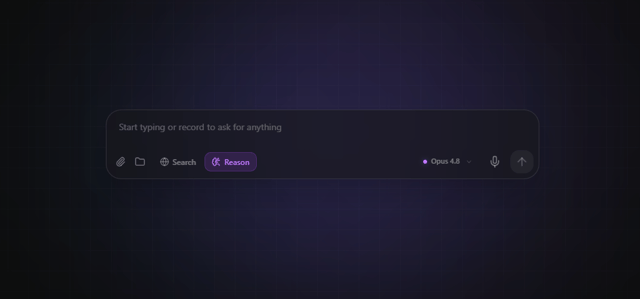
AI Prompt Input Box
2
More in Navigation
View all

Sidebar
235
Navbar with Theme Toggle
43

Sidebar
339

Tabs
60
Numberless Pagination with Text
11
Oversized 404 Numeral
50
Footer
446
Pagination
43


