
About
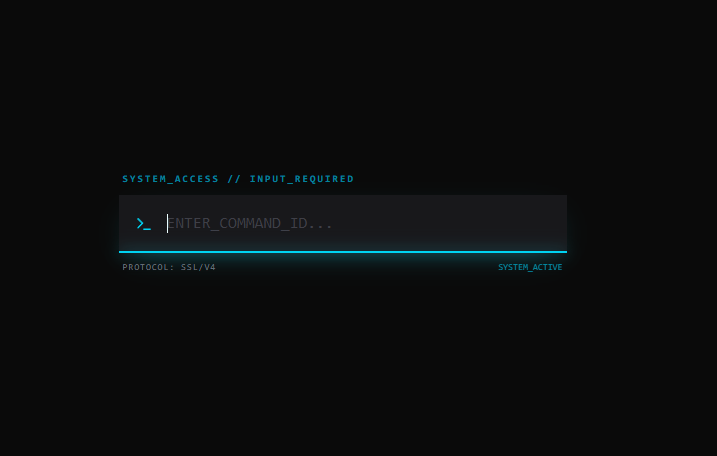
text input
Built with React and Tailwind. Copy the prompt and paste it into Claude Code, Cursor or Lovable: your agent adds sleek text input to your project and fits it to your theme.
Code
How sleek text input is used: the demo's code. The component's own source comes with a free account.
Usage.tsx
import React, { useState } from 'react';
import { Terminal } from 'lucide-react';

/**
 * CyberInput Component
 * A high-contrast, tech-inspired text input with neon glow effects.
 */
const CyberInput = ({
  label = "System_Access // Input_Required",
  placeholder = "ENTER_COMMAND_ID...",
  protocol = "SSL/V4"
}) => {
  const [isActive, setIsActive] = useState(false);
  const [value, setValue] = useState("");

  const handleKeyDown = (e) => {
    if (e.key === 'Enter') {
      console.log("Executing:", value);
      setValue("");
    }
  };

  return (
    <div className="w-full max-w-md space-y-2 font-mono">
      {/* Top Label */}
      <label className="block text-[10px] uppercase tracking-[0.2em] text-cyan-500/70 font-bold ml-1">
        {label}
      </label>

      {/* Input Field Main Container */}
      <div className="relative group">
        {/* Terminal Icon Decor */}
        <div className={`absolute left-4 top-1/2 -translate-y-1/2 transition-colors duration-300 ${
          isActive ? 'text-cyan-400' : 'text-cyan-500/50'
        }`}>
          <Terminal size={18} />
        </div>

        {/* Matte Charcoal Input Field */}
        <input
          type="text"
          value={value}
          onChange={(e) => setValue(e.target.value)}
          onFocus={() => setIsActive(true)}
          onBlur={() => setIsActive(false)}
          onKeyDown={handleKeyDown}
          placeholder={placeholder}
          className={`
            w-full bg-zinc-900/80 border-b-2 border-zinc-800 text-cyan-50 py-4 pl-12 pr-4
            outline-none transition-all duration-500 placeholder:text-zinc-700
            focus:border-cyan-400 focus:bg-zinc-900
            focus:shadow-[0_10px_30px_-15px_rgba(34,211,238,0.4)]
          `}
        />

        {/* The Animated Neon Underline */}
        <div
          className={`absolute bottom-0 left-0 h-[2px] bg-cyan-400 shadow-[0_0_15px_rgba(34,211,238,0.8)] transition-all duration-700 ${
            isActive ? 'w-full' : 'w-0'
          }`}
        />
      </div>

      {/* Bottom Metadata Bar */}
      <div className="flex justify-between items-center px-1">
        <span className="text-[9px] text-zinc-500 uppercase tracking-widest">
          Protocol: {protocol}
        </span>
        <span className={`text-[9px] uppercase transition-colors duration-300 ${
          isActive ? 'text-cyan-500 animate-pulse' : 'text-zinc-600'
        }`}>
          {isActive ? 'SYSTEM_ACTIVE' : 'IDLE_WAITING...'}
        </span>
      </div>
    </div>
  );
};

export default CyberInput;More by ashish rajwani
View all
ASMR background
684
animated pattern cloud
616
Balloons Pop background
362
realistic fog background
309
3d animated stars background
3
Matrix background
1
tab pages
1
Botanical background