
About
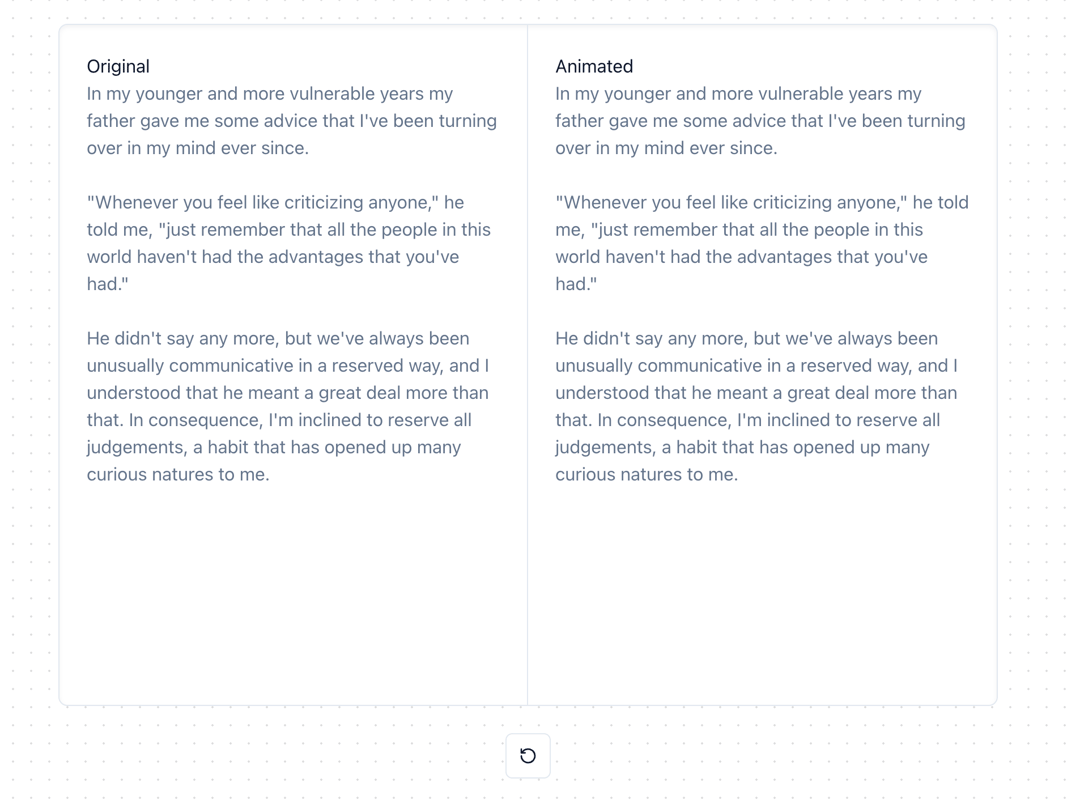
Smoothly animate frequently–updating text, like text from a chatbot.
Built with React and Tailwind. Copy the prompt and paste it into Claude Code, Cursor or Lovable: your agent adds Animated Text to your project and fits it to your theme.
Code
How Animated Text is used: the demo's code. The component's own source comes with a free account.
Usage.tsx
"use client";

import { useState } from "react";
import { useAnimatedText } from "@/components/ui/animated-text";
import { Card } from "@/components/ui/card";
import { Button } from "@/components/ui/button";
import { RotateCcw } from "lucide-react";

const DEMO_TEXT = "In my younger and more vulnerable years my father gave me some advice that I've been turning over in my mind ever since.\n\n" +
  "\"Whenever you feel like criticizing anyone,\" he told me, \"just remember that all the people in this world haven't had the advantages that you've had.\"\n\n" +
  "He didn't say any more, but we've always been unusually communicative in a reserved way, and I understood that he meant a great deal more than that. In consequence, I'm inclined to reserve all judgements, a habit that has opened up many curious natures to me.";

function AnimationDemo({
  originalText,
  animatedText
}: {
  originalText: string;
  animatedText: string;
}) {
  return (
    <Card className="w-full min-h-[600px] shadow-inner">
      <div className="flex h-full" style={{ minHeight: "inherit" }}>
        <div className="flex-1 p-6 min-w-[50%] border-r">
          <h3>Original</h3>
          <p className="text-muted-foreground whitespace-pre-wrap">{originalText}</p>
        </div>
        <div className="flex-1 p-6 min-w-[50%]">
          <h3>Animated</h3>
          <p className="text-muted-foreground whitespace-pre-wrap">{animatedText}</p>
        </div>
      </div>
    </Card>
  );
}

function ChunkToCharacterDemo() {
  const [isPlaying, setIsPlaying] = useState(true);
  const chunkText = useAnimatedText(isPlaying ? DEMO_TEXT : "", "\n\n", 1);
  const characterText = useAnimatedText(isPlaying ? DEMO_TEXT : "", "");

  const handleRestart = () => {
    setIsPlaying(false);
    setTimeout(() => setIsPlaying(true), 0);
  };

  return (
    <div className="space-y-6">
      <AnimationDemo originalText={chunkText} animatedText={characterText} />
      <div className="flex justify-center">
        <Button
          variant="outline"
          size="icon"
          onClick={handleRestart}
        >
          <RotateCcw className="h-4 w-4" />
        </Button>
      </div>
    </div>
  );
}

function ChunkToWordDemo() {
  const [isPlaying, setIsPlaying] = useState(true);
  const chunkText = useAnimatedText(isPlaying ? DEMO_TEXT : "", "\n\n", 1);
  const wordText = useAnimatedText(isPlaying ? DEMO_TEXT : "", " ");

  const handleRestart = () => {
    setIsPlaying(false);
    setTimeout(() => setIsPlaying(true), 0);
  };

  return (
    <div className="space-y-6">
      <AnimationDemo originalText={chunkText} animatedText={wordText} />
      <div className="flex justify-center">
        <Button
          variant="outline"
          size="icon"
          onClick={handleRestart}
        >
          <RotateCcw className="h-4 w-4" />
        </Button>
      </div>
    </div>
  );
}

export default {
  ChunkToCharacterDemo,
  ChunkToWordDemo,
}
Dependencies
More by Build UI
View all
Filesystem Item
575
Animated Tabs
85
Animated Counter
79
Slider
53
iOS Animated Switch
6
More in Text
View all

Vertical Cut Reveal Characters
103

Rainbow Text Effect
47
Motion Blur Text
36
Text Loop
310
Text Reveal
27
Apple Hello Effect
610
Typography
4

Animated Text
8

