
About
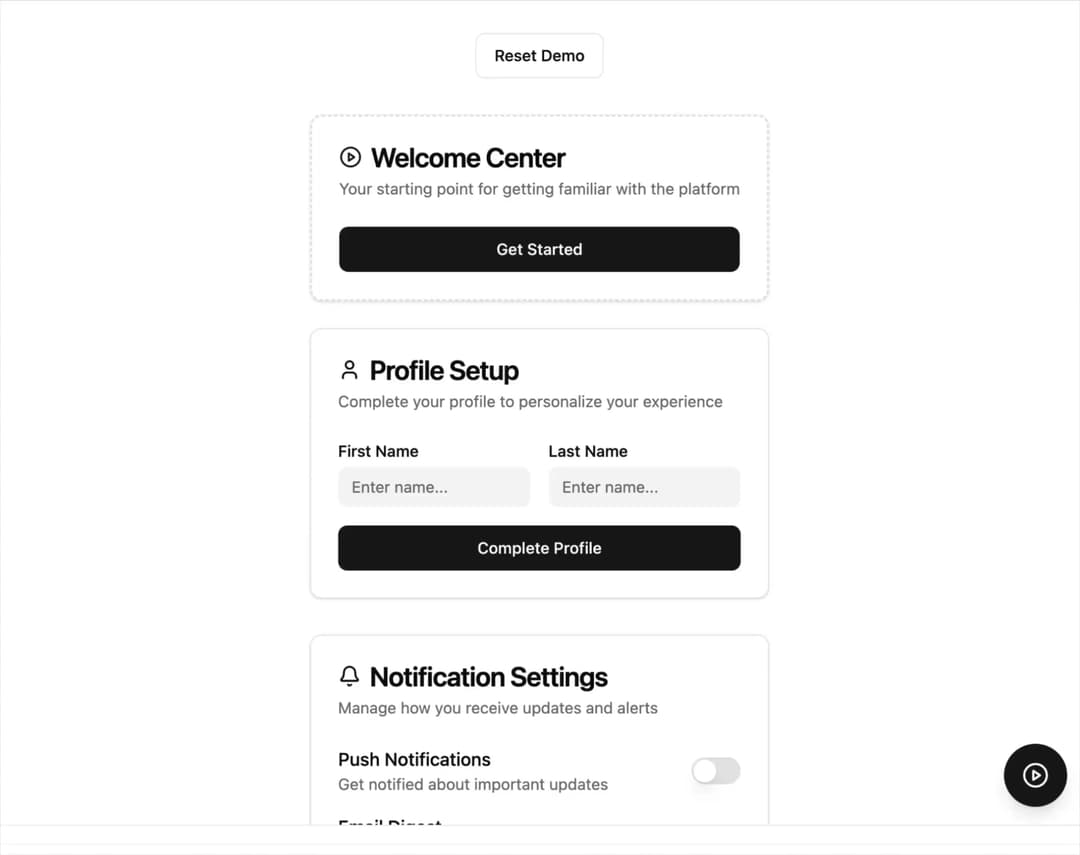
An Interactive Onboarding Checklist that guides users step-by-step through key actions in your app, with a slide-out checklist panel, progress indicator, and coachmarks that spotlight targeted UI elements.
Built with React and Tailwind. Copy the prompt and paste it into Claude Code, Cursor or Lovable: your agent adds Onboarding Checklist to your project and fits it to your theme.
Code
How Onboarding Checklist is used: the demo's code. The component's own source comes with a free account.
Usage.tsx
"use client";

import React, { useState } from "react";
import { InteractiveOnboardingChecklist, type Step } from "@/components/ui/onboarding-checklist";
import { Button } from "@/components/ui/button";
import { Card, CardHeader, CardTitle, CardDescription, CardContent } from "@/components/ui/card";
import { Switch } from "@/components/ui/switch";
import { Badge } from "@/components/ui/badge";
import { PlayCircle, Bell, User } from "lucide-react";

export default function InteractiveOnboardingChecklistDemo() {
  const [onboardingOpen, setOnboardingOpen] = useState(false);
  const [completedSteps, setCompletedSteps] = useState<Set<string>>(new Set());
  const [notificationsEnabled, setNotificationsEnabled] = useState(false);
  const [profileSetup, setProfileSetup] = useState(false);

  const steps: Step[] = [
    {
      id: "welcome",
      title: "Welcome to the Platform",
      description: "Click the welcome button to get started with your journey.",
      targetSelector: "[data-onboard='welcome-button']",
      completed: completedSteps.has("welcome")
    },
    {
      id: "profile",
      title: "Set up your profile",
      description: "Complete your profile information to personalize your experience.",
      targetSelector: "[data-onboard='profile-card']",
      completed: completedSteps.has("profile")
    },
    {
      id: "notifications",
      title: "Enable notifications",
      description: "Turn on notifications to stay updated with important updates.",
      targetSelector: "[data-onboard='notifications-toggle']",
      completed: completedSteps.has("notifications")
    }
  ];

  const handleCompleteStep = (stepId: string) => {
    setCompletedSteps(prev => new Set([...prev, stepId]));


    switch (stepId) {
      case "profile":
        setProfileSetup(true);
        break;
      case "notifications":
        setNotificationsEnabled(true);
        break;
    }
  };

  const handleFinish = () => {
    console.log("Onboarding completed!");
    setOnboardingOpen(false);
  };

  const resetDemo = () => {
    setCompletedSteps(new Set());
    setNotificationsEnabled(false);
    setProfileSetup(false);
    setOnboardingOpen(true);
  };

  const completedCount = steps.filter(step => completedSteps.has(step.id)).length;
  const isOnboardingComplete = completedCount === steps.length;

  return (
    <div className="min-h-screen bg-background p-8">
      <div className="max-w-6xl mx-auto space-y-8">

        <div className="text-center space-y-4">
          <div className="flex justify-center gap-4">
            <Button onClick={resetDemo} variant="outline" className="gap-2">
              Reset Demo
            </Button>
          </div>
        </div>


        <div className="grid grid-cols-1 lg:grid-cols-2 gap-8">

          <div className="space-y-6">

            <Card data-onboard="welcome-button" className="border-2 border-dashed border-muted-foreground/20">
              <CardHeader>
                <CardTitle className="flex items-center gap-2">
                  <PlayCircle className="h-5 w-5 text-primary" />
                  Welcome Center
                </CardTitle>
                <CardDescription>
                  Your starting point for getting familiar with the platform
                </CardDescription>
              </CardHeader>
              <CardContent>
                <Button
                  className="w-full"
                  onClick={() => {
                    if (!completedSteps.has("welcome")) {
                      handleCompleteStep("welcome");
                    }
                  }}
                  variant={completedSteps.has("welcome") ? "outline" : "default"}
                >
                  {completedSteps.has("welcome") ? "✓ Welcome Complete" : "Get Started"}
                </Button>
              </CardContent>
            </Card>


            <Card
              data-onboard="profile-card"
              className={`transition-colors ${profileSetup ? 'border-primary bg-primary/5' : ''}`}
            >
              <CardHeader>
                <CardTitle className="flex items-center gap-2">
                  <User className="h-5 w-5" />
                  Profile Setup
                  {profileSetup && <Badge variant="default" className="ml-auto">Complete</Badge>}
                </CardTitle>
                <CardDescription>
                  Complete your profile to personalize your experience
                </CardDescription>
              </CardHeader>
              <CardContent className="space-y-4">
                <div className="grid grid-cols-2 gap-4">
                  <div>
                    <label className="text-sm font-medium mb-1 block">First Name</label>
                    <div className="h-9 bg-muted rounded-md flex items-center px-3 text-sm text-muted-foreground">
                      {profileSetup ? "John" : "Enter name..."}
                    </div>
                  </div>
                  <div>
                    <label className="text-sm font-medium mb-1 block">Last Name</label>
                    <div className="h-9 bg-muted rounded-md flex items-center px-3 text-sm text-muted-foreground">
                      {profileSetup ? "Doe" : "Enter name..."}
                    </div>
                  </div>
                </div>
                <Button
                  className="w-full"
                  variant={profileSetup ? "outline" : "default"}
                  onClick={() => {
                    if (!completedSteps.has("profile")) {
                      handleCompleteStep("profile");
                    }
                  }}
                >
                  {profileSetup ? "✓ Profile Complete" : "Complete Profile"}
                </Button>
              </CardContent>
            </Card>
          </div>


          <div className="space-y-6">

            <Card>
              <CardHeader>
                <CardTitle className="flex items-center gap-2">
                  <Bell className="h-5 w-5" />
                  Notification Settings
                </CardTitle>
                <CardDescription>
                  Manage how you receive updates and alerts
                </CardDescription>
              </CardHeader>
              <CardContent className="space-y-4">
                <div className="flex items-center justify-between">
                  <div>
                    <div className="font-medium">Push Notifications</div>
                    <div className="text-sm text-muted-foreground">Get notified about important updates</div>
                  </div>
                  <Switch
                    data-onboard="notifications-toggle"
                    checked={notificationsEnabled}
                    onCheckedChange={(checked) => {
                      setNotificationsEnabled(checked);
                      if (checked && !completedSteps.has("notifications")) {
                        handleCompleteStep("notifications");
                      }
                    }}
                  />
                </div>
                <div className="flex items-center justify-between">
                  <div>
                    <div className="font-medium">Email Digest</div>
                    <div className="text-sm text-muted-foreground">Weekly summary of activity</div>
                  </div>
                  <Switch checked={false} disabled />
                </div>
              </CardContent>
            </Card>


          </div>
        </div>


      </div>


      <InteractiveOnboardingChecklist
        steps={steps}
        open={onboardingOpen}
        onOpenChange={setOnboardingOpen}
        onCompleteStep={handleCompleteStep}
        onFinish={handleFinish}
      />


      {!onboardingOpen && (
        <div className="fixed bottom-4 right-4 z-40">
          <Button
            onClick={() => setOnboardingOpen(true)}
            className="h-14 w-14 rounded-full shadow-lg hover:shadow-xl transition-all duration-200 group"
            size="icon"
          >
            {isOnboardingComplete ? (
              <div className="flex items-center justify-center">
                <span className="text-lg">✓</span>
              </div>
            ) : completedCount > 0 ? (
              <div className="flex items-center justify-center relative">
                <PlayCircle className="h-6 w-6" />
                <div className="absolute -top-1 -right-1 h-3 w-3 bg-primary-foreground text-primary rounded-full flex items-center justify-center text-xs font-bold">
                  {completedCount}
                </div>
              </div>
            ) : (
              <PlayCircle className="h-6 w-6" />
            )}
          </Button>


          <div className="absolute bottom-16 right-0 bg-popover text-popover-foreground px-3 py-2 rounded-lg shadow-md text-sm whitespace-nowrap opacity-0 group-hover:opacity-100 transition-opacity duration-200 pointer-events-none">
            {isOnboardingComplete ? "View Checklist" : completedCount > 0 ? "Continue Onboarding" : "Start Onboarding"}
          </div>
        </div>
      )}
    </div>
  );
}
Dependencies
More by Caio Bonato
View all
Liquid Metal Hero
1.3K
Globe Hero
968
Modern Timeline
658
Grain Gradient Hero Section
447
Animated Gradient Button
55
Animated Tabs
4
Simple Dropdown
Searchable Dropdown