
About
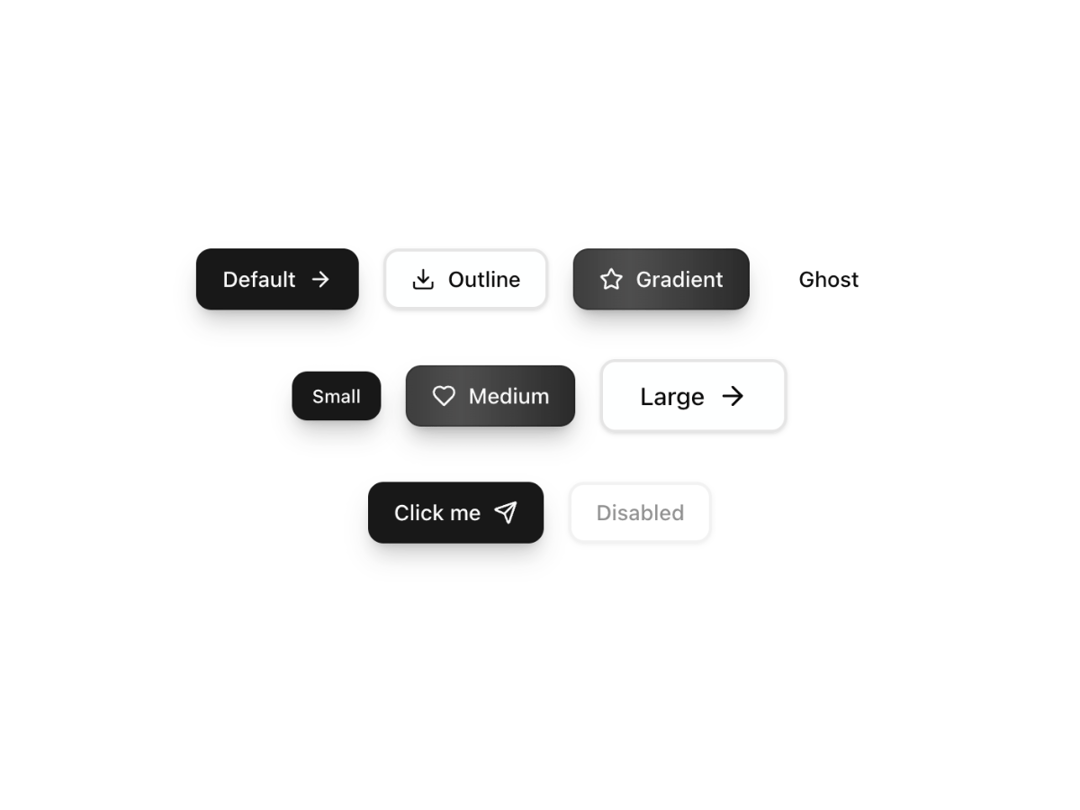
A modern, reusable button with animated gradients, smooth hover/tap interactions, and full dark mode support. Built with ShadCN UI, Tailwind, and Framer Motion — perfect for CTAs, forms, or landing pages.
Built with React and Tailwind. Copy the prompt and paste it into Claude Code, Cursor or Lovable: your agent adds Animated Gradient Button to your project and fits it to your theme.
Code
How Animated Gradient Button is used: the demo's code. The component's own source comes with a free account.
Usage.tsx
"use client";

import React from "react";
import { ArrowRight, Download, Heart, Star, Send } from "lucide-react";
import { AnimatedButton } from "@/components/ui/animated-gradient-button";

export default function AnimatedButtonDemo() {
  const [isLoading, setIsLoading] = React.useState(false);

  const handleAsyncAction = async () => {
    setIsLoading(true);
    await new Promise(resolve => setTimeout(resolve, 2000));
    setIsLoading(false);
  };

  return (
    <div className="min-h-screen bg-background flex items-center justify-center p-8">
      <div className="space-y-8">
        {/* Variants */}
        <div className="flex flex-wrap justify-center gap-4">
          <AnimatedButton
            label="Default"
            variant="default"
            iconRight={<ArrowRight />}
          />
          <AnimatedButton
            label="Outline"
            variant="outline"
            iconLeft={<Download />}
          />
          <AnimatedButton
            label="Gradient"
            variant="gradient"
            iconLeft={<Star />}
          />
          <AnimatedButton
            label="Ghost"
            variant="ghost"
          />
        </div>

        {/* Sizes */}
        <div className="flex flex-wrap justify-center items-center gap-4">
          <AnimatedButton
            label="Small"
            size="sm"
            variant="default"
          />
          <AnimatedButton
            label="Medium"
            size="md"
            variant="gradient"
            iconLeft={<Heart />}
          />
          <AnimatedButton
            label="Large"
            size="lg"
            variant="outline"
            iconRight={<ArrowRight />}
          />
        </div>

        {/* States */}
        <div className="flex flex-wrap justify-center gap-4">
          <AnimatedButton
            label={isLoading ? "Loading..." : "Click me"}
            variant="default"
            loading={isLoading}
            onClick={handleAsyncAction}
            iconRight={!isLoading ? <Send /> : undefined}
          />
          <AnimatedButton
            label="Disabled"
            variant="outline"
            disabled
          />
        </div>
      </div>
    </div>
  );
}
Dependencies
More by Caio Bonato
View all
Liquid Metal Hero
1.3K
Globe Hero
965
Modern Timeline
656
Grain Gradient Hero Section
445
Onboarding Checklist
125
Animated Tabs
4
Simple Dropdown
Searchable Dropdown
More in Buttons
View all

Button
5

App Store Button
453

Button
47

Eclipse Button
39

Button
4
Texture Button
92
Split Button
14

Button
32

