About
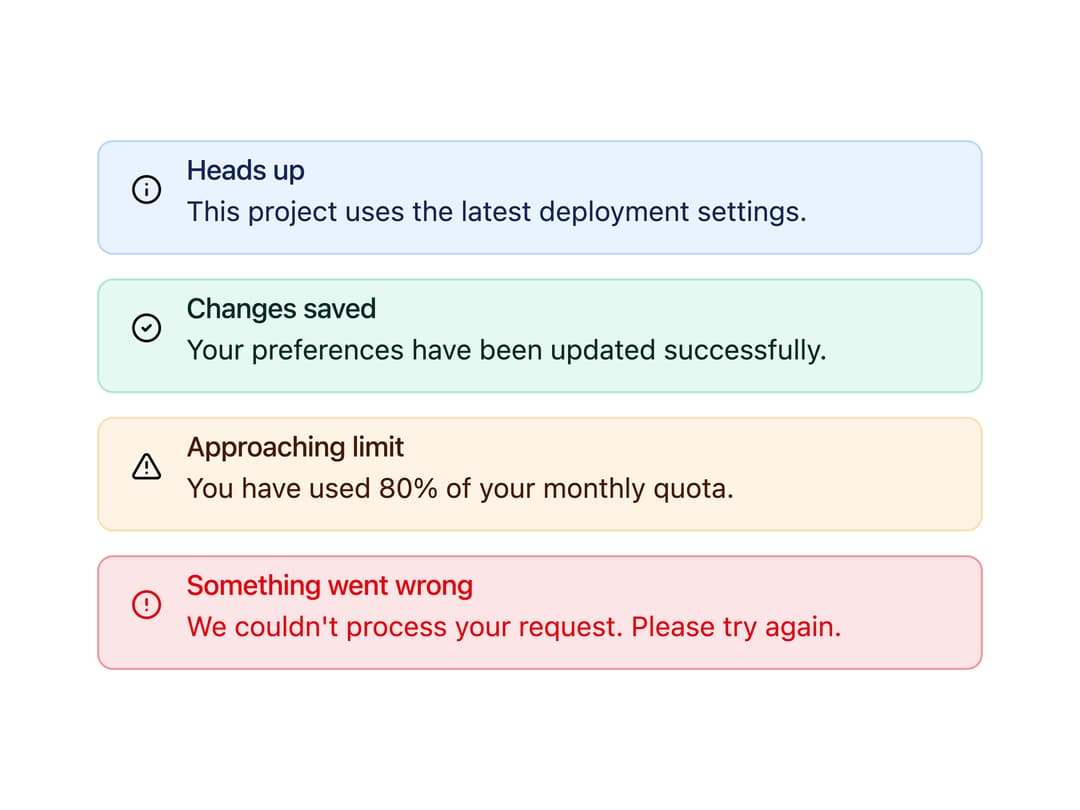
A restrained alert wrapper with info, success, warning, primary, and destructive tones for inline notices and status messages.
Built with React and Tailwind. Copy the prompt and paste it into Claude Code, Cursor or Lovable: your agent adds Notice Alert to your project and fits it to your theme.
Code
How Notice Alert is used: the demo's code. The component's own source comes with a free account.
Usage.tsx
import { NoticeAlert } from "@/components/ui/notice-alert";

export default function NoticeAlertDemo() {
  return (
    <div className="flex min-h-svh w-full items-center justify-center bg-background p-6">
      <div className="flex w-full max-w-md flex-col gap-3">
        <NoticeAlert
          tone="info"
          title="Heads up"
          description="This project uses the latest deployment settings."
        />
        <NoticeAlert
          tone="success"
          title="Changes saved"
          description="Your preferences have been updated successfully."
        />
        <NoticeAlert
          tone="warning"
          title="Approaching limit"
          description="You have used 80% of your monthly quota."
        />
        <NoticeAlert
          tone="destructive"
          title="Something went wrong"
          description="We couldn't process your request. Please try again."
        />
      </div>
    </div>
  );
}
Dependencies
More by corr
View all

Audit Log
84
Stepper
59
Pie Chart
8
Scroll Blur
8
Key Value List
7
Area Chart
4
Animated Spinner
3
Presence Fade
2