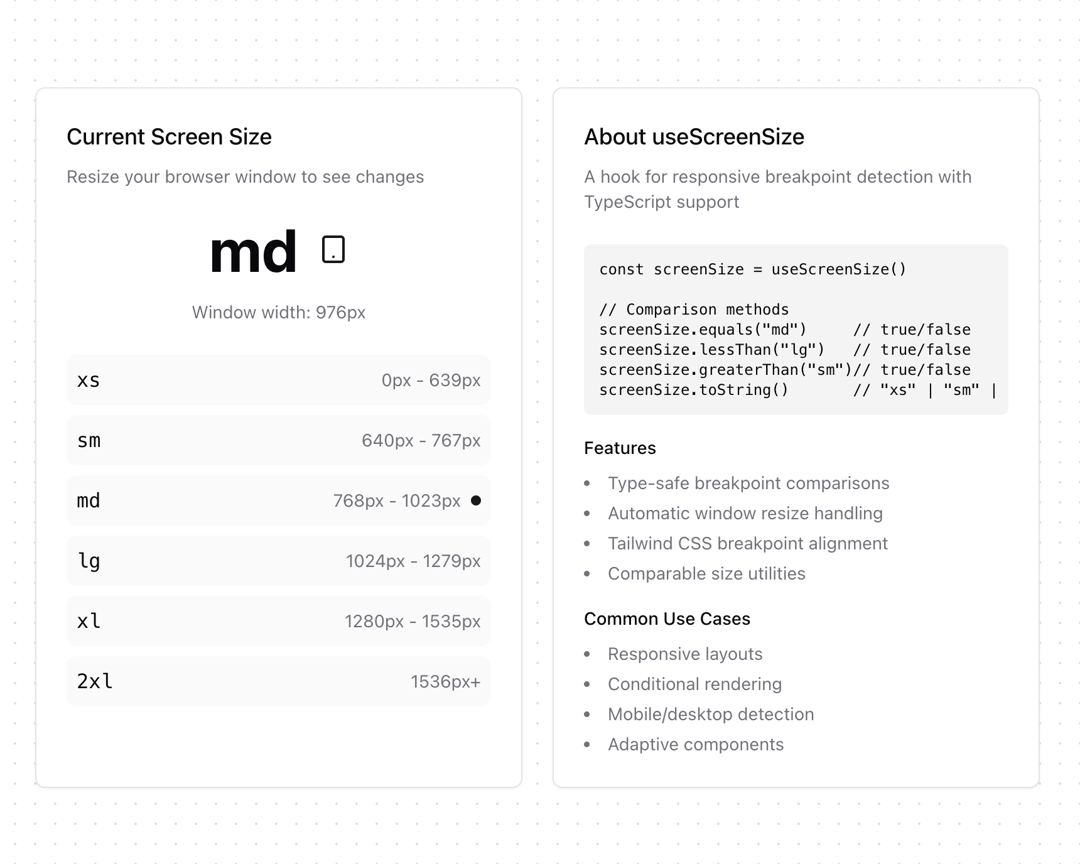
About
A custom React hook that provides responsive breakpoint detection with TypeScript support. Aligns with Tailwind CSS default breakpoints and provides convenient comparison methods.
Built with React and Tailwind. Copy the prompt and paste it into Claude Code, Cursor or Lovable: your agent adds useScreenSize to your project and fits it to your theme.
Code
How useScreenSize is used: the demo's code. The component's own source comes with a free account.
Usage.tsx
'use client'

import { useEffect, useState } from "react"
import { motion } from "framer-motion"
import { Monitor, Smartphone, Tablet, Laptop } from "lucide-react"
import { useScreenSize } from "@/components/hooks/use-screen-size"
import { Card } from "@/components/ui/card"

function ScreenSizeDemo() {
  const screenSize = useScreenSize()
  const [windowWidth, setWindowWidth] = useState(0)

  useEffect(() => {
    setWindowWidth(window.innerWidth)
    const handleResize = () => setWindowWidth(window.innerWidth)
    window.addEventListener('resize', handleResize)
    return () => window.removeEventListener('resize', handleResize)
  }, [])

  const breakpoints = {
    xs: 0,
    sm: 640,
    md: 768,
    lg: 1024,
    xl: 1280,
    "2xl": 1536,
  }

  const getDeviceIcon = (size: string) => {
    if (screenSize.equals(size)) {
      switch (size) {
        case 'xs': return <Smartphone className="h-6 w-6 text-primary" />
        case 'sm': return <Smartphone className="h-6 w-6 text-primary" />
        case 'md': return <Tablet className="h-6 w-6 text-primary" />
        case 'lg': return <Laptop className="h-6 w-6 text-primary" />
        case 'xl':
        case '2xl': return <Monitor className="h-6 w-6 text-primary" />
        default: return null
      }
    }
    return null
  }

  return (
    <div className="grid grid-cols-1 md:grid-cols-2 gap-6 max-w-4xl mx-auto p-6">
      {/* Interactive Demo */}
      <Card className="p-6">
        <div className="space-y-6">
          <div className="space-y-2">
            <h3 className="text-lg font-medium">Current Screen Size</h3>
            <p className="text-sm text-muted-foreground">
              Resize your browser window to see changes
            </p>
          </div>

          <div className="flex flex-col items-center space-y-4">
            <div className="text-5xl font-bold flex items-center gap-4">
              {screenSize.toString()}
              {getDeviceIcon(screenSize.toString())}
            </div>
            <div className="text-sm text-muted-foreground">
              Window width: {windowWidth}px
            </div>
          </div>

          <div className="space-y-2">
            {Object.entries(breakpoints).map(([size, width]) => (
              <div
                key={size}
                className="flex items-center justify-between p-2 rounded-lg bg-muted/50"
              >
                <span className="font-mono">{size}</span>
                <div className="flex items-center gap-2">
                  <span className="text-sm text-muted-foreground">
                    {width}px{size !== '2xl' ? ' - ' + (breakpoints[Object.keys(breakpoints)[Object.keys(breakpoints).indexOf(size) + 1]] - 1) + 'px' : '+'}
                  </span>
                  {screenSize.equals(size) && (
                    <div className="w-2 h-2 rounded-full bg-primary" />
                  )}
                </div>
              </div>
            ))}
          </div>
        </div>
      </Card>

      {/* Documentation */}
      <Card className="p-6">
        <div className="space-y-6">
          <div>
            <h3 className="text-lg font-medium mb-2">About useScreenSize</h3>
            <p className="text-sm text-muted-foreground">
              A hook for responsive breakpoint detection with TypeScript support
            </p>
          </div>

          <div className="space-y-4">
            <pre className="bg-muted p-3 rounded-md text-xs overflow-x-auto">
              {`const screenSize = useScreenSize()

// Comparison methods
screenSize.equals("md")     // true/false
screenSize.lessThan("lg")   // true/false
screenSize.greaterThan("sm")// true/false
screenSize.toString()       // "xs" | "sm" | "md" | "lg" | "xl" | "2xl"`}
            </pre>

            <div className="space-y-4">
              <div>
                <h4 className="text-sm font-medium mb-2">Features</h4>
                <ul className="list-disc list-inside space-y-1 text-sm text-muted-foreground">
                  <li>Type-safe breakpoint comparisons</li>
                  <li>Automatic window resize handling</li>
                  <li>Tailwind CSS breakpoint alignment</li>
                  <li>Comparable size utilities</li>
                </ul>
              </div>

              <div>
                <h4 className="text-sm font-medium mb-2">Common Use Cases</h4>
                <ul className="list-disc list-inside space-y-1 text-sm text-muted-foreground">
                  <li>Responsive layouts</li>
                  <li>Conditional rendering</li>
                  <li>Mobile/desktop detection</li>
                  <li>Adaptive components</li>
                </ul>
              </div>
            </div>
          </div>
        </div>
      </Card>
    </div>
  )
}

export { ScreenSizeDemo }
Dependencies
More by Daniel Petho
View all
Parallax Floating
2.2K
Text Rotate
2.1K
Typewriter
1.9K
Marquee Along SVG Path
1.4K
Image Trail
1.4K
Animated Gradient With SVG
884
Text Cursor Proximity
781
Pixel Trail
645
More in Cards
View all

Statistics Card 2
264

Course Design Cards
1.1K
Card
70
Stats cards with links
39
The Item one
3

Card Studio
7
Statistics Card 7
292

Item
10
