
About
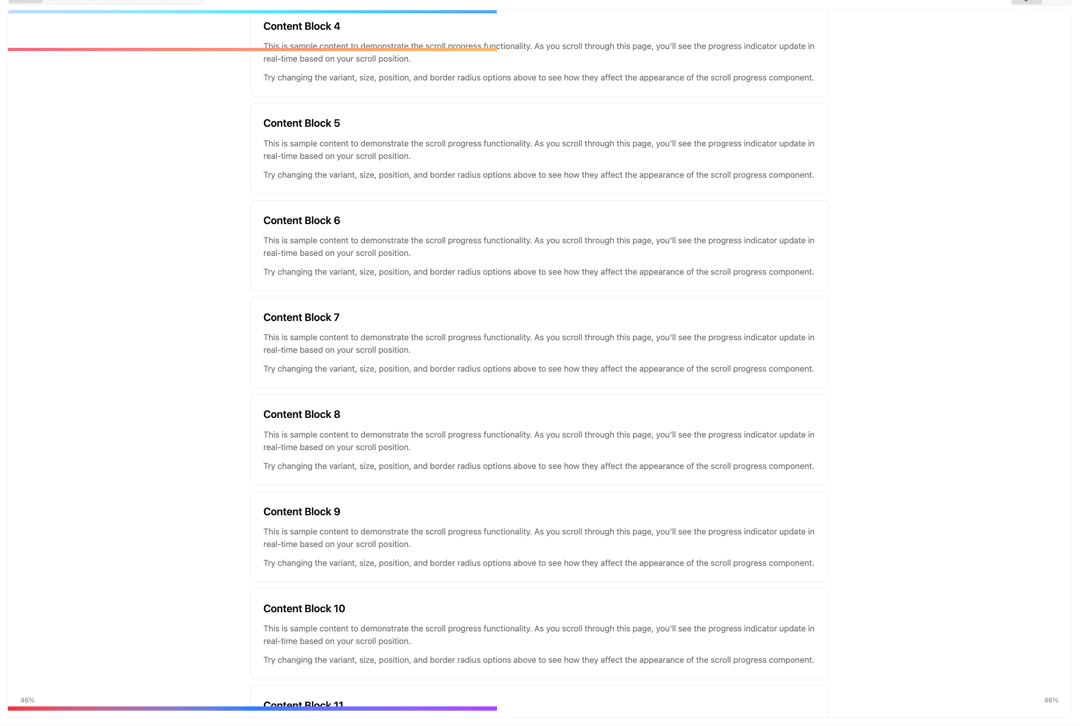
A minimal scroll progress indicator that tracks how far a user has scrolled down a page or container. Fully theme-aware and built with composability in mind, it supports both horizontal and vertical directions and works seamlessly in light and dark mode.
Built with React and Tailwind. Copy the prompt and paste it into Claude Code, Cursor or Lovable: your agent adds Scroll Progress to your project and fits it to your theme.
Code
How Scroll Progress is used: the demo's code. The component's own source comes with a free account.
Usage.tsx
import { ScrollProgress } from "@/components/ui/scroll-progress-1"

export default function DemoOne() {
  return (
    <div className="min-h-screen">
      <div className="mx-auto max-w-6xl space-y-3 p-6">
        <div className="py-8 text-center">
          <h1 className="mb-4 text-4xl font-bold">Scroll Progress Showcase</h1>
          <p className="text-muted-foreground text-lg">
            Customize the scroll progress component with different variants and
            options
          </p>
        </div>
        <ScrollProgress variant={"ice"} showPercentage />
        <ScrollProgress
          variant="rainbow"
          size="lg"
          position={"bottom"}
          showPercentage
           percentagePosition="left"
        />
        <ScrollProgress
          variant="custom"
          customGradient="bg-gradient-to-r mt-18 from-rose-400 to-orange-300"
        />

        {Array.from({ length: 15 }, (_, i) => (
          <div key={i} className="bg-card rounded-lg border p-6">
            <h3 className="mb-3 text-xl font-semibold">
              Content Block {i + 1}
            </h3>
            <p className="text-muted-foreground mb-3">
              This is sample content to demonstrate the scroll progress
              functionality. As you scroll through this page, you'll see the
              progress indicator update in real-time based on your scroll
              position.
            </p>
            <p className="text-muted-foreground">
              Try changing the variant, size, position, and border radius
              options above to see how they affect the appearance of the scroll
              progress component.
            </p>
          </div>
        ))}
      </div>
    </div>
  )
}
Dependencies
More by Ali Imam
View all

Liquid Glass Button
6.7K
Shader Animation
3.7K
WebGL Shader
2.6K
Shader Lines
2.3K
Shiny Button
2.2K
GLSL Hills
2.1K
Canvas
1.8K
Glowing Shadow
1.5K