
About
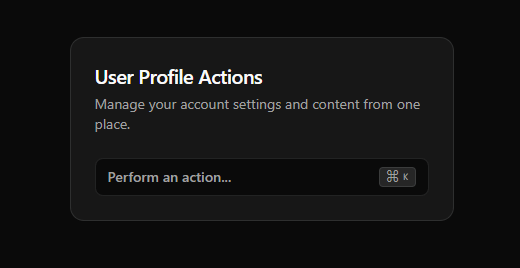
A self-contained card that opens a searchable command palette for quick actions. It's themeable, accessible, and follows modern UI/UX patterns.
Built with React and Tailwind. Copy the prompt and paste it into Claude Code, Cursor or Lovable: your agent adds Interactive Command Card to your project and fits it to your theme.
Code
How Interactive Command Card is used: the demo's code. The component's own source comes with a free account.
Usage.tsx
import * as React from "react";
import {
  FilePlus2,
  Settings,
  Trash2,
  User,
  LogOut,
  Moon,
  Sun,
} from "lucide-react";
import InteractiveCommandCard from "@/components/ui/interactive-command-card";


const DemoOne = () => {
  // Demo: Define the commands to be used in the card
  const userProfileCommands = [
    {
      group: "Account",
      label: "View Profile",
      icon: User,
      action: () => console.log("Navigating to profile..."),
    },
    {
      group: "Account",
      label: "Edit Settings",
      icon: Settings,
      action: () => console.log("Opening settings..."),
    },
    {
      group: "Content",
      label: "Create New File",
      icon: FilePlus2,
      action: () => console.log("Creating new file..."),
    },
    {
      group: "Theme",
      label: "Toggle Light Mode",
      icon: Sun,
      action: () => {
        document.documentElement.classList.remove("dark");
        console.log("Theme changed to light");
      },
    },
    {
      group: "Theme",
      label: "Toggle Dark Mode",
      icon: Moon,
      action: () => {
        document.documentElement.classList.add("dark");
        console.log("Theme changed to dark");
      },
    },
    {
      group: "Danger Zone",
      label: "Delete Account",
      icon: Trash2,
      action: () => console.warn("Account deletion initiated!"),
    },
    {
      group: "Danger Zone",
      label: "Log Out",
      icon: LogOut,
      action: () => console.log("Logging out..."),
    },
  ];

  // Set a default theme for demo purposes
  React.useEffect(() => {
    if (
      window.matchMedia &&
      window.matchMedia("(prefers-color-scheme: dark)").matches
    ) {
      document.documentElement.classList.add("dark");
    }
  }, []);

  return (
    <div className="flex items-center justify-center min-h-screen bg-background text-foreground font-sans p-4">
      <InteractiveCommandCard
        title="User Profile Actions"
        description="Manage your account settings and content from one place."
        ctaText="Perform an action..."
        commands={userProfileCommands}
        className="w-full max-w-sm"
      />
    </div>
  );
};

export default DemoOne;
Dependencies
More by Dhileep Kumar GM
View all

Aether Flow Hero
1.9K
Woven Light Hero
1.5K
AnomalousMatterHero
1.5K
PulseFit hero
922
Mountain Scene
859
HolographicCard
820
3D Animation
765
Cybernetic Bento Grid
556
More in Cards
View all

Statistics Card 2
264

Course Design Cards
1.1K
Card
70
Stats cards with links
39
The Item one
3

Card Studio
7
Statistics Card 7
292

Item
10
