
About
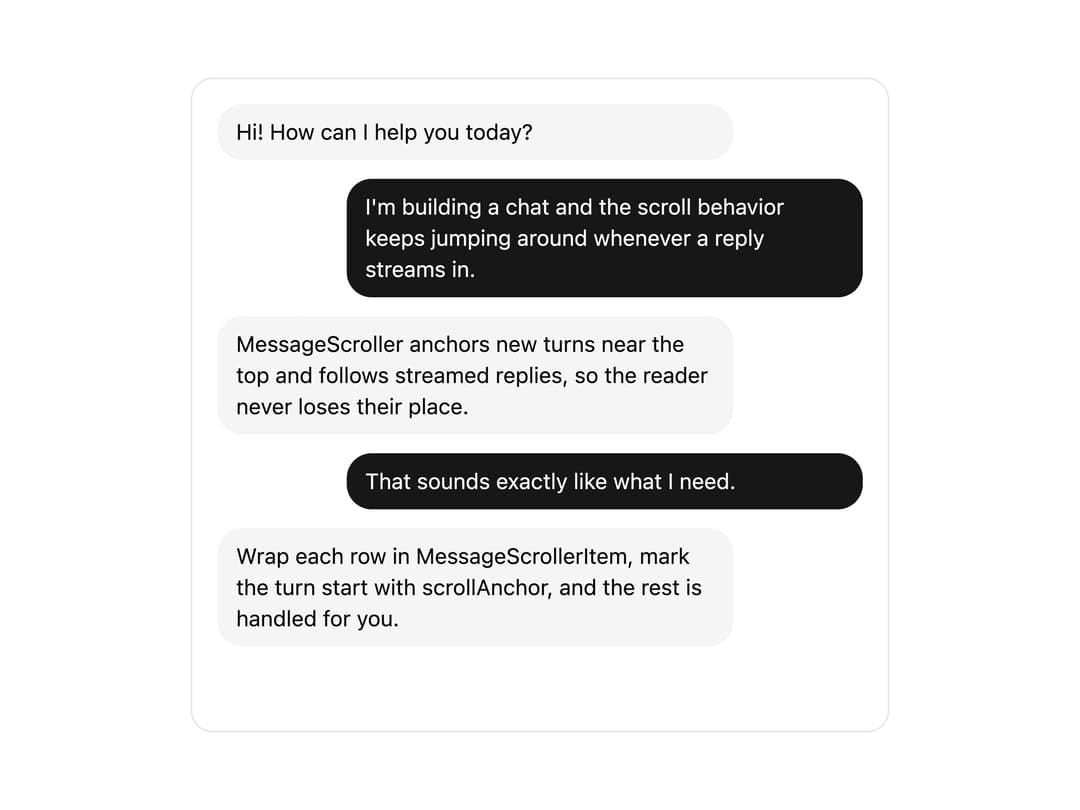
A chat transcript container that auto-scrolls to new messages, anchors new conversation turns near the top, and lets readers jump back to the latest reply in a streaming AI chat interface.
Built with React and Tailwind. Copy the prompt and paste it into Claude Code, Cursor or Lovable: your agent adds Message Scroller to your project and fits it to your theme.
Code
How Message Scroller is used: the demo's code. The component's own source comes with a free account.
Usage.tsx
"use client";

import * as React from "react";
import {
  MessageScrollerProvider,
  MessageScroller,
  MessageScrollerViewport,
  MessageScrollerContent,
  MessageScrollerItem,
  MessageScrollerButton,
} from "@/components/ui/message-scroller";

const messages = [
  { id: "1", from: "assistant", text: "Hi! How can I help you today?" },
  {
    id: "2",
    from: "user",
    text: "I'm building a chat and the scroll behavior keeps jumping around whenever a reply streams in.",
  },
  {
    id: "3",
    from: "assistant",
    text: "MessageScroller anchors new turns near the top and follows streamed replies, so the reader never loses their place.",
  },
  { id: "4", from: "user", text: "That sounds exactly like what I need." },
  {
    id: "5",
    from: "assistant",
    text: "Wrap each row in MessageScrollerItem, mark the turn start with scrollAnchor, and the rest is handled for you.",
  },
];

export default function MessageScrollerDemo() {
  return (
    <MessageScrollerProvider autoScroll defaultScrollPosition="end">
      <MessageScroller className="h-[420px] w-full max-w-md rounded-xl border border-border bg-background">
        <MessageScrollerViewport>
          <MessageScrollerContent className="gap-3 p-4">
            {messages.map((message) => (
              <MessageScrollerItem
                key={message.id}
                messageId={message.id}
                scrollAnchor={message.from === "user"}
              >
                <div
                  className={
                    message.from === "user"
                      ? "ml-auto max-w-[80%] rounded-2xl bg-primary px-3 py-2 text-sm text-primary-foreground"
                      : "mr-auto max-w-[80%] rounded-2xl bg-muted px-3 py-2 text-sm text-foreground"
                  }
                >
                  {message.text}
                </div>
              </MessageScrollerItem>
            ))}
          </MessageScrollerContent>
        </MessageScrollerViewport>
        <MessageScrollerButton />
      </MessageScroller>
    </MessageScrollerProvider>
  );
}
Dependencies
More by Diar Muradi
View all

Toggleable Add-on Pricing
153
Toggle Pricing Cards
78
ROI Pricing Calculator
49
Pricing With FAQ
43
Sign Up Split Panel
40
Volume Pricing Card
31
Logo Orbit
27
Sticky Header Navbar
19
More in AI chats
View all

AI Actions
319
Agent Chat
17

System Message
54
Message Thread
35
Color Picker
81

AI Task List
160

Modal Card
101
Quota Banner
21


