About
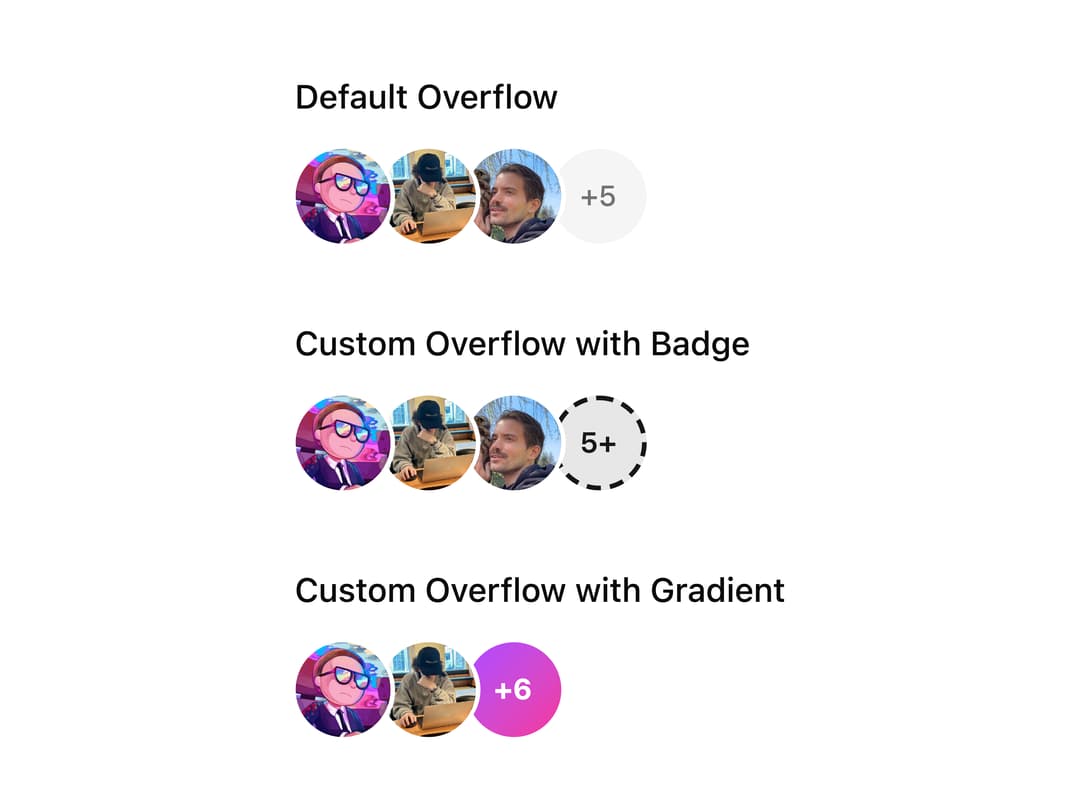
A component that stacks user avatars with overlapping visual masking, supporting truncation with an overflow indicator, RTL/vertical orientation, and custom overflow rendering.
Built with React and Tailwind. Copy the prompt and paste it into Claude Code, Cursor or Lovable: your agent adds Avatar Group to your project and fits it to your theme.
Code
How Avatar Group is used: the demo's code. The component's own source comes with a free account.
Usage.tsx
import { Avatar, AvatarFallback, AvatarImage } from "@/components/ui/avatar";
import AvatarGroup from "@/components/ui/avatar-group";

const avatars = [
  {
    name: "shadcn",
    src: "https://cdn.21st.dev/assets/localized/513d06f542692036ff0bb17938f04b3efd60567ba2cae08049469d21f18e0524.jpg",
    fallback: "CN",
  },
  {
    name: "Ethan Niser",
    src: "https://cdn.21st.dev/assets/localized/690f258046cd8ac3b10b0eda87a9277a0022a050ab659961a9f45486f72f7fb8.jpg",
    fallback: "EN",
  },
  {
    name: "Guillermo Rauch",
    src: "https://cdn.21st.dev/assets/localized/fa600e6e3f008d0a54390646f123fcd1c952304522185e7b85837595eacb74db.jpg",
    fallback: "GR",
  },
  {
    name: "Lee Robinson",
    src: "https://cdn.21st.dev/assets/localized/b881fc6e5d91d95f912abd2f45508332c7a398d9dd53c136c6c0a2d500c8fc7e.png",
    fallback: "LR",
  },
  {
    name: "Evil Rabbit",
    src: "https://cdn.21st.dev/assets/localized/ef407ec862dd072b8624fad7a331df80f56694e98bc1d89b0feb0ea0185e8954.png",
    fallback: "ER",
  },
  {
    name: "Tim Neutkens",
    src: "https://cdn.21st.dev/assets/localized/6608456435176a64af4bfba8948e6f18b0d01ce74b6165ecfe55086f91a6d8d8.jpg",
    fallback: "TN",
  },
  {
    name: "JJ Kasper",
    src: "https://cdn.21st.dev/assets/localized/fc5f4c675319bb8be0963fcaae376a5a59a6f3d4d92cf5777a6e8c425b6a74e0.png",
    fallback: "JK",
  },
  {
    name: "Sebastian Markbage",
    src: "https://cdn.21st.dev/assets/localized/dcf77bbf416fc768e6b69a9a52ce1ece7545651edb7fa98fc5757f19d4577796.jpg",
    fallback: "SM",
  },
];

export default function AvatarGroupCustomOverflowDemo() {
  return (
    <div className="flex flex-col gap-8">
      <div className="flex flex-col gap-3">
        <h3 className="text-sm font-medium">Default Overflow</h3>
        <AvatarGroup max={4}>
          {avatars.map((avatar, index) => (
            <Avatar key={index}>
              <AvatarImage src={avatar.src} />
              <AvatarFallback>{avatar.fallback}</AvatarFallback>
            </Avatar>
          ))}
        </AvatarGroup>
      </div>
      <div className="flex flex-col gap-3">
        <h3 className="text-sm font-medium">Custom Overflow with Badge</h3>
        <AvatarGroup
          max={4}
          renderOverflow={(count) => (
            <div className="flex size-full items-center justify-center rounded-full border-2 border-dashed border-primary bg-primary/10 text-xs font-semibold text-primary">
              {count}+
            </div>
          )}
        >
          {avatars.map((avatar, index) => (
            <Avatar key={index}>
              <AvatarImage src={avatar.src} />
              <AvatarFallback>{avatar.fallback}</AvatarFallback>
            </Avatar>
          ))}
        </AvatarGroup>
      </div>
      <div className="flex flex-col gap-3">
        <h3 className="text-sm font-medium">Custom Overflow with Gradient</h3>
        <AvatarGroup
          max={3}
          renderOverflow={(count) => (
            <div className="flex size-full items-center justify-center rounded-full bg-linear-to-br from-purple-500 to-pink-500 text-xs font-bold text-white">
              +{count}
            </div>
          )}
        >
          {avatars.map((avatar, index) => (
            <Avatar key={index}>
              <AvatarImage src={avatar.src} />
              <AvatarFallback>{avatar.fallback}</AvatarFallback>
            </Avatar>
          ))}
        </AvatarGroup>
      </div>
    </div>
  );
}
Dependencies
More by Dice UI
View all

Compare Slider
75
Sortable
49
Circular Progress
41
Status
28
Pending
27
Banner
19
Stack
8
Scroller
5