About
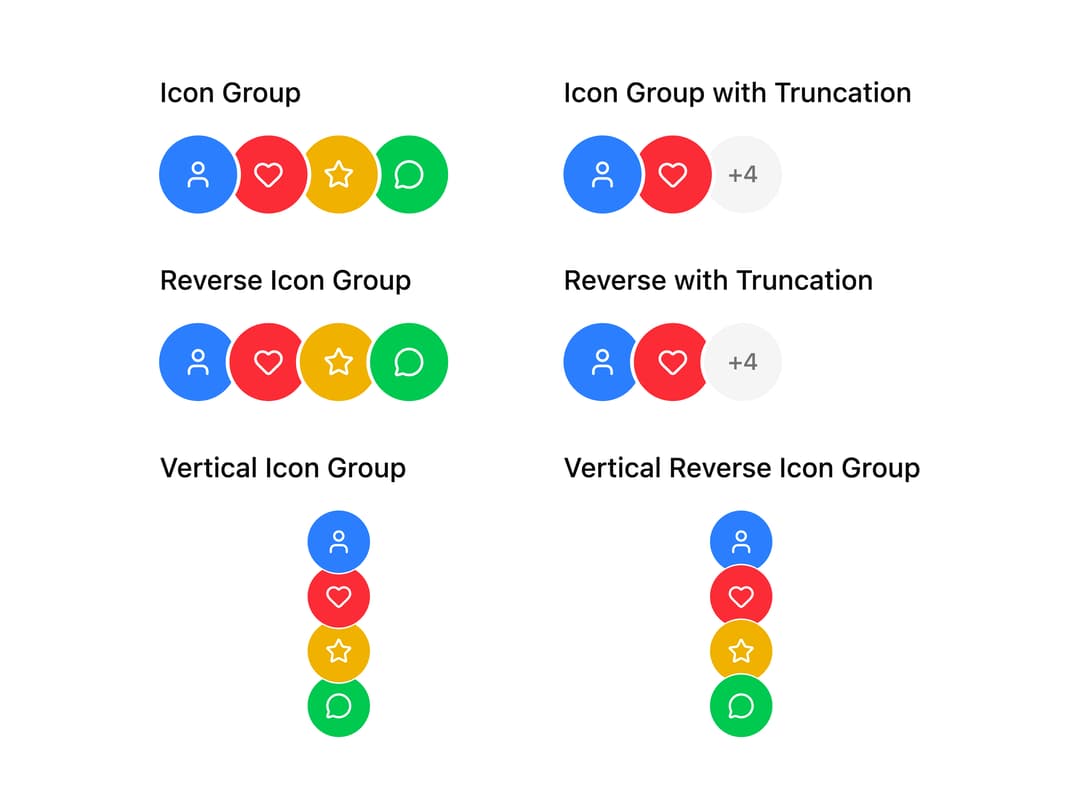
A component that stacks user avatars with overlapping visual masking, supporting truncation with an overflow indicator, RTL/vertical orientation, and custom overflow rendering.
Built with React and Tailwind. Copy the prompt and paste it into Claude Code, Cursor or Lovable: your agent adds Avatar Group to your project and fits it to your theme.
Code
How Avatar Group is used: the demo's code. The component's own source comes with a free account.
Usage.tsx
import AvatarGroup from "@/components/ui/avatar-group";
import { Bell, Heart, MessageCircle, Settings, Star, User } from "lucide-react";

const iconData = [
  { icon: User, color: "bg-blue-500" },
  { icon: Heart, color: "bg-red-500" },
  { icon: Star, color: "bg-yellow-500" },
  { icon: MessageCircle, color: "bg-green-500" },
  { icon: Settings, color: "bg-purple-500" },
  { icon: Bell, color: "bg-orange-500" },
];

export default function AvatarGroupIconsDemo() {
  return (
    <div className="grid grid-cols-1 gap-6 md:grid-cols-2">
      <div className="flex flex-col gap-3">
        <h3 className="text-sm font-medium">Icon Group</h3>
        <AvatarGroup>
          {iconData.slice(0, 4).map((item, index) => {
            const IconComponent = item.icon;
            return (
              <div
                key={index}
                className={`flex size-10 items-center justify-center rounded-full text-white ${item.color}`}
              >
                <IconComponent size={16} />
              </div>
            );
          })}
        </AvatarGroup>
      </div>
      <div className="flex flex-col gap-3">
        <h3 className="text-sm font-medium">Icon Group with Truncation</h3>
        <AvatarGroup max={3}>
          {iconData.map((item, index) => {
            const IconComponent = item.icon;
            return (
              <div
                key={index}
                className={`flex size-10 items-center justify-center rounded-full text-white ${item.color}`}
              >
                <IconComponent size={16} />
              </div>
            );
          })}
        </AvatarGroup>
      </div>
      <div className="flex flex-col gap-3">
        <h3 className="text-sm font-medium">Reverse Icon Group</h3>
        <AvatarGroup reverse>
          {iconData.slice(0, 4).map((item, index) => {
            const IconComponent = item.icon;
            return (
              <div
                key={index}
                className={`flex size-10 items-center justify-center rounded-full text-white ${item.color}`}
              >
                <IconComponent size={16} />
              </div>
            );
          })}
        </AvatarGroup>
      </div>
      <div className="flex flex-col gap-3">
        <h3 className="text-sm font-medium">Reverse with Truncation</h3>
        <AvatarGroup reverse max={3}>
          {iconData.map((item, index) => {
            const IconComponent = item.icon;
            return (
              <div
                key={index}
                className={`flex size-10 items-center justify-center rounded-full text-white ${item.color}`}
              >
                <IconComponent size={16} />
              </div>
            );
          })}
        </AvatarGroup>
      </div>
      <div className="flex flex-col gap-3">
        <h3 className="text-sm font-medium">Vertical Icon Group</h3>
        <div className="flex justify-center">
          <AvatarGroup orientation="vertical" size={32}>
            {iconData.slice(0, 4).map((item, index) => {
              const IconComponent = item.icon;
              return (
                <div
                  key={index}
                  className={`flex size-8 items-center justify-center rounded-full text-white ${item.color}`}
                >
                  <IconComponent size={14} />
                </div>
              );
            })}
          </AvatarGroup>
        </div>
      </div>
      <div className="flex flex-col gap-3">
        <h3 className="text-sm font-medium">Vertical Reverse Icon Group</h3>
        <div className="flex justify-center">
          <AvatarGroup orientation="vertical" reverse size={32}>
            {iconData.slice(0, 4).map((item, index) => {
              const IconComponent = item.icon;
              return (
                <div
                  key={index}
                  className={`flex size-8 items-center justify-center rounded-full text-white ${item.color}`}
                >
                  <IconComponent size={14} />
                </div>
              );
            })}
          </AvatarGroup>
        </div>
      </div>
    </div>
  );
}
Dependencies
More by Dice UI
View all

Compare Slider
75
Sortable
49
Circular Progress
41
Status
28
Pending
27
Banner
19
Stack
8
Scroller
5