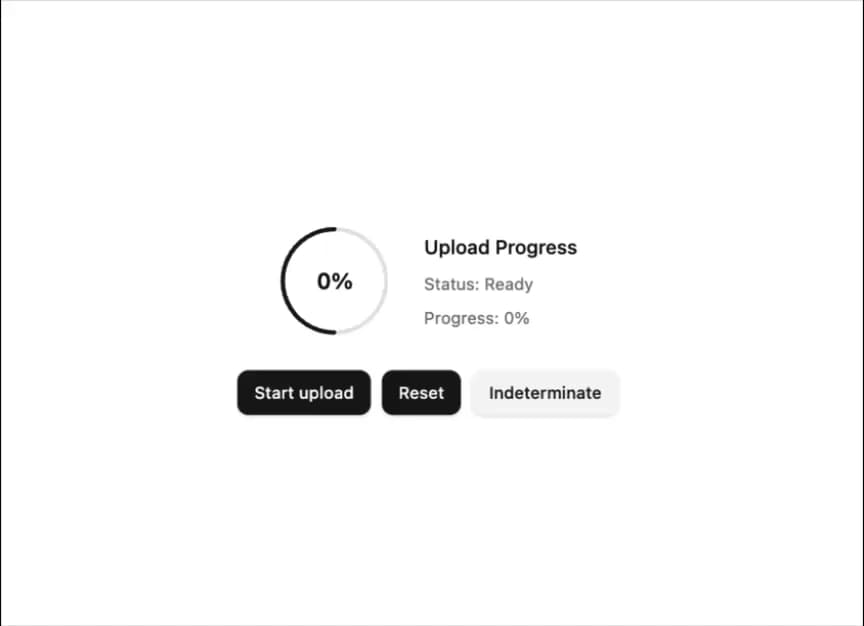
About
A composable circular progress indicator with track, range, and value text parts, supporting determinate and indeterminate states.
Built with React and Tailwind. Copy the prompt and paste it into Claude Code, Cursor or Lovable: your agent adds Circular Progress to your project and fits it to your theme.
Code
How Circular Progress is used: the demo's code. The component's own source comes with a free account.
Usage.tsx
"use client";

import * as React from "react";
import { Button } from "@/components/ui/button";
import {
  CircularProgress,
  CircularProgressIndicator,
  CircularProgressRange,
  CircularProgressTrack,
  CircularProgressValueText,
} from "@/components/ui/circular-progress";

export default function CircularProgressControlledDemo() {
  const [uploadProgress, setUploadProgress] = React.useState<number | null>(0);
  const [isUploading, setIsUploading] = React.useState(false);
  const intervalRef = React.useRef<NodeJS.Timeout | null>(null);

  const onUploadStart = React.useCallback(() => {
    setIsUploading(true);
    setUploadProgress(0);
  }, []);

  const onUploadReset = React.useCallback(() => {
    setUploadProgress(0);
    setIsUploading(false);
    if (intervalRef.current) {
      clearInterval(intervalRef.current);
      intervalRef.current = null;
    }
  }, []);

  React.useEffect(() => {
    if (isUploading) {
      intervalRef.current = setInterval(() => {
        setUploadProgress((prev) => {
          if (prev === null) return 0;
          if (prev >= 100) {
            if (intervalRef.current) {
              clearInterval(intervalRef.current);
              intervalRef.current = null;
            }
            setIsUploading(false);
            return 100;
          }
          return Math.min(100, prev + Math.random() * 15);
        });
      }, 200);
    }

    return () => {
      if (intervalRef.current) {
        clearInterval(intervalRef.current);
        intervalRef.current = null;
      }
    };
  }, [isUploading]);

  return (
    <div className="flex flex-col items-center gap-6">
      <div className="flex items-center gap-6">
        <CircularProgress
          value={uploadProgress}
          min={0}
          max={100}
          size={80}
          thickness={6}
        >
          <CircularProgressIndicator>
            <CircularProgressTrack />
            <CircularProgressRange />
          </CircularProgressIndicator>
          <CircularProgressValueText className="font-semibold text-base" />
        </CircularProgress>
        <div className="flex flex-col gap-2">
          <div className="font-medium text-sm">Upload Progress</div>
          <div className="text-muted-foreground text-xs">
            Status:{" "}
            {isUploading
              ? "Uploading..."
              : uploadProgress === 100
                ? "Complete"
                : "Ready"}
          </div>
          <div className="text-muted-foreground text-xs">
            Progress:{" "}
            {uploadProgress === null
              ? "Indeterminate"
              : `${Math.round(uploadProgress)}%`}
          </div>
        </div>
      </div>
      <div className="flex items-center gap-2">
        <Button size="sm" onClick={onUploadStart} disabled={isUploading}>
          Start upload
        </Button>
        <Button size="sm" onClick={onUploadReset} disabled={isUploading}>
          Reset
        </Button>
        <Button
          variant="secondary"
          size="sm"
          onClick={() => setUploadProgress(null)}
          disabled={isUploading}
        >
          Indeterminate
        </Button>
      </div>
    </div>
  );
}
Dependencies
More by Dice UI
View all

Compare Slider
75
Sortable
49
Status
28
Pending
27
Banner
19
Stack
8
Scroller
5
Kanban Board
4