
About
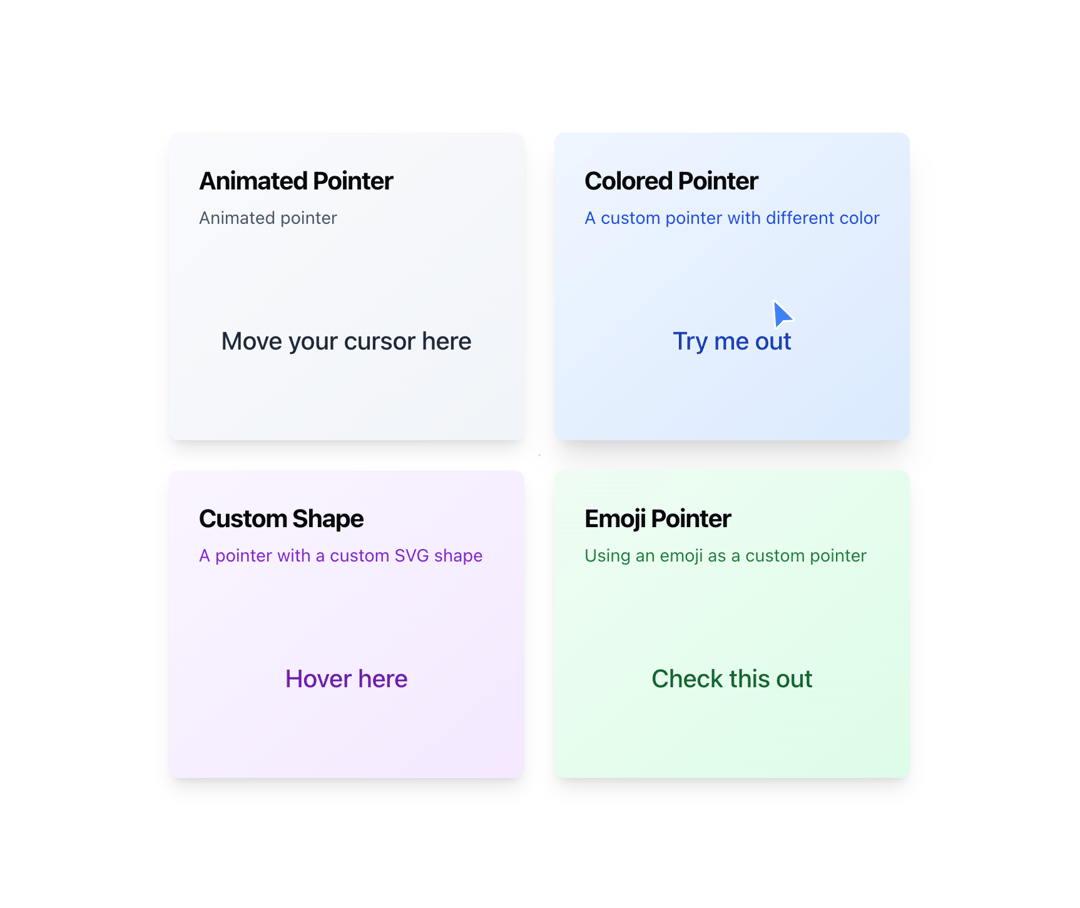
A component that displays a pointer when hovering over an element
Built with React and Tailwind. Copy the prompt and paste it into Claude Code, Cursor or Lovable: your agent adds Pointer to your project and fits it to your theme.
Code
How Pointer is used: the demo's code. The component's own source comes with a free account.
Usage.tsx
"use client";

import {
  Card,
  CardContent,
  CardDescription,
  CardHeader,
  CardTitle,
} from "@/components/ui/card";
import { Pointer } from "@/components/ui/pointer";
import { motion } from "motion/react";

export function PointerDemo1() {
  return (
    <div className="grid grid-cols-1 gap-6 md:grid-cols-2 md:grid-rows-2">
      <Card className="col-span-1 row-span-1 overflow-hidden border-none bg-gradient-to-br from-slate-50 to-slate-100 shadow-lg transition-all hover:shadow-xl dark:from-slate-900 dark:to-slate-800">
        <CardHeader className="relative pb-2">
          <CardTitle className="text-xl font-bold">Animated Pointer</CardTitle>
          <CardDescription className="text-sm text-slate-600 dark:text-slate-400">
            Animated pointer
          </CardDescription>
        </CardHeader>
        <CardContent className="relative flex h-40 items-center justify-center p-6">
          <span className="pointer-events-none text-center text-xl font-medium text-slate-800 dark:text-slate-200">
            Move your cursor here
          </span>
        </CardContent>
        <Pointer>
          <motion.div
            animate={{
              scale: [0.8, 1, 0.8],
              rotate: [0, 5, -5, 0],
            }}
            transition={{
              duration: 1.5,
              repeat: Infinity,
              ease: "easeInOut",
            }}
          >
            <svg
              width="40"
              height="40"
              viewBox="0 0 40 40"
              fill="none"
              xmlns="http://www.w3.org/2000/svg"
              className="text-pink-600"
            >
              <motion.path
                d="M12 21.35l-1.45-1.32C5.4 15.36 2 12.28 2 8.5 2 5.42 4.42 3 7.5 3c1.74 0 3.41.81 4.5 2.09C13.09 3.81 14.76 3 16.5 3 19.58 3 22 5.42 22 8.5c0 3.78-3.4 6.86-8.55 11.54L12 21.35z"
                fill="currentColor"
                animate={{ scale: [1, 1.2, 1] }}
                transition={{
                  duration: 0.8,
                  repeat: Infinity,
                  ease: "easeInOut",
                }}
              />
            </svg>
          </motion.div>
        </Pointer>
      </Card>

      <Card className="col-span-1 row-span-1 overflow-hidden border-none bg-gradient-to-br from-blue-50 to-blue-100 shadow-lg transition-all hover:shadow-xl dark:from-blue-900 dark:to-blue-800">
        <CardHeader className="relative pb-2">
          <CardTitle className="text-xl font-bold">Colored Pointer</CardTitle>
          <CardDescription className="text-sm text-blue-700 dark:text-blue-300">
            A custom pointer with different color
          </CardDescription>
        </CardHeader>
        <CardContent className="relative flex h-40 items-center justify-center p-6">
          <span className="pointer-events-none text-center text-xl font-medium text-blue-800 dark:text-blue-200">
            Try me out
          </span>
        </CardContent>
        <Pointer className="fill-blue-500" />
      </Card>

      <Card className="col-span-1 row-span-1 overflow-hidden border-none bg-gradient-to-br from-purple-50 to-purple-100 shadow-lg transition-all hover:shadow-xl dark:from-purple-900 dark:to-purple-800">
        <CardHeader className="relative pb-2">
          <CardTitle className="text-xl font-bold">Custom Shape</CardTitle>
          <CardDescription className="text-sm text-purple-700 dark:text-purple-300">
            A pointer with a custom SVG shape
          </CardDescription>
        </CardHeader>
        <CardContent className="relative flex h-40 items-center justify-center p-6">
          <span className="pointer-events-none text-center text-xl font-medium text-purple-800 dark:text-purple-200">
            Hover here
          </span>
        </CardContent>
        <Pointer>
          <svg
            width="24"
            height="24"
            viewBox="0 0 24 24"
            fill="none"
            xmlns="http://www.w3.org/2000/svg"
          >
            <circle cx="12" cy="12" r="10" className="fill-purple-500" />
            <circle cx="12" cy="12" r="5" className="fill-white" />
          </svg>
        </Pointer>
      </Card>

      <Card className="col-span-1 row-span-1 overflow-hidden border-none bg-gradient-to-br from-green-50 to-green-100 shadow-lg transition-all hover:shadow-xl dark:from-green-900 dark:to-green-800">
        <CardHeader className="relative pb-2">
          <CardTitle className="text-xl font-bold">Emoji Pointer</CardTitle>
          <CardDescription className="text-sm text-green-700 dark:text-green-300">
            Using an emoji as a custom pointer
          </CardDescription>
        </CardHeader>
        <CardContent className="relative flex h-40 items-center justify-center p-6">
          <span className="pointer-events-none text-center text-xl font-medium text-green-800 dark:text-green-200">
            Check this out
          </span>
        </CardContent>
        <Pointer>
          <div className="text-2xl">👆</div>
        </Pointer>
      </Card>
    </div>
  );
}
Dependencies
More by Dillion Verma
View all

Interactive Hover Button
3.4K
Rainbow Button
2.4K
Globe
2.2K
Animated Beam
1.9K
Text Reveal
1.7K
Sparkles Text
1.2K
Confetti
1.2K
Interactive Icon Cloud
1.1K
More in Cards
View all

Statistics Card 2
264

Course Design Cards
1.1K
Card
70
Stats cards with links
39
The Item one
3

Card Studio
7
Statistics Card 7
292

Item
10
