
About
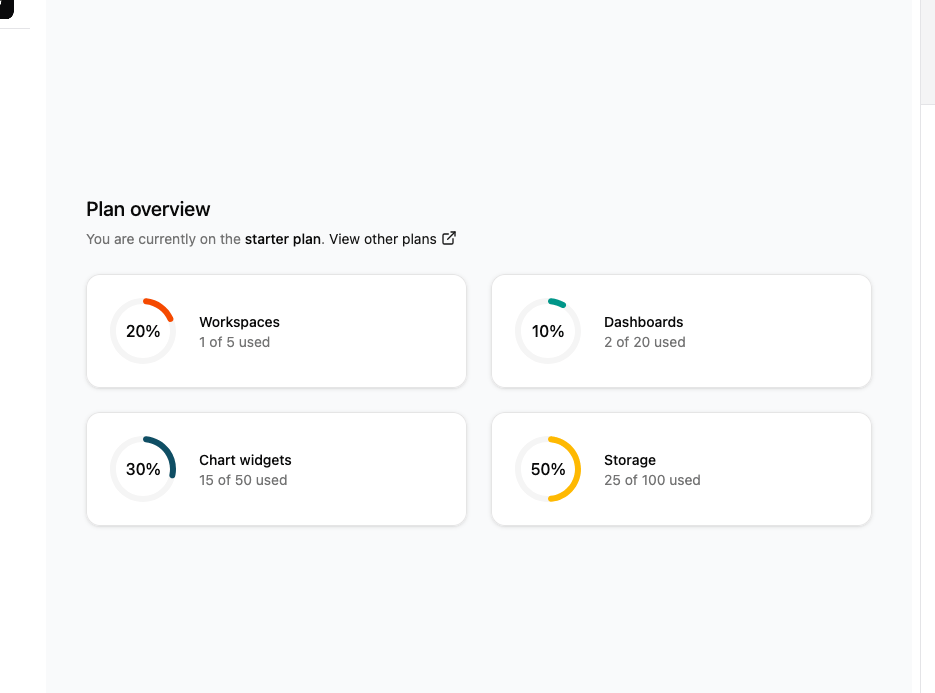
Here is Stats cards with links
Built with React and Tailwind. Copy the prompt and paste it into Claude Code, Cursor or Lovable: your agent adds Stats cards with links to your project and fits it to your theme.
Code
How Stats cards with links is used: the demo's code. The component's own source comes with a free account.
Usage.tsx
"use client";

import * as React from "react";
import clsx, { type ClassValue } from "clsx";
import { twMerge } from "tailwind-merge";
import * as RechartsPrimitive from "recharts";
import { ExternalLink } from "lucide-react";

function cn(...inputs: ClassValue[]) {
  return twMerge(clsx(inputs));
}

const Card = React.forwardRef<
  HTMLDivElement,
  React.HTMLAttributes<HTMLDivElement>
>(({ className, ...props }, ref) => (
  <div
    ref={ref}
    className={cn(
      "rounded-xl border bg-card text-card-foreground shadow",
      className
    )}
    {...props}
  />
));
Card.displayName = "Card";

const CardContent = React.forwardRef<
  HTMLDivElement,
  React.HTMLAttributes<HTMLDivElement>
>(({ className, ...props }, ref) => (
  <div ref={ref} className={cn("p-6 pt-0", className)} {...props} />
));
CardContent.displayName = "CardContent";

const THEMES = { light: "", dark: ".dark" } as const;

export type ChartConfig = {
  [k in string]: {
    label?: React.ReactNode;
    icon?: React.ComponentType;
  } & (
    | { color?: string; theme?: never }
    | { color?: never; theme: Record<keyof typeof THEMES, string> }
  );
};

type ChartContextProps = {
  config: ChartConfig;
};

const ChartContext = React.createContext<ChartContextProps | null>(null);

function useChart() {
  const context = React.useContext(ChartContext);
  if (!context) {
    throw new Error("useChart must be used within a <ChartContainer />");
  }
  return context;
}

const ChartStyle = ({ id, config }: { id: string; config: ChartConfig }) => {
  const colorConfig = Object.entries(config).filter(
    ([, config]) => config.theme || config.color
  );

  if (!colorConfig.length) {
    return null;
  }

  return (
    <style
      dangerouslySetInnerHTML={{
        __html: Object.entries(THEMES)
          .map(
            ([theme, prefix]) => `
${prefix} [data-chart=${id}] {
${colorConfig
  .map(([key, itemConfig]) => {
    const color =
      itemConfig.theme?.[theme as keyof typeof itemConfig.theme] ||
      itemConfig.color;
    return color ? `  --color-${key}: ${color};` : null;
  })
  .join("\n")}
}
`
          )
          .join("\n"),
      }}
    />
  );
};

function ChartContainer({
  id,
  className,
  children,
  config,
  ...props
}: React.ComponentProps<"div"> & {
  config: ChartConfig;
  children: React.ComponentProps<
    typeof RechartsPrimitive.ResponsiveContainer
  >["children"];
}) {
  const uniqueId = React.useId();
  const chartId = `chart-${id || uniqueId.replace(/:/g, "")}`;

  return (
    <ChartContext.Provider value={{ config }}>
      <div
        data-slot="chart"
        data-chart={chartId}
        className={cn(
          "[&_.recharts-cartesian-axis-tick_text]:fill-muted-foreground flex aspect-video justify-center text-xs",
          className
        )}
        {...props}
      >
        <ChartStyle id={chartId} config={config} />
        <RechartsPrimitive.ResponsiveContainer width="100%" height="100%">
          {children}
        </RechartsPrimitive.ResponsiveContainer>
      </div>
    </ChartContext.Provider>
  );
}

const data = [
  {
    name: "Workspaces",
    capacity: 20,
    current: 1,
    allowed: 5,
    fill: "var(--color-workspaces)",
  },
  {
    name: "Dashboards",
    capacity: 10,
    current: 2,
    allowed: 20,
    fill: "var(--color-dashboards)",
  },
  {
    name: "Chart widgets",
    capacity: 30,
    current: 15,
    allowed: 50,
    fill: "var(--color-chartWidgets)",
  },
  {
    name: "Storage",
    capacity: 50,
    current: 25,
    allowed: 100,
    fill: "var(--color-storage)",
  },
];

const chartConfig = {
  workspaces: {
    label: "Workspaces",
    theme: {
      light: "hsl(200, 70%, 50%)", // Голубой для светлой темы
      dark: "hsl(200, 70%, 70%)",  // Светлее голубой для темной темы
    },
  },
  dashboards: {
    label: "Dashboards",
    theme: {
      light: "hsl(120, 70%, 50%)", // Зеленый для светлой темы
      dark: "hsl(120, 70%, 70%)",  // Светлее зеленый для темной темы
    },
  },
  chartWidgets: {
    label: "Chart widgets",
    theme: {
      light: "hsl(340, 70%, 50%)", // Розовый для светлой темы
      dark: "hsl(340, 70%, 70%)",  // Светлее розовый для темной темы
    },
  },
  storage: {
    label: "Storage",
    theme: {
      light: "hsl(280, 70%, 50%)", // Фиолетовый для светлой темы
      dark: "hsl(280, 70%, 70%)",  // Светлее фиолетовый для темной темы
    },
  },
  background: {
    label: "Background",
    theme: {
      light: "hsl(210, 40%, 96%)", // Светло-серый для светлой темы
      dark: "hsl(210, 40%, 20%)",  // Темно-серый для темной темы
    },
  },
} satisfies ChartConfig;

export default function Stats07() {
  return (
    <div className="flex items-center justify-center p-10 w-full">
      <div className="w-full">
        <h2 className="text-xl font-medium text-foreground">Plan overview</h2>
        <p className="mt-1 text-sm leading-6 text-muted-foreground">
          You are currently on the{" "}
          <span className="font-medium text-foreground">starter plan</span>.{" "}
          <a
            href="#"
            className="inline-flex items-center gap-1 text-primary hover:underline hover:underline-offset-4"
          >
            View other plans
            <ExternalLink className="size-4" aria-hidden={true} />
          </a>
        </p>
        <dl className="mt-6 grid grid-cols-1 gap-6 sm:grid-cols-2 lg:grid-cols-4">
          {data.map((item) => (
            <Card key={item.name} className="p-4">
              <CardContent className="p-0 flex items-center space-x-4">
                <div className="relative flex items-center justify-center">
                  <ChartContainer
                    config={chartConfig}
                    className="h-[80px] w-[80px]"
                  >
                    <RechartsPrimitive.RadialBarChart
                      data={[item]}
                      innerRadius={30}
                      outerRadius={38}
                      barSize={8}
                      startAngle={90}
                      endAngle={450}
                    >
                      <RechartsPrimitive.PolarAngleAxis
                        type="number"
                        domain={[0, 100]}
                        angleAxisId={0}
                        tick={false}
                        axisLine={false}
                      />
                      <RechartsPrimitive.RadialBar
                        dataKey="capacity"
                        background={{ fill: "var(--color-background)" }}
                        cornerRadius={10}
                        fill={item.fill}
                        angleAxisId={0}
                      />
                    </RechartsPrimitive.RadialBarChart>
                  </ChartContainer>
                  <div className="absolute inset-0 flex items-center justify-center">
                    <span className="text-base font-medium text-foreground">
                      {item.capacity}%
                    </span>
                  </div>
                </div>
                <div>
                  <dt className="text-sm font-medium text-foreground">
                    {item.name}
                  </dt>
                  <dd className="text-sm text-muted-foreground">
                    {item.current} of {item.allowed} used
                  </dd>
                </div>
              </CardContent>
            </Card>
          ))}
        </dl>
      </div>
    </div>
  );
}
Dependencies
More by Ephraim Duncan
View all
Stats
147
Form Layout
96
File Upload
85
login
79
Share Dialog
51
Login & Signup
50
Form
46
Registration
43
More in Cards
View all

Statistics Card 2
264

Course Design Cards
1.1K
Card
70
The Item one
3

Card Studio
7
Statistics Card 7
292

Item
10
Dashboard with Collapsible Sidebar
2.4K
