
About
A searchable select input that opens a filterable list of options so a user can quickly find and pick one value by typing, with full keyboard navigation.
Built with React and Tailwind. Copy the prompt and paste it into Claude Code, Cursor or Lovable: your agent adds Combobox to your project and fits it to your theme.
Code
How Combobox is used: the demo's code. The component's own source comes with a free account.
Usage.tsx
"use client";

import Combobox, {
  tokens,
  motion,
  useThemeContext,
  usePal,
} from "@/components/ui/combobox";
import { useState } from "react";

function Text({
  children,
  size = "base",
  weight = "regular",
  color,
  mono,
  muted,
  secondary,
  align,
  truncate,
  theme: tp,
  style: sp,
  as: C = "span",
}) {
  const ctx = useThemeContext();
  const theme = tp || ctx;
  const pal = usePal(theme);
  let c = pal.text;
  if (color) c = color;
  else if (muted) c = pal.textMuted;
  else if (secondary) c = pal.textSecondary;

  return (
    <C
      style={{
        ...tokens.type[size],
        fontWeight: tokens.weight[weight],
        fontFamily: mono ? tokens.font.mono : tokens.font.sans,
        color: c,
        textAlign: align,
        transition: `color ${motion.smooth} ${motion.easeInOut}`,
        ...(truncate && {
          overflow: "hidden",
          textOverflow: "ellipsis",
          whiteSpace: "nowrap",
        }),
        ...sp,
      }}
    >
      {children}
    </C>
  );
}

function Stack({
  children,
  gap = "md",
  direction = "column",
  align,
  justify,
  wrap,
  style: sp,
}) {
  return (
    <div
      style={{
        display: "flex",
        flexDirection: direction === "row" ? "row" : "column",
        gap: tokens.space[gap] ?? gap,
        alignItems: align,
        justifyContent: justify,
        flexWrap: wrap ? "wrap" : undefined,
        ...sp,
      }}
    >
      {children}
    </div>
  );
}

export default function ComboboxControlledDemo() {
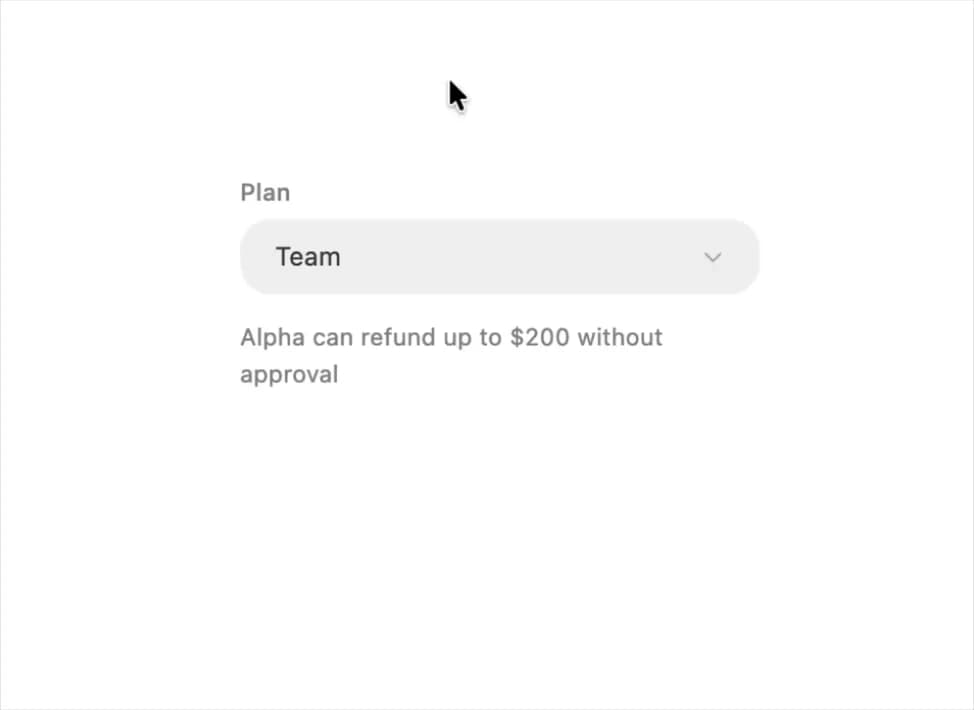
  const plans = [
    { value: "starter", label: "Starter", cap: "$50" },
    { value: "team", label: "Team", cap: "$200" },
    { value: "scale", label: "Scale", cap: "$500" },
  ];
  const [plan, setPlan] = useState("team");
  const current = plans.find((p) => p.value === plan);
  return (
    <Stack gap={12} style={{ width: 260, height: 280 }}>
      <Combobox label="Plan" value={plan} onChange={setPlan} options={plans} />
      <Text size="sm" secondary>
        Alpha can refund up to {current.cap} without approval
      </Text>
    </Stack>
  );
}
More by halaska-studio
View all
Dot Grid
24
Orb
15
Segmented Control
8
Choicebox
6
Dialog
4
Input OTP
4
Table
2
Switch
1
More in Pricing
View all
Pricing Section
582

Pricing Section
173

Pricing Card
365
pricing section
158

Pricing Cards
86
Colorful-Pricing
85
Glowing Pricing Tiers
45

RuixenPricing05
102


