
About
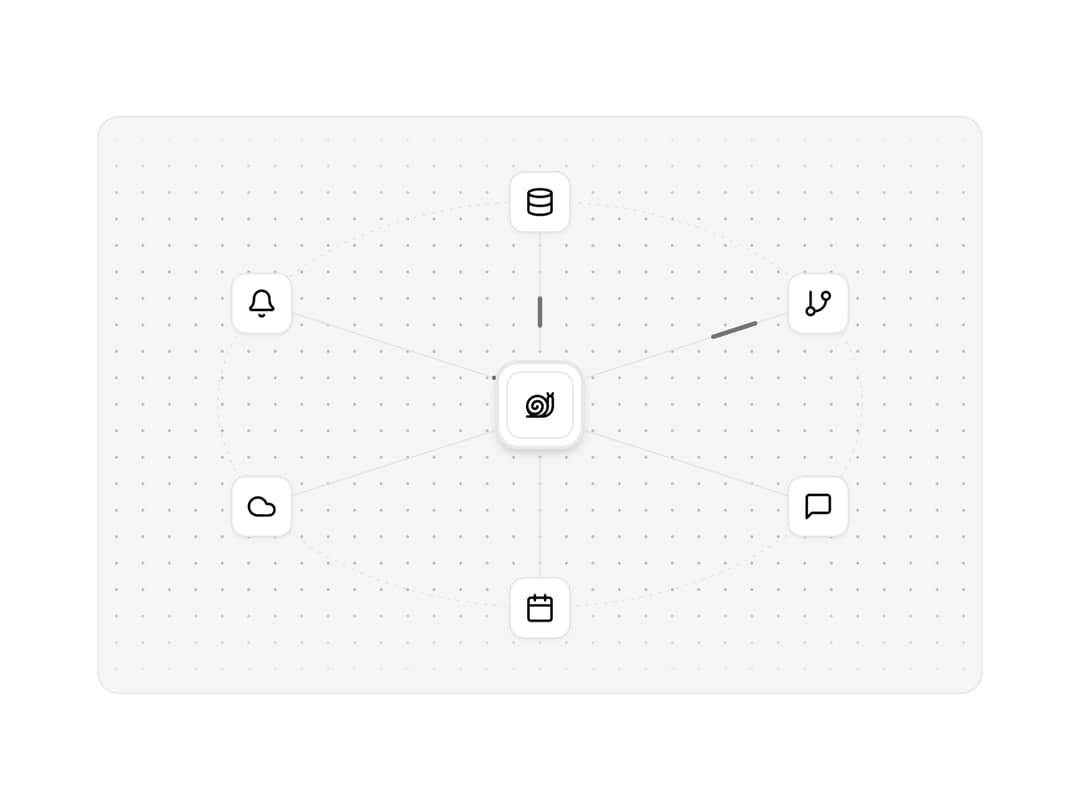
A hub and the tools wired into it, with pulses along the routes.
Built with React and Tailwind. Copy the prompt and paste it into Claude Code, Cursor or Lovable: your agent adds Integration Orbit to your project and fits it to your theme.
Code
How Integration Orbit is used: the demo's code. The component's own source comes with a free account.
Usage.tsx
"use client"

import {
  BellIcon,
  CalendarIcon,
  CloudIcon,
  DatabaseIcon,
  GitBranchIcon,
  MessageSquareIcon,
} from "lucide-react"
import {
  motion,
  useReducedMotion as usePrefersReducedMotion,
} from "motion/react"
import {
  IntegrationVisual,
  type IntegrationItem,
} from "@/components/ui/integration-visual"
import * as React from "react"
import { clsx, type ClassValue } from "clsx"
import { twMerge } from "tailwind-merge"

function cn(...inputs: ClassValue[]) {
  return twMerge(clsx(inputs))
}

type Pixel = [x: number, y: number]

/*
 * One step of the crawl, in shell-anchored columns. `shift` is how far the
 * shell has moved since the cycle began; a cycle moves the snail forward by
 * CYCLE_SHIFT columns. Head, shell and tail each move on a different frame,
 * so the body stretches and gathers like a real foot instead of sliding.
 */
type Frame = {
  tail: number
  head: number
  /** Stalk tips: back, upright or forward. */
  lean: -1 | 0 | 1
  shift: number
  /** Eyes shut. */
  blink?: boolean
  /** Nudges the whole snail sideways, for shuffling while it rests. */
  dx?: number
  /** Lifts the shell off the foot, for a hop. */
  bob?: number
  /** Where the eyes look: up on raised stalks, level, or down on lowered ones. */
  gaze?: -1 | 0 | 1
  /** Stretches the neck up a row, or ducks the head down one. */
  raise?: -1 | 0 | 1
}

const FRAMES: Frame[] = [
  { tail: 0, head: 16, lean: 0, shift: 0 },
  { tail: 0, head: 17, lean: 1, shift: 0 },
  { tail: -1, head: 17, lean: 1, shift: 1 },
  { tail: -1, head: 16, lean: 0, shift: 2 },
]
const CYCLE_SHIFT = 2

const REST: Frame = FRAMES[0]!

/*
 * What a resting snail does: looks about, blinks, reaches, and shuffles a
 * pixel forward and back again, so it never ends where it began. The holds
 * are uneven on purpose; an even beat reads as a machine.
 */
const IDLE: [frame: Frame, ms: number][] = [
  [REST, 1800],
  [{ ...REST, lean: 1 }, 700],
  [REST, 900],
  [{ ...REST, blink: true }, 140],
  [REST, 1500],
  [{ ...REST, head: 17, lean: 1 }, 600],
  [{ ...REST, dx: 1 }, 1600],
  [{ ...REST, dx: 1, lean: -1 }, 900],
  [{ ...REST, dx: 1 }, 700],
  [{ ...REST, dx: 1, blink: true }, 140],
  [{ ...REST, dx: 1 }, 1200],
  [{ ...REST, tail: -1, head: 16, dx: 0 }, 500],
]

/*
 * A little dance: the stalks sway on the beat while the shell hops, then a
 * shuffle to one side and back, then a breather so it never turns frantic.
 */
const SWAY: [frame: Frame, ms: number][] = [
  [{ ...REST, lean: -1 }, 280],
  [{ ...REST, lean: 1, head: 17, bob: 1, gaze: -1 }, 280],
]
const DANCE: [frame: Frame, ms: number][] = [
  ...SWAY,
  ...SWAY,
  ...SWAY,
  [REST, 500],
  [{ ...REST, blink: true }, 140],
  [REST, 400],
  [{ ...REST, lean: 1, dx: 1 }, 260],
  [{ ...REST, lean: -1, dx: 1, bob: 1 }, 260],
  [{ ...REST, lean: 1, dx: 1 }, 260],
  [{ ...REST, lean: -1, bob: 1 }, 260],
  [REST, 1600],
]

const SHELL = [
  "...#####...",
  ".###.#.###.",
  ".#.##..#.#.",
  "####....###",
  "#.#..##...#",
  "#.##..#...#",
  "##.####..##",
  ".#.......#.",
  ".###...###.",
  "...#####...",
]
// The shell's top row; it stands a row taller than the head.
const SHELL_TOP = -1

/*
 * The drawing spans columns -1 to 22 and rows -4 to 12: room for the shell
 * to hop a row and the eyes to rise on stretched stalks. The ground is row
 * 12, and the foot's middle, where a sprite is anchored, is column 9.
 */
const MIN_X = -1
const MIN_Y = -4
const COLS = 24
const ROWS = 17
const FOOT_MIDDLE = 9
const GROUND_ROW = 12
const GROUND_PITCH = 4

const SCALE = { sm: 2, default: 3, lg: 4 } as const
const FRAME_MS = { slow: 260, default: 180, fast: 110 } as const

function row(y: number, from: number, to: number): Pixel[] {
  return Array.from({ length: to - from + 1 }, (_, i) => [from + i, y])
}

type Drawing = { ink: Pixel[]; whites: Pixel[] }

const EYE_RIM: Pixel[] = [
  [1, 0],
  [2, 0],
  [0, 1],
  [3, 1],
  [0, 2],
  [3, 2],
  [1, 3],
  [2, 3],
]
const EYE_WHITE: Pixel[] = [
  [1, 1],
  [2, 1],
  [1, 2],
  [2, 2],
]

/*
 * A googly eye, four pixels square: a rim round a two-by-two white, with a
 * one-pixel pupil in the corner it looks toward. Shut, it is a line along
 * the bottom.
 */
function eyeball(
  left: number,
  top: number,
  look: { x: number; y: number },
  shut: boolean
): Drawing {
  const at = ([x, y]: Pixel): Pixel => [left + x, top + y]
  if (shut) return { ink: row(top + 3, left, left + 3), whites: [] }
  const pupil: Pixel = [look.x < 0 ? 1 : 2, look.y < 0 ? 1 : 2]
  return {
    ink: [...EYE_RIM, pupil].map(at),
    whites: EYE_WHITE.filter(([x, y]) => x !== pupil[0] || y !== pupil[1]).map(
      at
    ),
  }
}

function snailPixels({
  tail,
  head,
  lean,
  blink = false,
  dx = 0,
  bob = 0,
  gaze = 0,
  raise = 0,
}: Frame): Drawing {
  const shell = SHELL.flatMap((line, y) =>
    [...line].flatMap((cell, x): Pixel[] =>
      cell === "#" ? [[x + 1, y + SHELL_TOP - bob]] : []
    )
  )
  /*
   * Two stalks splay into a V with an eye on each. The eyes nod forward as
   * the head reaches, and ride higher on longer stalks to look up or sink
   * onto the head to look down.
   */
  const eyeTop = -2 + gaze
  const side = (splay: -1 | 1): Drawing => {
    const base = head + splay
    const stalk: Pixel[] = [[base, 3]]
    for (let y = 2; y > eyeTop + 3; y--)
      stalk.push([base + splay + (y === eyeTop + 4 ? lean : 0), y])
    const left = splay < 0 ? head - 4 + lean : head + 1 + lean
    const eye = eyeball(left, eyeTop, { x: lean, y: gaze }, blink)
    return { ink: [...stalk, ...eye.ink], whites: eye.whites }
  }
  const back = side(-1)
  const front = side(1)
  // The head rides on the neck: raised, the neck fills in under it; ducked,
  // it sinks into the neck.
  const lift = ([x, y]: Pixel): Pixel => [x, y - raise]
  const ink: Pixel[] = [
    ...shell,
    ...[
      ...back.ink,
      ...front.ink,
      ...row(4, head - 1, head + 1),
      ...row(5, head - 2, head + 1),
      ...row(6, head - 2, head + 1),
      ...row(7, head - 2, head),
    ].map(lift),
    ...(raise > 0 ? row(7, head - 2, head) : []),
    ...row(8, head - 3, head),
    ...row(9, tail + 1, head + 1),
    ...row(10, tail, head + 2),
  ]
  const whites = [...back.whites, ...front.whites].map(lift)
  const shift = ([x, y]: Pixel): Pixel => [x + dx, y]
  return { ink: ink.map(shift), whites: whites.map(shift) }
}

function groundPixels(distance: number): Pixel[] {
  const offset = distance % GROUND_PITCH
  return Array.from(
    { length: Math.ceil(COLS / GROUND_PITCH) + 1 },
    (_, i): Pixel => [MIN_X + i * GROUND_PITCH - offset, GROUND_ROW]
  ).filter(([x]) => x >= MIN_X)
}

function useReducedMotion() {
  return React.useSyncExternalStore(
    (onChange) => {
      const list = window.matchMedia("(prefers-reduced-motion: reduce)")
      list.addEventListener("change", onChange)
      return () => list.removeEventListener("change", onChange)
    },
    () => window.matchMedia("(prefers-reduced-motion: reduce)").matches,
    () => false
  )
}

// Parts overlap where they meet, such as a ducked head sinking into the
// neck, so a pixel can be listed twice; each is drawn once.
function Pixels({ pixels }: { pixels: Pixel[] }) {
  const unique = new Map(pixels.map(([x, y]) => [`${x}:${y}`, [x, y]]))
  return [...unique].map(([key, [x, y]]) => (
    <rect key={key} x={x} y={y} width={1} height={1} />
  ))
}

// The whites of the eyes take the page colour, so the pupils read in either
// theme.
function Drawn({ ink, whites }: Drawing) {
  return (
    <>
      <g className="fill-background">
        <Pixels pixels={whites} />
      </g>
      <Pixels pixels={ink} />
    </>
  )
}

type Pace = keyof typeof FRAME_MS

function useCrawl(pace: Pace, paused: boolean) {
  const [step, setStep] = React.useState(0)
  React.useEffect(() => {
    if (paused) return
    const id = window.setInterval(() => setStep((s) => s + 1), FRAME_MS[pace])
    return () => window.clearInterval(id)
  }, [pace, paused])
  return step
}

function useLoop(script: [frame: Frame, ms: number][], paused: boolean) {
  const [beat, setBeat] = React.useState(0)
  const index = beat % script.length
  React.useEffect(() => {
    if (paused) return
    const id = window.setTimeout(() => setBeat((b) => b + 1), script[index]![1])
    return () => window.clearTimeout(id)
  }, [script, index, paused])
  return script[index]![0]
}

const ASSEMBLE_TICK_MS = 40
// Time spent at each stage: coarse blocks arriving, then holding, then
// halving, until the art is whole.
const ASSEMBLE_STAGES = [
  { block: 4, ms: 400, reveal: true },
  { block: 4, ms: 120, reveal: false },
  { block: 2, ms: 160, reveal: false },
] as const
const ASSEMBLE_MS = ASSEMBLE_STAGES.reduce((sum, s) => sum + s.ms, 0)

type Assembly = { block: number; shown: number } | "hidden" | "whole"

/*
 * The stage comes from the time since mount rather than a count of ticks,
 * so a throttled background tab skips ahead instead of dragging it out.
 */
function useAssemble(delay: number | undefined, skip: boolean): Assembly {
  const [elapsed, setElapsed] = React.useState(-1)
  const active = delay !== undefined && !skip
  React.useEffect(() => {
    if (!active) return
    const start = performance.now() + delay
    const id = window.setInterval(() => {
      const since = performance.now() - start
      setElapsed(since)
      if (since >= ASSEMBLE_MS) window.clearInterval(id)
    }, ASSEMBLE_TICK_MS)
    return () => window.clearInterval(id)
  }, [active, delay])
  if (!active || elapsed >= ASSEMBLE_MS) return "whole"
  if (elapsed < 0) return "hidden"
  let rest = elapsed
  for (const stage of ASSEMBLE_STAGES) {
    if (rest < stage.ms)
      return {
        block: stage.block,
        shown: stage.reveal ? rest / stage.ms : 1,
      }
    rest -= stage.ms
  }
  return "whole"
}

// How finely the build-up's progress is reported.
const ASSEMBLE_STEPS = 10

/*
 * Reports each step of the build-up once: a new share of blocks, a split to
 * smaller blocks, and the finish. A snail shown whole from the start reports
 * nothing.
 */
function useAssembleSteps(
  assembly: Assembly,
  onAssemble: PixelSnailSpriteProps["onAssemble"]
) {
  const report = React.useRef(onAssemble)
  React.useEffect(() => {
    report.current = onAssemble
  })
  const built = React.useRef(false)
  const building = typeof assembly === "object"
  const block = building ? assembly.block : 0
  const shown = building ? Math.round(assembly.shown * ASSEMBLE_STEPS) : 0
  const whole = assembly === "whole"
  React.useEffect(() => {
    if (building) {
      built.current = true
      report.current?.({ block, shown: shown / ASSEMBLE_STEPS })
    } else if (whole && built.current) {
      built.current = false
      report.current?.("whole")
    }
  }, [building, whole, block, shown])
}

/*
 * The art at a coarser grid: a block is filled when enough of its pixels
 * are. Blocks arrive in a scattered but fixed order, so the snail builds up
 * like a picture loading rather than wiping in from one side.
 */
function Mosaic({
  pixels,
  block,
  shown,
}: {
  pixels: Pixel[]
  block: number
  shown: number
}) {
  const counts = new Map<string, [number, number, number]>()
  for (const [x, y] of pixels) {
    const bx = Math.floor((x - MIN_X) / block)
    const by = Math.floor((y - MIN_Y) / block)
    const key = `${bx}:${by}`
    const count = counts.get(key)?.[2] ?? 0
    counts.set(key, [bx, by, count + 1])
  }
  const threshold = Math.max(1, (block * block) / 4)
  const blocks = [...counts.values()]
    .filter(([, , count]) => count >= threshold)
    .sort(([ax, ay], [bx, by]) => scatter(ax, ay) - scatter(bx, by))
  return blocks
    .slice(0, Math.ceil(blocks.length * shown))
    .map(([bx, by]) => (
      <rect
        key={`${bx}:${by}`}
        x={MIN_X + bx * block}
        y={MIN_Y + by * block}
        width={block}
        height={block}
      />
    ))
}

function scatter(x: number, y: number) {
  return ((x * 73856093) ^ (y * 19349663)) % 97
}

type Look = {
  /** Behind, level or ahead, from where the snail faces. */
  x: -1 | 0 | 1
  /** Up, level or down. */
  y: -1 | 0 | 1
  /** Which way the snail faces: `1` right, as drawn, or `-1` turned round. */
  facing?: -1 | 1
}

type PixelSnailSpriteProps = Omit<React.ComponentProps<"g">, "children"> & {
  /** Size of one art pixel, in the parent SVG's user units. */
  pixel?: number
  /** How long each frame of the crawl holds. */
  pace?: Pace
  /**
   * `crawl` walks in place, for riding a path. `rest` idles on the spot,
   * looking about and shuffling. `dance` sways and hops on a loop.
   */
  mode?: "crawl" | "rest" | "dance"
  /**
   * Holds still and turns toward a point: the eyes lean, the head reaches or
   * pulls back, the neck stretches up or ducks, and `facing` turns the whole
   * snail round. Pass `null` to let the mode play.
   */
  look?: Look | null
  /**
   * Builds the snail up from coarse blocks after this many milliseconds,
   * instead of showing it at once.
   */
  assembleDelay?: number
  /**
   * Called as the build-up moves on: with the block size and the share of
   * blocks shown each time more arrive or the blocks split, then with
   * `"whole"` once the art is complete. For syncing sound to the pixels.
   */
  onAssemble?: (step: { block: number; shown: number } | "whole") => void
}

/**
 * The snail as a bare SVG group for use inside another drawing, such as one
 * riding a path with `animateMotion`. Its origin is under the middle of the
 * foot, so it sits on the path rather than straddling it.
 */
function PixelSnailSprite({
  pixel = 1,
  pace = "default",
  mode = "crawl",
  look = null,
  assembleDelay,
  onAssemble,
  transform,
  ...props
}: PixelSnailSpriteProps) {
  const reduceMotion = useReducedMotion()
  const still = reduceMotion || look !== null
  const step = useCrawl(pace, still || mode !== "crawl")
  const idle = useLoop(IDLE, still || mode !== "rest")
  const dance = useLoop(DANCE, still || mode !== "dance")
  const assembly = useAssemble(assembleDelay, reduceMotion)
  useAssembleSteps(assembly, onAssemble)

  const frame: Frame = look
    ? {
        ...REST,
        head: REST.head + look.x,
        lean: look.x,
        gaze: look.y,
        raise: look.y === 0 ? 0 : look.y === -1 ? 1 : -1,
      }
    : reduceMotion
      ? REST
      : { crawl: FRAMES[step % FRAMES.length]!, rest: idle, dance }[mode]
  const { ink, whites } = snailPixels(frame)
  const flip = look?.facing === -1 ? -1 : 1
  const origin = `scale(${pixel * flip} ${pixel}) translate(${-FOOT_MIDDLE} -11)`
  return (
    <g
      data-slot="pixel-snail-sprite"
      fill="currentColor"
      shapeRendering="crispEdges"
      transform={transform ? `${transform} ${origin}` : origin}
      {...props}
    >
      {assembly === "hidden" ? null : assembly === "whole" ? (
        <Drawn ink={ink} whites={whites} />
      ) : (
        <Mosaic pixels={ink} {...assembly} />
      )}
    </g>
  )
}

type PixelSnailProps = Omit<React.ComponentProps<"div">, "children"> & {
  /** Size of one art pixel: 2, 3 or 4 screen pixels. */
  size?: keyof typeof SCALE
  /** How long each frame of the crawl holds. */
  pace?: Pace
  /**
   * Crawl across the full width of the container and wrap around, instead
   * of crawling in place while the ground slides past.
   */
  travel?: boolean
  /** A dotted line under the snail that shows it moving. */
  ground?: boolean
  /** Announced to assistive technology while the snail is shown. */
  label?: string
}

/**
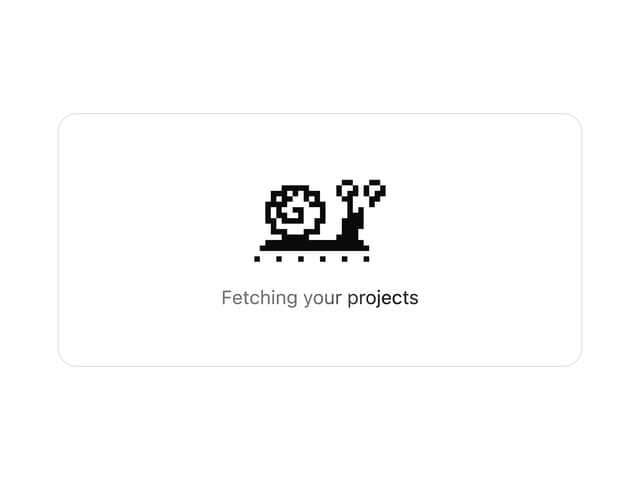
 * A one-colour pixel snail that crawls on a loop, for loading states. It
 * draws in `currentColor`, so a text colour class recolours it.
 */
function PixelSnail({
  size = "default",
  pace = "default",
  travel = false,
  ground = true,
  label = "Loading",
  className,
  ...props
}: PixelSnailProps) {
  const reduceMotion = useReducedMotion()
  const step = useCrawl(pace, reduceMotion)
  const [trackWidth, setTrackWidth] = React.useState(0)
  const trackRef = React.useRef<HTMLDivElement>(null)

  React.useEffect(() => {
    const track = trackRef.current
    if (!travel || !track) return
    const observer = new ResizeObserver(([entry]) =>
      setTrackWidth(entry?.contentRect.width ?? 0)
    )
    observer.observe(track)
    return () => observer.disconnect()
  }, [travel])

  const frame = FRAMES[step % FRAMES.length]!
  const distance = Math.floor(step / FRAMES.length) * CYCLE_SHIFT + frame.shift
  const scale = SCALE[size]
  const width = COLS * scale
  const height = ROWS * scale

  const snail = (
    <svg
      aria-hidden="true"
      width={width}
      height={height}
      viewBox={`${MIN_X} ${MIN_Y} ${COLS} ${ROWS}`}
      shapeRendering="crispEdges"
      fill="currentColor"
      className="block shrink-0"
    >
      <Drawn {...snailPixels(frame)} />
      {ground && !travel ? <Pixels pixels={groundPixels(distance)} /> : null}
    </svg>
  )

  // The snail enters from past the left edge and leaves past the right one,
  // stepping a whole art pixel at a time so it never blurs between pixels.
  const lap = trackWidth + width
  const x =
    reduceMotion || lap <= width ? 0 : ((distance * scale) % lap) - width

  return (
    <div
      data-slot="pixel-snail"
      data-travel={travel || undefined}
      role="status"
      className={cn(
        "text-foreground",
        travel ? "relative w-full overflow-hidden" : "inline-flex",
        className
      )}
      style={travel ? { height } : undefined}
      {...props}
    >
      {/* Text, not aria-label: screen readers read a status region's
      content and often skip its name. */}
      <span className="sr-only">{label}</span>
      {travel ? (
        <div ref={trackRef} className="absolute inset-0">
          {ground ? (
            <div
              data-slot="pixel-snail-ground"
              aria-hidden="true"
              className="absolute inset-x-0"
              style={{
                top: (GROUND_ROW - MIN_Y) * scale,
                height: scale,
                backgroundImage: `linear-gradient(to right, currentColor ${scale}px, transparent ${scale}px)`,
                backgroundSize: `${GROUND_PITCH * scale}px ${scale}px`,
              }}
            />
          ) : null}
          <div
            className="absolute top-0 left-0"
            style={{ transform: `translateX(${x}px)` }}
          >
            {snail}
          </div>
        </div>
      ) : (
        snail
      )}
    </div>
  )
}

const tools: IntegrationItem[] = [
  { title: "Database", icon: <DatabaseIcon /> },
  { title: "Repository", icon: <GitBranchIcon /> },
  { title: "Chat", icon: <MessageSquareIcon /> },
  { title: "Calendar", icon: <CalendarIcon /> },
  { title: "Storage", icon: <CloudIcon /> },
  { title: "Alerts", icon: <BellIcon /> },
]

// A highlight sweeps across the caption so it reads as work in progress.
function Shimmer({ children }: { children: string }) {
  const reduceMotion = usePrefersReducedMotion()
  if (reduceMotion) {
    return <span className="text-xs text-muted-foreground">{children}</span>
  }
  return (
    <motion.span
      className="bg-clip-text text-xs text-transparent"
      style={{
        backgroundImage:
          "linear-gradient(90deg, var(--color-muted-foreground) 35%, var(--color-foreground) 50%, var(--color-muted-foreground) 65%)",
        backgroundSize: "250% 100%",
      }}
      initial={{ backgroundPosition: "100% 0" }}
      animate={{ backgroundPosition: "0% 0" }}
      transition={{ duration: 1.6, repeat: Infinity, ease: "linear" }}
    >
      {children}
    </motion.span>
  )
}

function SyncThumbnail() {
  return (
    <div className="flex aspect-video w-full flex-col items-center justify-center gap-2 rounded-lg bg-muted px-4">
      <PixelSnail travel pace="fast" label="Syncing" />
      <Shimmer>Syncing 6 sources</Shimmer>
    </div>
  )
}

export default function IntegrationVisualDemo() {
  return (
    <div className="w-full max-w-xl overflow-hidden rounded-xl border border-border">
      <IntegrationVisual
        layout="orbit"
        items={tools}
        preview={<SyncThumbnail />}
      />
    </div>
  )
}
Dependencies
More by Tori Bryan
View all

Portfolio Banner
33
Token Flow
29
Annotated Text
9
Count
Reactions
Pixel snail
Filter menu