
About
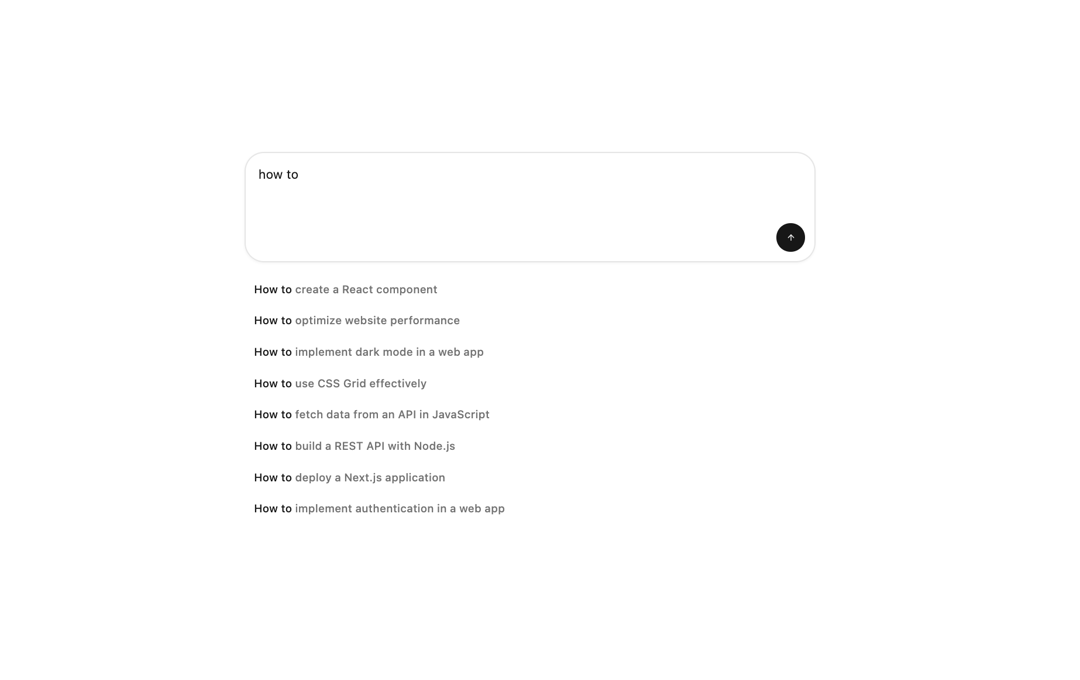
Here is Promt Input with Actions component
Built with React and Tailwind. Copy the prompt and paste it into Claude Code, Cursor or Lovable: your agent adds Promt Input with Actions to your project and fits it to your theme.
Code
How Promt Input with Actions is used: the demo's code. The component's own source comes with a free account.
Usage.tsx
"use client"

import {
  PromptInput,
  PromptInputActions,
  PromptInputTextarea,
} from "@/components/ui/prompt-input"
import { PromptSuggestion } from "@/components/ui/prompt-suggestion"
import { Button } from "@/components/ui/button"
import { ArrowUpIcon } from "lucide-react"
import { useState } from "react"

const howToPrompts = [
  "How to create a React component",
  "How to optimize website performance",
  "How to implement dark mode in a web app",
  "How to use CSS Grid effectively",
  "How to fetch data from an API in JavaScript",
  "How to build a REST API with Node.js",
  "How to deploy a Next.js application",
  "How to implement authentication in a web app",
]

function PromptAutocompleteHighlight() {
  const [inputValue, setInputValue] = useState("how to")

  const handlePromptInputValueChange = (value: string) => {
    setInputValue(value)
  }

  const handleSend = () => {
    console.log("send")
  }

  const handleKeyDown = (e: React.KeyboardEvent) => {
    if (e.key === "Enter") {
      handleSend()
    }
  }

  const promptSuggestions = howToPrompts.filter((prompt) =>
    prompt.toLowerCase().includes(inputValue.toLowerCase())
  )

  return (
    <div className="absolute inset-x-0 mx-auto flex max-w-3xl flex-col items-start justify-center gap-4 p-3 md:p-5">
      <PromptInput
        className="border-input bg-popover relative z-10 w-full rounded-3xl border p-0 pt-1 shadow-xs"
        value={inputValue}
        onValueChange={handlePromptInputValueChange}
        onSubmit={handleSend}
      >
        <PromptInputTextarea
          placeholder="Ask anything..."
          className="min-h-[44px] pt-3 pl-4 text-base leading-[1.3] sm:text-base md:text-base"
          onKeyDown={handleKeyDown}
        />
        <PromptInputActions className="mt-5 flex w-full items-end justify-end gap-2 px-3 pb-3">
          <Button
            size="sm"
            className="h-9 w-9 rounded-full"
            onClick={handleSend}
            disabled={!inputValue.trim()}
          >
            <ArrowUpIcon className="h-4 w-4" />
          </Button>
        </PromptInputActions>
      </PromptInput>
      <div className="w-full space-y-1">
        {inputValue.trim() &&
          promptSuggestions.length > 0 &&
          promptSuggestions.map((prompt) => (
            <PromptSuggestion
              key={prompt}
              highlight={inputValue}
              className="flex h-auto flex-wrap text-left"
            >
              {prompt}
            </PromptSuggestion>
          ))}
      </div>
    </div>
  )
}

export default  PromptAutocompleteHighlight;
Dependencies
More by Julien Thibeaut
View all

Dock
3.1K
Text Effect
1.6K
Infinite Slider
1.5K
Text Shimmer
1.3K
Text Scramble
1.1K
Progressive blur
683
Glow Effect
610
Tailwind CSS Background Snippet
535