
About
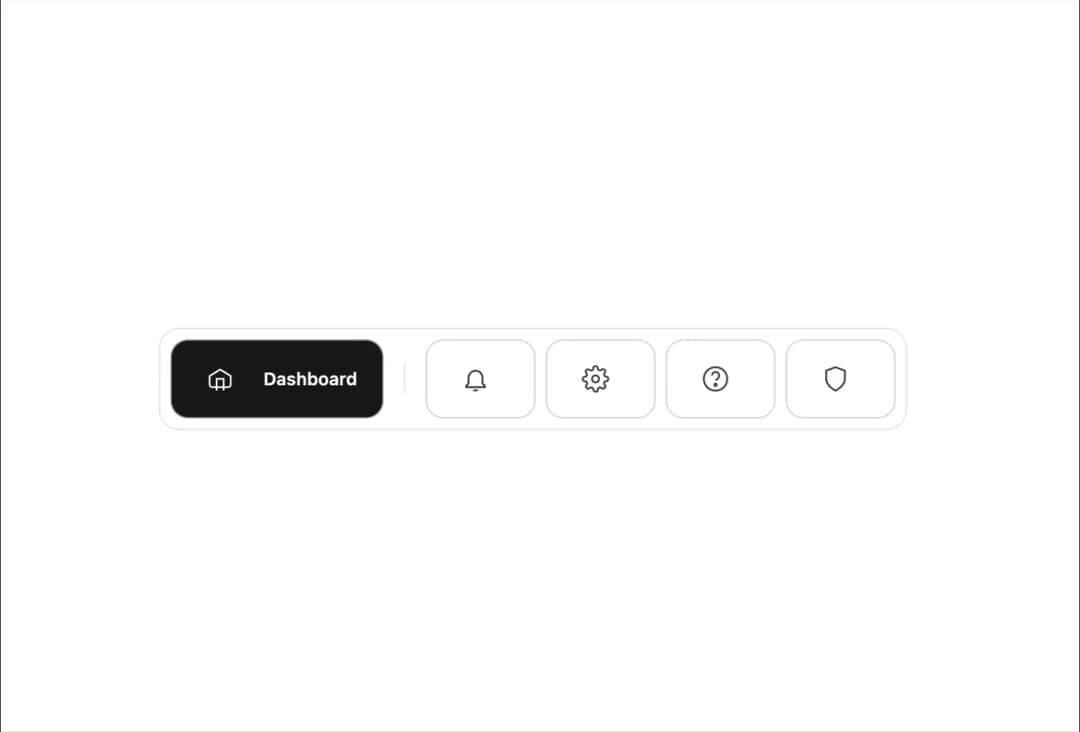
A modern, responsive menu bar React component featuring animated icon expansion, active state highlighting, and smooth transitions. Supports both dark and light themes out of the box using Tailwind CSS. On mobile, tooltips appear on tap for accessible navigation. Designed for clean code, accessibility, and seamless integration into any Next.js or React project.
Built with React and Tailwind. Copy the prompt and paste it into Claude Code, Cursor or Lovable: your agent adds Animated Menu Bar to your project and fits it to your theme.
Code
How Animated Menu Bar is used: the demo's code. The component's own source comes with a free account.
Usage.tsx
import { MenuBar } from "@/components/ui/animated-menu-bar";
import React, { useState } from 'react'

const menuItems = [
  'dashboard',
  'notifications',
  'settings',
  'help',
  'security',
] as const;
type MenuItem = typeof menuItems[number];

export default function DemoOne() {
    const [active, setActive] = useState<MenuItem>('dashboard');
  return  <MenuBar active={active} onSelect={setActive} />;
}
More by Ankit Verma
View all

Stack Card
306
File Uploader
64
Scroll-linked spring animation
54
Error 404 Page
47
Dialog box
21
Path morphing
18
Pricing Page
5
3D Card
1
More in Buttons
View all

Button
14
Button
34
Texture Button
92
Button Save
46

Button
64

Button Group
3

App Store Button
454

Notification Button
103

