
About
Built with React and Tailwind. Copy the prompt and paste it into Claude Code, Cursor or Lovable: your agent adds Material Design 3 Ripple to your project and fits it to your theme.
Code
How Material Design 3 Ripple is used: the demo's code. The component's own source comes with a free account.
Usage.tsx
import React, { useState } from "react";
import { Ripple } from "@/components/ui/material-design-3-ripple";
import { Fingerprint, Lock, Unlock, ChevronRight } from "lucide-react";

export default function SpotlightRippleDemo() {
  const [unlocked, setUnlocked] = useState(false);

  return (
    <div className="relative min-h-[600px] h-screen w-full flex items-center justify-center bg-[#09090b] overflow-hidden font-sans selection:bg-indigo-500/30">

      {/* 1. DOTTED BACKGROUND */}
      {/* We create a pattern using radial gradients */}
      <div className="absolute inset-0 z-0 h-full w-full bg-[radial-gradient(#27272a_1px,transparent_1px)] [background-size:16px_16px] [mask-image:radial-gradient(ellipse_50%_50%_at_50%_50%,#000_70%,transparent_100%)]" />

      {/* 2. SHINY SPOTLIGHT EFFECT */}
      {/* A massive gradient glow from the top to simulate a light source */}
      <div className="absolute top-0 left-1/2 -translate-x-1/2 w-[600px] h-[300px] bg-indigo-500/20 blur-[120px] rounded-full pointer-events-none" />

      {/* 3. THE HERO CARD */}
      <div className="relative z-10 group">

        {/* Glow behind the card */}
        <div className="absolute -inset-0.5 bg-gradient-to-r from-indigo-500 to-purple-600 rounded-[32px] blur opacity-20 group-hover:opacity-50 transition duration-1000 group-hover:duration-200" />

        {/* Main Container */}
        <div className="relative w-[340px] bg-zinc-950 rounded-[30px] border border-white/10 shadow-2xl flex flex-col overflow-hidden">

            {/* --- RIPPLE LAYER --- */}
            {/* We place the ripple here as an overlay.
                Using 'text-white' allows the currentColor to be white,
                creating a "Flash" effect on the dark card. */}
            <Ripple
                className="cursor-pointer"
                color="text-white"
                opacity={0.15} // Higher opacity for dramatic effect
                onClick={() => setUnlocked(!unlocked)}
            >
                {/* CARD CONTENT */}
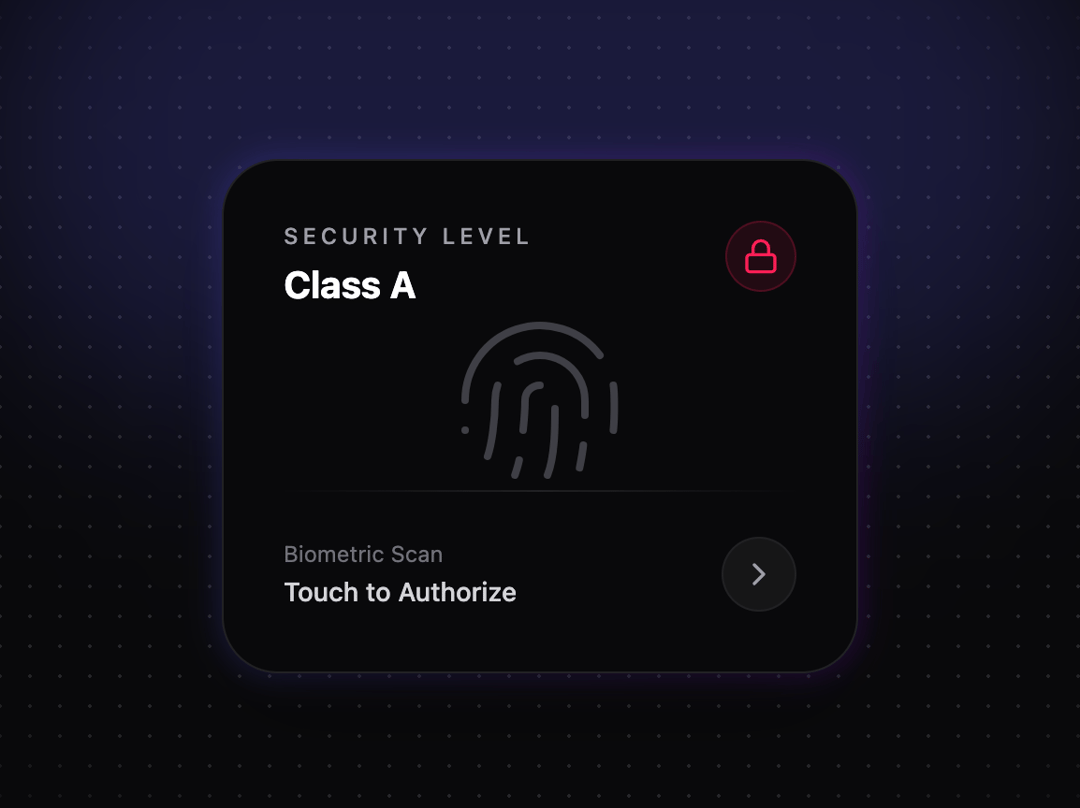
                <div className="h-full w-full p-8 flex flex-col justify-between relative z-20 pointer-events-none">

                    {/* Header */}
                    <div className="flex justify-between items-start">
                        <div className="space-y-1">
                            <h3 className="text-zinc-400 text-xs font-medium uppercase tracking-[0.2em]">Security Level</h3>
                            <p className="text-white font-bold text-xl">Class A</p>
                        </div>
                        <div className={`p-2 rounded-full border transition-colors duration-500 ${unlocked ? 'bg-emerald-500/10 border-emerald-500/20 text-emerald-500' : 'bg-rose-500/10 border-rose-500/20 text-rose-500'}`}>
                            {unlocked ? <Unlock className="w-5 h-5" /> : <Lock className="w-5 h-5" />}
                        </div>
                    </div>

                    {/* Central Graphic */}
                    <div className="flex-1 flex items-center justify-center">
                        <div className="relative">
                            <div className={`absolute inset-0 bg-indigo-500 blur-[40px] transition-opacity duration-700 ${unlocked ? 'opacity-40' : 'opacity-0'}`} />
                            <Fingerprint
                                className={`w-24 h-24 transition-all duration-700 ${unlocked ? 'text-indigo-400 scale-110 drop-shadow-[0_0_15px_rgba(129,140,248,0.8)]' : 'text-zinc-700 scale-100'}`}
                                strokeWidth={1}
                            />
                        </div>
                    </div>

                    {/* Footer */}
                    <div className="space-y-6">
                        <div className="h-px w-full bg-gradient-to-r from-transparent via-white/10 to-transparent" />

                        <div className="flex items-center justify-between">
                            <div>
                                <p className="text-zinc-500 text-xs">Biometric Scan</p>
                                <p className="text-zinc-300 text-sm font-medium mt-0.5">
                                    {unlocked ? "Access Granted" : "Touch to Authorize"}
                                </p>
                            </div>

                            {/* Small decorative arrow that moves on hover */}
                            <div className="w-10 h-10 rounded-full bg-white/5 flex items-center justify-center border border-white/5 group-hover:bg-white/10 transition-colors">
                                <ChevronRight className="w-5 h-5 text-zinc-400" />
                            </div>
                        </div>
                    </div>

                </div>
            </Ripple>

        </div>
      </div>

      {/* Instruction Label */}
      <div className="absolute bottom-12 text-zinc-500 text-xs font-mono tracking-widest opacity-60">
        INTERACTIVE SURFACE • CLICK ANYWHERE
      </div>

    </div>
  );
}More by Hossain Jahed
View all

Spotlight Card
8.8K
Cinematic landing Hero
5.6K
Motion Footer
5.6K
Sign In
4.6K
AI prompt Box
3K
Glassmorphism Trust Hero
2.8K
Limelight Nav
2K
Ai chat input
1.7K
More in Cards
View all
Stats cards with links
33

Course Design Cards
1.1K

Card
70
Statistics Card 2
264
Statistics Card 10
263

Card
17

Card Studio
9
The Item one
3
