
About
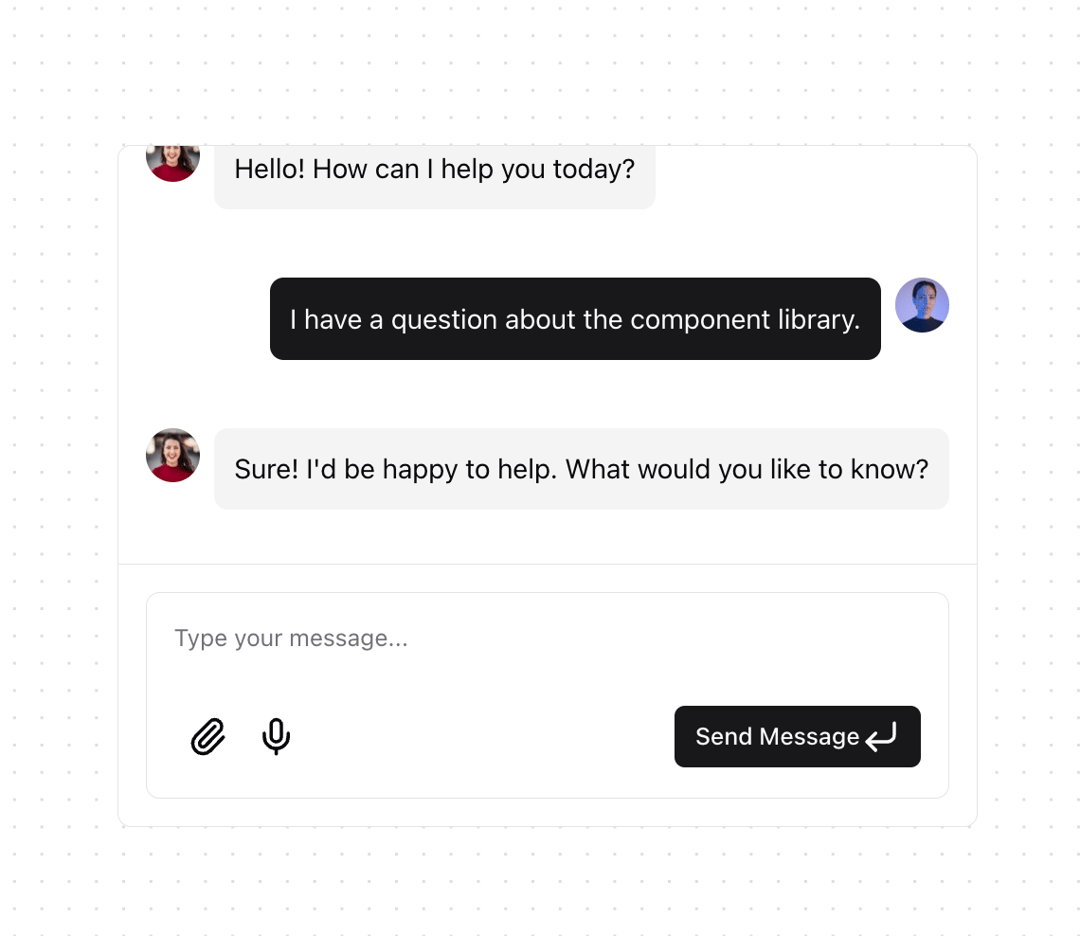
The ChatMessageList component (chat-message-list.tsx) is a simple wrapper component for the <ChatBubble> components. It also includes a custom useAutoScroll hook which has been architected to handle auto-scrolling, enabling the user to opt in and out of autscrolling.
Built with React and Tailwind. Copy the prompt and paste it into Claude Code, Cursor or Lovable: your agent adds Chat Message List to your project and fits it to your theme.
Code
How Chat Message List is used: the demo's code. The component's own source comes with a free account.
Usage.tsx
"use client";

import { useState, FormEvent } from "react";
import { Paperclip, Mic, CornerDownLeft } from "lucide-react";
import { Button } from "@/components/ui/button";
import {
  ChatBubble,
  ChatBubbleAvatar,
  ChatBubbleMessage,
} from "@/components/ui/chat-bubble";
import { ChatMessageList } from "@/components/ui/chat-message-list";
import { ChatInput } from "@/components/ui/chat-input";

export function ChatMessageListDemo() {
  const [messages, setMessages] = useState([
    {
      id: 1,
      content: "Hello! How can I help you today?",
      sender: "ai",
    },
    {
      id: 2,
      content: "I have a question about the component library.",
      sender: "user",
    },
    {
      id: 3,
      content: "Sure! I'd be happy to help. What would you like to know?",
      sender: "ai",
    },
  ]);

  const [input, setInput] = useState("");
  const [isLoading, setIsLoading] = useState(false);

  const handleSubmit = (e: FormEvent) => {
    e.preventDefault();
    if (!input.trim()) return;

    setMessages((prev) => [
      ...prev,
      {
        id: prev.length + 1,
        content: input,
        sender: "user",
      },
    ]);
    setInput("");
    setIsLoading(true);

    setTimeout(() => {
      setMessages((prev) => [
        ...prev,
        {
          id: prev.length + 1,
          content: "This is an AI response to your message.",
          sender: "ai",
        },
      ]);
      setIsLoading(false);
    }, 1000);
  };

  const handleAttachFile = () => {
    //
  };

  const handleMicrophoneClick = () => {
    //
  };

  return (
    <div className="h-[400px] border bg-background rounded-lg flex flex-col">
      <div className="flex-1 overflow-hidden">
        <ChatMessageList>
          {messages.map((message) => (
            <ChatBubble
              key={message.id}
              variant={message.sender === "user" ? "sent" : "received"}
            >
              <ChatBubbleAvatar
                className="h-8 w-8 shrink-0"
                src={
                  message.sender === "user"
                    ? "https://cdn.21st.dev/assets/mirror/4d/4db029bb98244eb14fbadba571c02ba446b82164dde3776ea3a7330e8f88f190.jpg"
                    : "https://cdn.21st.dev/assets/mirror/14/145a595e9641b63540835840271b593d4f3f0e757f1cf3a351bca4b88321a99b.jpg"
                }
                fallback={message.sender === "user" ? "US" : "AI"}
              />
              <ChatBubbleMessage
                variant={message.sender === "user" ? "sent" : "received"}
              >
                {message.content}
              </ChatBubbleMessage>
            </ChatBubble>
          ))}

          {isLoading && (
            <ChatBubble variant="received">
              <ChatBubbleAvatar
                className="h-8 w-8 shrink-0"
                src="https://cdn.21st.dev/assets/mirror/14/145a595e9641b63540835840271b593d4f3f0e757f1cf3a351bca4b88321a99b.jpg"
                fallback="AI"
              />
              <ChatBubbleMessage isLoading />
            </ChatBubble>
          )}
        </ChatMessageList>
      </div>

      <div className="p-4 border-t">
        <form
          onSubmit={handleSubmit}
          className="relative rounded-lg border bg-background focus-within:ring-1 focus-within:ring-ring p-1"
        >
          <ChatInput
            value={input}
            onChange={(e) => setInput(e.target.value)}
            placeholder="Type your message..."
            className="min-h-12 resize-none rounded-lg bg-background border-0 p-3 shadow-none focus-visible:ring-0"
          />
          <div className="flex items-center p-3 pt-0 justify-between">
            <div className="flex">
              <Button
                variant="ghost"
                size="icon"
                type="button"
                onClick={handleAttachFile}
              >
                <Paperclip className="size-4" />
              </Button>

              <Button
                variant="ghost"
                size="icon"
                type="button"
                onClick={handleMicrophoneClick}
              >
                <Mic className="size-4" />
              </Button>
            </div>
            <Button type="submit" size="sm" className="ml-auto gap-1.5">
              Send Message
              <CornerDownLeft className="size-3.5" />
            </Button>
          </div>
        </form>
      </div>
    </div>
  );
}
Dependencies
More by Jakob Hoeg Mørk
View all
Expandable Chat
737
Message loading
561
Chat Bubble
183
Chat Input
86
Button
77
useAutoScroll
45
More in AI chats
View all

AI Actions
319
Color Picker
81
Agent Chat
17
Prompt with Model Picker
2
Message Thread
35

System Message
54
Suggestions
28

Modal Card
101


