
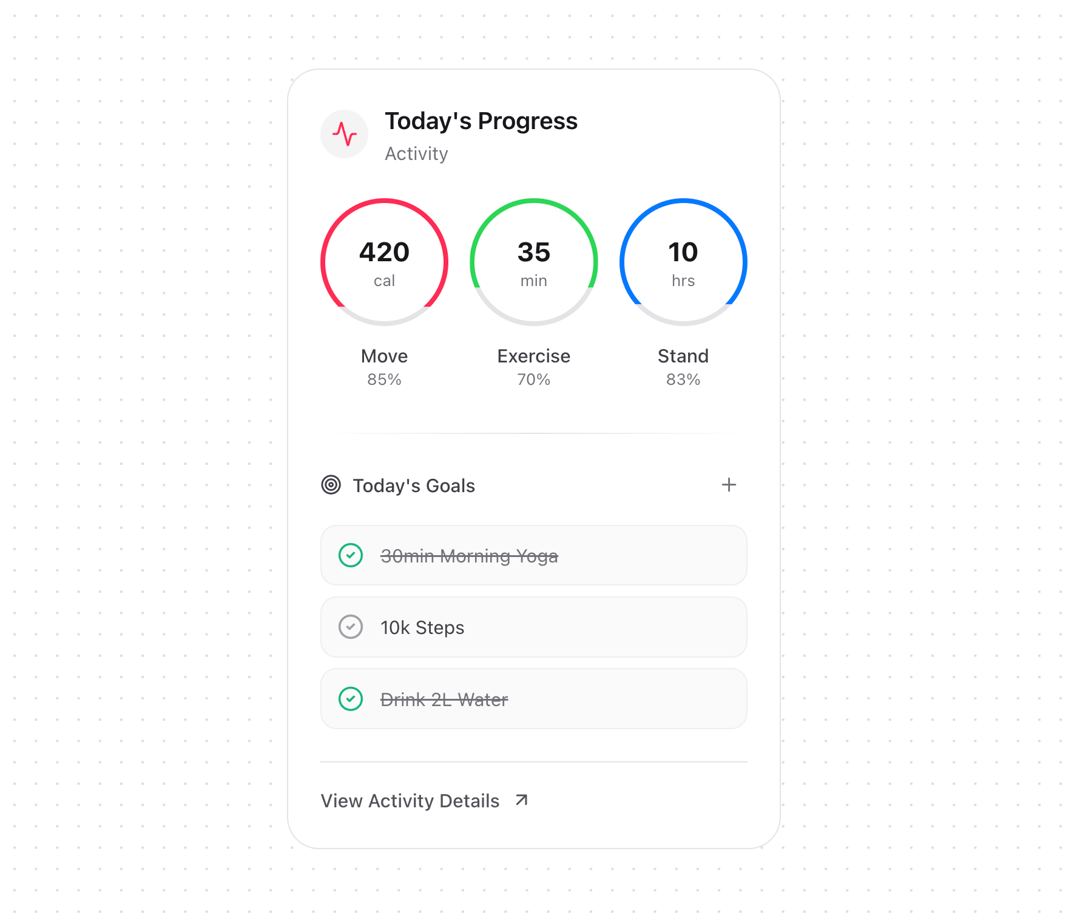
A versatile card component for displaying fitness and activity tracking data with interactive goals and metrics visualization. Features - Metric Rings - Circular progress indicators - Percentage-based visualization - Hover animations - Color-coded categories - Value and unit display - Daily Goals - Interactive checkboxes - Completion status - Add new goals functionality - Visual feedback for completed items - Hover states - Visual Elements - Category icon - Progress rings - Gradient dividers - Interactive buttons - Status indicators
Built with React and Tailwind. Copy the prompt and paste it into Claude Code, Cursor or Lovable: your agent adds Activity Card to your project and fits it to your theme.
Code
How Activity Card is used: the demo's code. The component's own source comes with a free account.
Usage.tsx
// components/examples/activity-card-demo.tsx
import { ActivityCard, Goal, Metric } from "@/components/ui/activity-card";
import { useState } from "react";

const INITIAL_METRICS: Metric[] = [
  { label: "Move", value: "420", trend: 85, unit: "cal" },
  { label: "Exercise", value: "35", trend: 70, unit: "min" },
  { label: "Stand", value: "10", trend: 83, unit: "hrs" },
];

const INITIAL_GOALS: Goal[] = [
  { id: "1", title: "30min Morning Yoga", isCompleted: true },
  { id: "2", title: "10k Steps", isCompleted: false },
  { id: "3", title: "Drink 2L Water", isCompleted: true },
];

export function ActivityCardDemo() {
  const [goals, setGoals] = useState<Goal[]>(INITIAL_GOALS);
  const [metrics, setMetrics] = useState<Metric[]>(INITIAL_METRICS);

  const handleToggleGoal = (goalId: string) => {
    setGoals(prev => prev.map(goal =>
      goal.id === goalId
        ? { ...goal, isCompleted: !goal.isCompleted }
        : goal
    ));
  };

  const handleAddGoal = () => {
    const newGoal: Goal = {
      id: `goal-${goals.length + 1}`,
      title: `New Goal ${goals.length + 1}`,
      isCompleted: false,
    };
    setGoals(prev => [...prev, newGoal]);
  };

  const handleViewDetails = () => {
    console.log("Viewing details");
  };

  return (
    <div className="p-8">
      <div className="max-w-md mx-auto">
        <ActivityCard
          metrics={metrics}
          dailyGoals={goals}
          onAddGoal={handleAddGoal}
          onToggleGoal={handleToggleGoal}
          onViewDetails={handleViewDetails}
        />
      </div>
    </div>
  );
}
Dependencies
More by Kokonut UI
View all

Background Paths
5.7K
Shape Landing Hero
3.5K
Beams Background
2.8K
Bento Grid
2.2K
v0 AI Chat
2.1K
AI Voice Input
1.7K
Hand Writing Text
1.3K
Action Search Bar
1.3K
More in Cards
View all

Statistics Card 2
264

Course Design Cards
1.1K
Card
70
Stats cards with links
39
The Item one
3

Card Studio
7
Statistics Card 7
292

Item
10
