
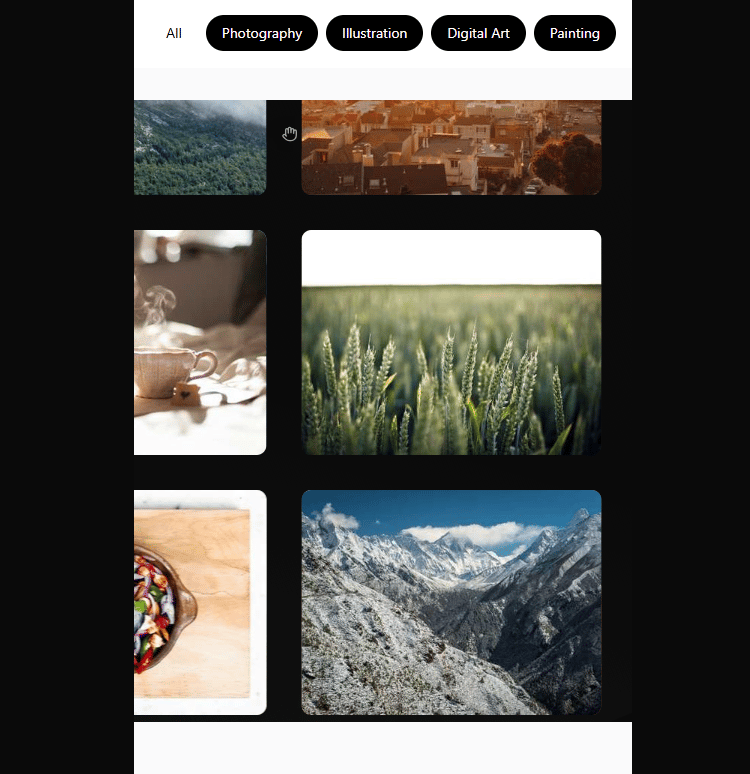
A draggable, highly customizable, dynamic grid layout gallery that seamlessly loops in both x and y directions. Includes dynamic post processing effects like film grain, motion blur, bloom, camera shake, vignette and more that vary in intensity according to drag speed. Featuring a physically based drag engine with simulated friction and momentum and interactive animated gallery items. dragging motion includes a unique mirroring affect on grid motion for added creative style
Built with React and Tailwind. Copy the prompt and paste it into Claude Code, Cursor or Lovable: your agent adds Infinite Drag Grid to your project and fits it to your theme.
Code
How Infinite Drag Grid is used: the demo's code. The component's own source comes with a free account.
Usage.tsx
// Usage example without motion blur slider
import React, { useState, useEffect } from 'react';
import { InfiniteDragGrid, GridItem } from '/src/components/ui/infinite-drag-grid';

const EnhancedGalleryExample = () => {
  const [enableEffects, setEnableEffects] = useState(true);

  // Generate sample items
  const generateSampleItems = (count: number): GridItem[] => {
    const categories = ['Photography', 'Illustration', 'Digital Art', 'Painting', 'Nature', 'Urban', 'Abstract'];
    const titles = [
      'Ethereal Dreams', 'Urban Jungle', 'Silent Waters', 'Golden Hour',
      'Abstract Thoughts', 'Nature\'s Canvas', 'City Lights', 'Mystic Forest',
      'Ocean\'s Embrace', 'Mountain Peaks', 'Desert Mirage', 'Cosmic Journey',
      'Vintage Memories', 'Modern Architecture', 'Wild Life', 'Culinary Art'
    ];

    return Array.from({ length: count }, (_, i) => ({
      id: `sample-${i + 1}`,
      title: titles[i % titles.length],
      description: `A captivating piece exploring ${categories[i % categories.length].toLowerCase()}`,
      category: categories[i % categories.length],
      thumbnail: `https://picsum.photos/seed/${i + 100}/400/300`,
      images: [`https://picsum.photos/seed/${i + 100}/800/600`],
    }));
  };

  const items = generateSampleItems(16);

  return (
    <div className="min-h-screen bg-gray-900">
      {/* Controls Panel */}
      <div className="fixed bottom-2 left-2 bg-black/50 backdrop-blur-md rounded-lg p-4 z-30 text-white">
        <h3 className="font-semibold mb-3">Gallery Controls</h3>

        <div className="space-y-3">
          <label className="flex items-center text-sm">
            <input
              type="checkbox"
              checked={enableEffects}
              onChange={(e) => setEnableEffects(e.target.checked)}
              className="mr-2"
            />
            Enable WebGL Effects
          </label>

          <div className="text-xs text-gray-300 mt-2">
            <p>• Drag to move the gallery</p>
            <p>• Click items to view details</p>
            <p>• Effects respond to movement speed</p>
            <p>• Camera shake at extreme speeds</p>
            <p>• Film grain varies with velocity</p>
            <p>• Bloom effect scales with movement</p>
          </div>
        </div>
      </div>

      {/* Main Gallery */}
      <div className="pt-8">
        <h1 className="text-4xl font-bold text-center text-white mb-8">
          Enhanced WebGL Gallery
        </h1>

        <InfiniteDragGrid
          gridItems={items}
          enablePostProcessing={enableEffects}
          onItemClick={(item) => {
            console.log('Clicked:', item.title);
            alert(`Viewing: ${item.title}`);
          }}
          gridColumns={4}
          gridRows={3}
          itemWidth={200}
          itemHeight={300}
          gap={35}
          animationEnabled={true}
        />
      </div>

      {/* Info Panel */}
      <div className="fixed bottom-4 right-4 bg-black/50 backdrop-blur-md rounded-lg p-4 text-white max-w-xs">
        <h3 className="font-semibold mb-2">Active Effects:</h3>
        <ul className="text-sm space-y-1 text-gray-300">
          <li className={enableEffects ? 'text-green-400' : 'text-gray-500'}>
            • Motion Blur {enableEffects ? '✓' : '✗'}
          </li>
          <li className={enableEffects ? 'text-green-400' : 'text-gray-500'}>
            • Chromatic Aberration (Faded) {enableEffects ? '✓' : '✗'}
          </li>
          <li className={enableEffects ? 'text-green-400' : 'text-gray-500'}>
            • Camera Shake {enableEffects ? '✓' : '✗'}
          </li>
          <li className={enableEffects ? 'text-green-400' : 'text-gray-500'}>
            • Dynamic Film Grain {enableEffects ? '✓' : '✗'}
          </li>
          <li className={enableEffects ? 'text-green-400' : 'text-gray-500'}>
            • Velocity-based Bloom {enableEffects ? '✓' : '✗'}
          </li>
          <li className={enableEffects ? 'text-green-400' : 'text-gray-500'}>
            • Vignette Effect {enableEffects ? '✓' : '✗'}
          </li>
        </ul>
      </div>
    </div>
  );
};

// Performance monitoring component
const PerformanceMonitor = () => {
  const [fps, setFps] = useState(0);
  const [memoryUsage, setMemoryUsage] = useState(0);

  useEffect(() => {
    let frameCount = 0;
    let lastTime = performance.now();

    const updateStats = () => {
      frameCount++;
      const currentTime = performance.now();

      if (currentTime - lastTime >= 1000) {
        setFps(Math.round((frameCount * 1000) / (currentTime - lastTime)));
        frameCount = 0;
        lastTime = currentTime;

        if ('memory' in performance) {
          const memory = (performance as any).memory;
          setMemoryUsage(Math.round(memory.usedJSHeapSize / 1024 / 1024));
        }
      }

      requestAnimationFrame(updateStats);
    };

    updateStats();
  }, []);

  return (
    <div className="fixed top-4 right-4 bg-black/50 text-white px-3 py-2 rounded text-sm font-mono">
      <div>FPS: {fps}</div>
      {memoryUsage > 0 && <div>Memory: {memoryUsage}MB</div>}
    </div>
  );
};

// Complete example with performance monitoring
const CompleteGalleryExample = () => {
  const [enableEffects, setEnableEffects] = useState(true);

  // Generate sample items
  const generateSampleItems = (count: number): GridItem[] => {
    const categories = ['Photography', 'Illustration', 'Digital Art', 'Painting', 'Nature', 'Urban', 'Abstract'];
    const titles = [
      'Ethereal Dreams', 'Urban Jungle', 'Silent Waters', 'Golden Hour',
      'Abstract Thoughts', 'Nature\'s Canvas', 'City Lights', 'Mystic Forest',
      'Ocean\'s Embrace', 'Mountain Peaks', 'Desert Mirage', 'Cosmic Journey',
      'Vintage Memories', 'Modern Architecture', 'Wild Life', 'Culinary Art'
    ];

    return Array.from({ length: count }, (_, i) => ({
      id: `sample-${i + 1}`,
      title: titles[i % titles.length],
      description: `A captivating piece exploring ${categories[i % categories.length].toLowerCase()}`,
      category: categories[i % categories.length],
      thumbnail: `https://picsum.photos/seed/${i + 100}/400/300`,
      images: [`https://picsum.photos/seed/${i + 100}/800/600`],
    }));
  };

  const items = generateSampleItems(16);

  return (
    <div className="min-h-screen bg-gray-900">
      <PerformanceMonitor />

      {/* Controls Panel */}
      <div className="fixed bottom-4 left-4 bg-black/50 backdrop-blur-md rounded-lg p-4 z-30 text-white">
        <h3 className="font-semibold mb-3">Gallery Controls</h3>

        <div className="space-y-3">
          <label className="flex items-center text-sm">
            <input
              type="checkbox"
              checked={enableEffects}
              onChange={(e) => setEnableEffects(e.target.checked)}
              className="mr-2"
            />
            Enable WebGL Effects
          </label>

          <div className="text-xs text-gray-300 mt-2">
            <p>• Drag to move the gallery</p>
            <p>• Click items to view details</p>
            <p>• Effects respond to movement speed</p>
            <p>• Camera shake at extreme speeds</p>
            <p>• Film grain varies with velocity</p>
            <p>• Bloom effect scales with movement</p>
            <p>• Chromatic aberration fades in/out</p>
          </div>
        </div>
      </div>

      {/* Main Gallery */}
      <div className="pt-8">
        <h1 className="text-4xl font-bold text-center text-white mb-8">
          Enhanced WebGL Gallery
        </h1>

        <InfiniteDragGrid
          gridItems={items}
          enablePostProcessing={enableEffects}
          onItemClick={(item) => {
            console.log('Clicked:', item.title);
            // You can implement navigation or modal here
          }}
          gridColumns={4}
          gridRows={4}
          itemWidth={280}
          itemHeight={300}
          gap={30}
          animationEnabled={true}
        />
      </div>

      {/* Effects Info Panel */}
      <div className="fixed bottom-4 right-4 bg-black/50 backdrop-blur-md rounded-lg p-4 text-white max-w-xs">
        <h3 className="font-semibold mb-2">WebGL Effects:</h3>
        <ul className="text-sm space-y-1 text-gray-300">
          <li className={enableEffects ? 'text-green-400' : 'text-gray-500'}>
            • Motion Blur {enableEffects ? '✓' : '✗'}
          </li>
          <li className={enableEffects ? 'text-green-400' : 'text-gray-500'}>
            • Chromatic Aberration (Faded) {enableEffects ? '✓' : '✗'}
          </li>
          <li className={enableEffects ? 'text-green-400' : 'text-gray-500'}>
            • Camera Shake {enableEffects ? '✓' : '✗'}
          </li>
          <li className={enableEffects ? 'text-green-400' : 'text-gray-500'}>
            • Dynamic Film Grain {enableEffects ? '✓' : '✗'}
          </li>
          <li className={enableEffects ? 'text-green-400' : 'text-gray-500'}>
            • Velocity-based Bloom {enableEffects ? '✓' : '✗'}
          </li>
          <li className={enableEffects ? 'text-green-400' : 'text-gray-500'}>
            • Vignette Effect {enableEffects ? '✓' : '✗'}
          </li>
        </ul>

        <div className="mt-3 pt-3 border-t border-gray-600">
          <p className="text-xs text-gray-400">
            Drag faster to see enhanced effects!
          </p>
        </div>
      </div>
    </div>
  );
};

export default CompleteGalleryExample;
export { EnhancedGalleryExample, CompleteGalleryExample};
Dependencies
More by scott clayton
View all
Horizon Hero Section
4K
Full Screen Scroll FX
2K
Music Portfolio
677
Scroll Animated Video
562
Revolution Hero
455
Ethereal
404
Iphone Mockup
400
Music Reactive Hero Section
358
More in Galleries
View all
Thumbnail image viewer
43

Animated Gallery
1.4K

File Upload
18
Editorial Collage Hero
431
3D Parallax Unfurling Gallery
981

Image Gallery
123

Elastic Gallery
908

Tilted Grid Hero
1.5K

