
About
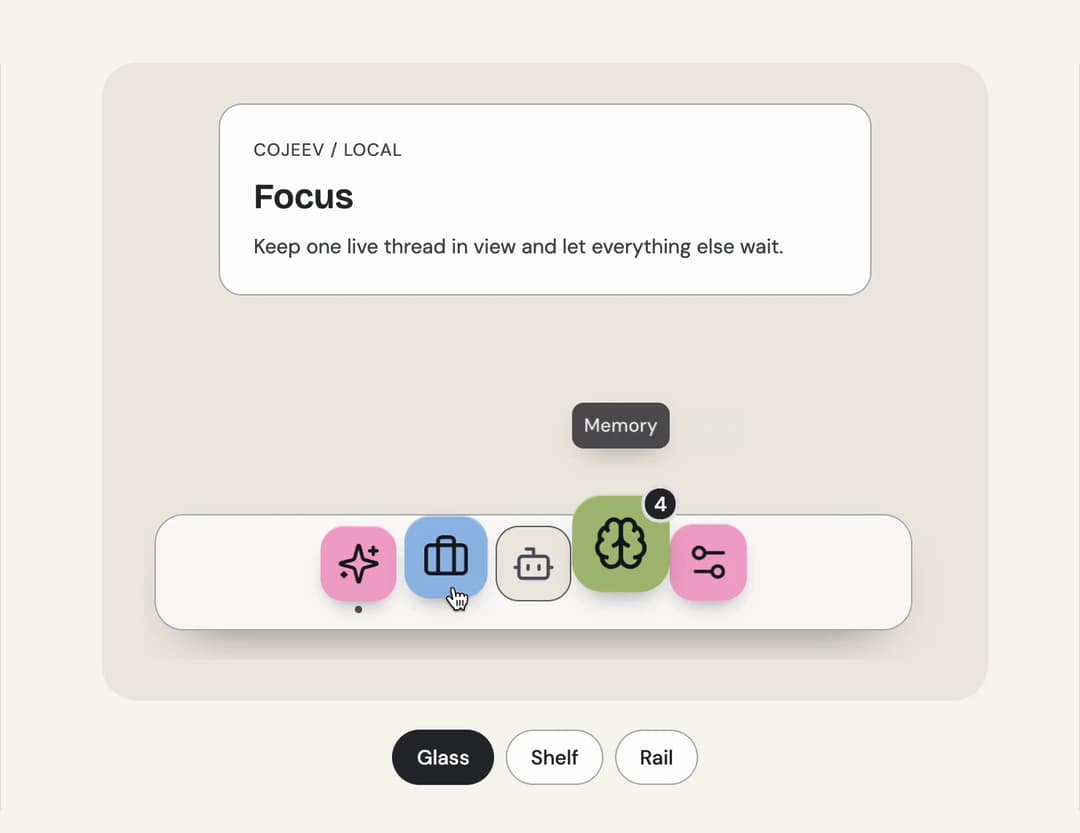
A compact workspace launcher with a magnifying glass bar, raised shelf and labelled vertical rail.
Built with React and Tailwind. Copy the prompt and paste it into Claude Code, Cursor or Lovable: your agent adds Dock to your project and fits it to your theme.
Code
How Dock is used: the demo's code. The component's own source comes with a free account.
Usage.tsx
"use client";

import * as React from "react";
import { Bot, Brain, Briefcase, Settings2, Sparkles } from "lucide-react";
import { Dock, type DockItem, type DockVariant } from "@/components/ui/dock";

const destinations = [
  { value: "focus", label: "Focus", icon: Sparkles, detail: "Keep one live thread in view and let everything else wait." },
  { value: "work", label: "Work", icon: Briefcase, detail: "See current tasks, their owners and the next useful action." },
  { value: "automations", label: "Automations", icon: Bot, detail: "Scheduled work is unavailable in this demo.", disabled: true },
  { value: "memory", label: "Memory", icon: Brain, detail: "Return to four ideas that were kept close.", badge: 4 },
  { value: "settings", label: "Settings", icon: Settings2, detail: "Tune this workspace without leaving the current context." },
] as const;

const variants: DockVariant[] = ["glass", "shelf", "rail"];

/** The demo brings its own 000h canvas, so it looks right on any host page (the component package sets nothing global). */
function DemoSurface({ children }: { children: import("react").ReactNode }) {
  return <div className="grid min-h-screen w-full place-items-center bg-[var(--v-canvas)] p-4 font-[family-name:var(--font-text)] text-[length:var(--fs-body)] leading-[var(--lh-body)] text-[var(--v-text)]">{children}</div>;
}

export default function Demo() {
  const [variant, setVariant] = React.useState<DockVariant>("glass");
  const [active, setActive] = React.useState("focus");
  const selected = destinations.find((item) => item.value === active) ?? destinations[0];
  const items = React.useMemo<DockItem[]>(
    () =>
      destinations.map((item) => ({
        value: item.value,
        label: item.label,
        disabled: "disabled" in item ? item.disabled : undefined,
        badge: "badge" in item ? item.badge : undefined,
        icon: <item.icon aria-hidden="true" size={22} strokeWidth={1.8} />,
      })),
    [],
  );
  const panel = (
    <section aria-label="Open workspace" className="grid w-full max-w-md gap-2 rounded-2xl bg-[var(--v-paper)] p-6 text-[var(--v-text)] shadow-[inset_0_0_0_1px_var(--v-border)]">
      <span className="text-xs tracking-wider text-[var(--v-text-2)]">COJEEV / LOCAL</span>
      <h3 className="font-[family-name:var(--font-display)] text-2xl font-semibold">{selected.label}</h3>
      <p className="text-sm text-[var(--v-text-2)]">{selected.detail}</p>
    </section>
  );
  const dock = <Dock items={items} variant={variant} value={active} onValueChange={setActive} itemSize={52} magnification={1.65} aria-label="Workspace" />;
  return (
    <DemoSurface>
      <div className="mx-auto grid w-full max-w-2xl gap-5 p-8">
        <div
          className={
            variant === "rail"
              ? "grid min-h-[350px] grid-cols-[auto_1fr] items-stretch gap-4 overflow-hidden rounded-3xl bg-[var(--v-beige)] p-5"
              : "grid min-h-[350px] content-between justify-items-center gap-6 overflow-hidden rounded-3xl bg-[var(--v-beige)] p-7"
          }
        >
          {variant === "rail" ? (
            <>
              {dock}
              {panel}
            </>
          ) : (
            <>
              {panel}
              {dock}
            </>
          )}
        </div>
        <div role="group" aria-label="Dock variant" className="flex flex-wrap justify-center gap-2">
          {variants.map((option) => (
            <button
              key={option}
              type="button"
              aria-pressed={variant === option}
              onClick={() => setVariant(option)}
              className="rounded-full border border-[var(--v-border)] bg-[var(--v-paper)] px-4 py-2 text-sm font-medium capitalize text-[var(--v-text)] transition-colors hover:bg-[var(--v-beige)] aria-pressed:border-[var(--v-ink)] aria-pressed:bg-[var(--v-ink)] aria-pressed:text-[var(--v-on-ink)]"
            >
              {option}
            </button>
          ))}
        </div>
      </div>
    </DemoSurface>
  );
}
Dependencies
More by Sanjay Kumar
View all
Prompt Bond
94
Agent State
47
Bento Grid
34
Theme Toggle
23
Variable Proximity
18
Shape
14
Meta Balls
12
Animated Icon
11
More in Navigation
View all

Sidebar
234

Tabs
60
Newsletter Signup Footer
16
Progress Bar Stepper
36

Footer 2
201
Navbar with Theme Toggle
43

Navbar
71

Pagination
86
