
About
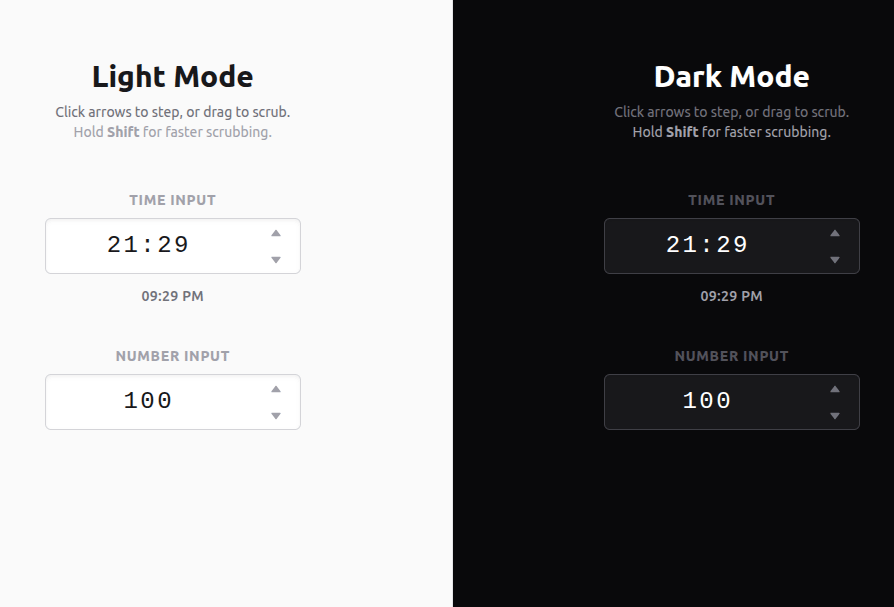
Blender and Unity style input fields that allow infinite value scrubbing by clicking and dragging.
Built with React and Tailwind. Copy the prompt and paste it into Claude Code, Cursor or Lovable: your agent adds Scrubbable Inputs to your project and fits it to your theme.
Code
How Scrubbable Inputs is used: the demo's code. The component's own source comes with a free account.
Usage.tsx
import { TimeScrubber, NumberScrubber } from "@/components/ui/scrubbable-inputs";
import { cn } from "@/lib/utils";

export default function ScrubbablesDemo() {
  return (
    <div className={cn("flex flex-col md:flex-row min-h-screen w-full overflow-hidden font-sans")}>

      {/* Light Theme Side */}
      <div className="w-full md:w-1/2 min-h-full bg-zinc-50 flex flex-col items-center justify-center p-8 border-b md:border-b-0 md:border-r border-zinc-200">
        <div className="mb-12 text-center max-w-md">
          <h1 className="text-3xl font-bold text-zinc-900 mb-2">Light Mode</h1>
          <p className="text-sm text-zinc-500">
            Click arrows to step, or drag to scrub. <br />
            <span className="text-zinc-400">Hold <b>Shift</b> for faster scrubbing.</span>
          </p>
        </div>

        <div className="flex flex-col gap-10">
          <div>
            <div className="text-sm font-semibold text-zinc-400 uppercase tracking-wider mb-2 text-center">Time Input</div>
            <TimeScrubber theme="light" />
          </div>

          <div>
            <div className="text-sm font-semibold text-zinc-400 uppercase tracking-wider mb-2 text-center">Number Input</div>
            <NumberScrubber theme="light" />
          </div>
        </div>
      </div>

      {/* Dark Theme Side */}
      <div className="w-full md:w-1/2 min-h-full bg-zinc-950 flex flex-col items-center justify-center p-8">
        <div className="mb-12 text-center max-w-md">
          <h1 className="text-3xl font-bold text-white mb-2">Dark Mode</h1>
          <p className="text-sm text-zinc-500">
            Click arrows to step, or drag to scrub. <br />
            <span className="text-zinc-400">Hold <b>Shift</b> for faster scrubbing.</span>
          </p>
        </div>

        <div className="flex flex-col gap-10">
          <div>
            <div className="text-sm font-semibold text-zinc-600 uppercase tracking-wider mb-2 text-center">Time Input</div>
            <TimeScrubber theme="dark" />
          </div>

          <div>
            <div className="text-sm font-semibold text-zinc-600 uppercase tracking-wider mb-2 text-center">Number Input</div>
            <NumberScrubber theme="dark" />
          </div>
        </div>
      </div>

    </div>
  );
}More by Mathew
View all
Trail Grid
100
Radial Time Picker
84
"Native" Mobile Nav

NexusOrb
More in Forms
View all

Premium Auth
500

Login 1
52
Authentication Card
47

Book A Demo 3
83
Book A Demo 1
69

Contact Card
1K

Login Card
32

Login 2
7
