
About
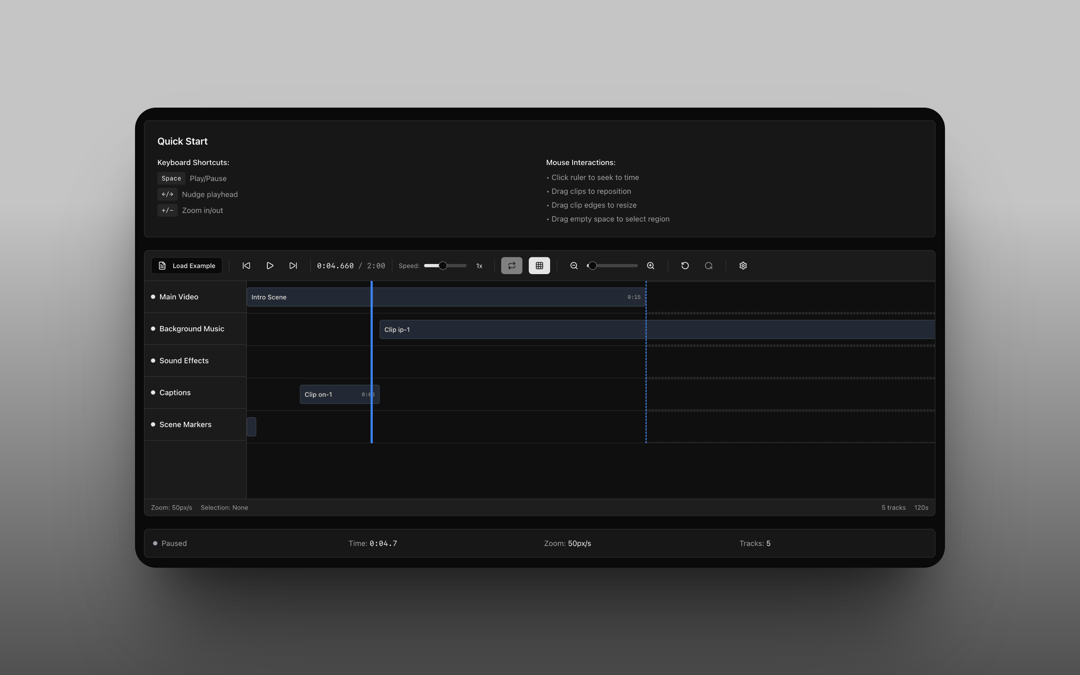
Multi-track timeline editor
Built with React and Tailwind. Copy the prompt and paste it into Claude Code, Cursor or Lovable: your agent adds Timeline to your project and fits it to your theme.
Code
How Timeline is used: the demo's code. The component's own source comes with a free account.
Usage.tsx
'use client';
import { Button } from '@/components/ui/button';
import { Timeline, TimelineTrack } from '@/components/ui/timeline';
import { Github, Moon, Sun } from 'lucide-react';
import { useEffect, useState } from 'react';
export default function TimelineDemo() {
const [tracks, setTracks] = useState<TimelineTrack[]>([
{
id: 'empty-video',
name: 'Video Track',
type: 'video',
height: 60,
visible: true,
items: [],
},
{
id: 'empty-audio',
name: 'Audio Track',
type: 'audio',
height: 60,
visible: true,
items: [],
},
]);
const [duration, setDuration] = useState(30);
const [currentTime, setCurrentTime] = useState(0);
const [isLoadingExample, setIsLoadingExample] = useState(false);
const [theme, setTheme] = useState<'light' | 'dark'>('light');
useEffect(() => {
// Check for saved theme preference or default to 'light'
const savedTheme = localStorage.getItem('theme') as 'light' | 'dark' | null;
const prefersDark = window.matchMedia('(prefers-color-scheme: dark)').matches;
const initialTheme = savedTheme || (prefersDark ? 'dark' : 'light');
setTheme(initialTheme);
document.documentElement.classList.toggle('dark', initialTheme === 'dark');
}, []);
const toggleTheme = () => {
const newTheme = theme === 'light' ? 'dark' : 'light';
setTheme(newTheme);
localStorage.setItem('theme', newTheme);
document.documentElement.classList.toggle('dark', newTheme === 'dark');
};
const handleLoadExample = async () => {
try {
setIsLoadingExample(true);
const response = await fetch('https://raw.githubusercontent.com/nparashar150/21st/refs/heads/main/timeline/public/exampleTimeline.json');
if (!response.ok) {
throw new Error('Failed to fetch example timeline');
}
const data = await response.json();
setTracks(data.tracks);
setDuration(data.duration);
setCurrentTime(0);
} catch (error) {
console.error('Error loading example timeline:', error);
// Could add toast notification here
} finally {
setIsLoadingExample(false);
}
};
return (
<div className="min-h-screen bg-background">
{/* Header */}
<header className="border-b bg-background/95 backdrop-blur supports-[backdrop-filter]:bg-background/60">
<div className="container mx-auto px-4 py-4">
<div className="flex items-center justify-between">
<div>
<h1 className="text-2xl font-bold">Interactive Timeline Component</h1>
<p className="text-muted-foreground mt-1">
Professional video editing timeline with tracks, clips, and advanced controls
</p>
</div>
<div className="flex items-center gap-3">
<Button asChild className="gap-2">
<a
href="https://github.com/nparashar150/21st"
target="_blank"
rel="noopener noreferrer"
>
<Github className="h-4 w-4" />
View on GitHub
</a>
</Button>
<Button size="icon" onClick={toggleTheme} aria-label="Toggle theme">
{theme === 'light' ? <Moon className="h-4 w-4" /> : <Sun className="h-4 w-4" />}
</Button>
</div>
</div>
</div>
</header>
{/* Demo Section */}
<main className="container mx-auto px-4 py-8">
<div className="space-y-8">
{/* Timeline Demo */}
<section>
<div className="mb-6">
<h2 className="text-xl font-semibold mb-2">Live Demo</h2>
<p className="text-muted-foreground">
Click "Generate Random" in the timeline controls to create a procedural timeline with multiple tracks, or use the empty tracks to explore the interface.
</p>
</div>
<Timeline
tracks={tracks}
duration={duration}
height={600}
onTimeUpdate={setCurrentTime}
onTracksChange={setTracks}
onDurationChange={setDuration}
showLoadExample={true}
onLoadExample={handleLoadExample}
isLoadingExample={isLoadingExample}
className="border-2"
/>
<div className="mt-4 p-4 bg-muted/50 rounded-lg">
<div className="text-sm text-muted-foreground">
<strong>Current Time:</strong> {currentTime.toFixed(2)}s
</div>
</div>
</section>
{/* Features */}
<section>
<h2 className="text-xl font-semibold mb-4">Key Features</h2>
<div className="grid grid-cols-1 md:grid-cols-2 lg:grid-cols-3 gap-6">
<div className="p-6 border rounded-lg bg-card">
<h3 className="font-semibold mb-2">🎬 Multi-Track Support</h3>
<p className="text-sm text-muted-foreground">
Support for video, audio, transcript, markers, and asset tracks with customizable heights.
</p>
</div>
<div className="p-6 border rounded-lg bg-card">
<h3 className="font-semibold mb-2">⚡ Interactive Playhead</h3>
<p className="text-sm text-muted-foreground">
Click-to-seek and drag-to-scrub functionality with precise time control.
</p>
</div>
<div className="p-6 border rounded-lg bg-card">
<h3 className="font-semibold mb-2">🔍 Zoom & Pan</h3>
<p className="text-sm text-muted-foreground">
Smooth zooming from 10px/s to 1000px/s with horizontal scrolling.
</p>
</div>
<div className="p-6 border rounded-lg bg-card">
<h3 className="font-semibold mb-2">🎯 Time Selection</h3>
<p className="text-sm text-muted-foreground">
Optional click-and-drag time range selection with loop functionality.
</p>
</div>
<div className="p-6 border rounded-lg bg-card">
<h3 className="font-semibold mb-2">⚙️ Customizable Settings</h3>
<p className="text-sm text-muted-foreground">
Toggle features like animations, auto-scroll, and selection tools.
</p>
</div>
<div className="p-6 border rounded-lg bg-card">
<h3 className="font-semibold mb-2">🎨 Theme Support</h3>
<p className="text-sm text-muted-foreground">
Full light/dark mode support with shadcn/ui components.
</p>
</div>
</div>
</section>
{/* Usage Example */}
<section>
<h2 className="text-xl font-semibold mb-4">Usage Example</h2>
<div className="bg-muted/50 rounded-lg p-6">
<pre className="text-sm overflow-x-auto">
{`import { Timeline } from '@/components/timeline/Timeline';
import { useTimelineStore } from '@/lib/timeline-store';
export function VideoEditor() {
const { project, loadProject } = useTimelineStore();
const handleLoadExample = async () => {
const response = await fetch('/api/timeline-data');
const data = await response.json();
loadProject(data);
};
return (
<Timeline
tracks={project.tracks}
duration={project.duration}
height={600}
onTimeUpdate={(time) => console.log('Current time:', time)}
showLoadExample={true}
onLoadExample={handleLoadExample}
/>
);
}`}
</pre>
</div>
</section>
{/* Props Documentation */}
<section>
<h2 className="text-xl font-semibold mb-4">Props</h2>
<div className="overflow-x-auto">
<table className="w-full border rounded-lg">
<thead className="bg-muted/50">
<tr>
<th className="text-left p-3 border-b font-semibold">Prop</th>
<th className="text-left p-3 border-b font-semibold">Type</th>
<th className="text-left p-3 border-b font-semibold">Required</th>
<th className="text-left p-3 border-b font-semibold">Description</th>
</tr>
</thead>
<tbody>
<tr>
<td className="p-3 border-b font-mono text-sm">tracks</td>
<td className="p-3 border-b text-sm">TimelineTrack[]</td>
<td className="p-3 border-b text-sm">Yes</td>
<td className="p-3 border-b text-sm">Array of timeline tracks with items</td>
</tr>
<tr>
<td className="p-3 border-b font-mono text-sm">duration</td>
<td className="p-3 border-b text-sm">number</td>
<td className="p-3 border-b text-sm">Yes</td>
<td className="p-3 border-b text-sm">Total timeline duration in seconds</td>
</tr>
<tr>
<td className="p-3 border-b font-mono text-sm">className</td>
<td className="p-3 border-b text-sm">string</td>
<td className="p-3 border-b text-sm">No</td>
<td className="p-3 border-b text-sm">Additional CSS classes</td>
</tr>
<tr>
<td className="p-3 border-b font-mono text-sm">height</td>
<td className="p-3 border-b text-sm">number</td>
<td className="p-3 border-b text-sm">No</td>
<td className="p-3 border-b text-sm">Timeline height in pixels (default: 600)</td>
</tr>
<tr>
<td className="p-3 border-b font-mono text-sm">onTimeUpdate</td>
<td className="p-3 border-b text-sm">(time: number) => void</td>
<td className="p-3 border-b text-sm">No</td>
<td className="p-3 border-b text-sm">Callback when playhead time changes</td>
</tr>
<tr>
<td className="p-3 border-b font-mono text-sm">onTracksChange</td>
<td className="p-3 border-b text-sm">(tracks: TimelineTrack[]) => void</td>
<td className="p-3 border-b text-sm">No</td>
<td className="p-3 border-b text-sm">Callback when tracks are modified</td>
</tr>
<tr>
<td className="p-3 border-b font-mono text-sm">onDurationChange</td>
<td className="p-3 border-b text-sm">(duration: number) => void</td>
<td className="p-3 border-b text-sm">No</td>
<td className="p-3 border-b text-sm">Callback when timeline duration changes</td>
</tr>
<tr>
<td className="p-3 border-b font-mono text-sm">showLoadExample</td>
<td className="p-3 border-b text-sm">boolean</td>
<td className="p-3 border-b text-sm">No</td>
<td className="p-3 border-b text-sm">Show load example button (default: false)</td>
</tr>
<tr>
<td className="p-3 border-b font-mono text-sm">onLoadExample</td>
<td className="p-3 border-b text-sm">() => void</td>
<td className="p-3 border-b text-sm">No</td>
<td className="p-3 border-b text-sm">Callback when load example button is clicked</td>
</tr>
<tr>
<td className="p-3 font-mono text-sm">isLoadingExample</td>
<td className="p-3 text-sm">boolean</td>
<td className="p-3 text-sm">No</td>
<td className="p-3 text-sm">Whether example data is currently loading (default: false)</td>
</tr>
</tbody>
</table>
</div>
</section>
</div>
</main>
</div>
);
}
Dependencies
More by Naman Parashar
View all
AI Writer
3
Query Builder
1