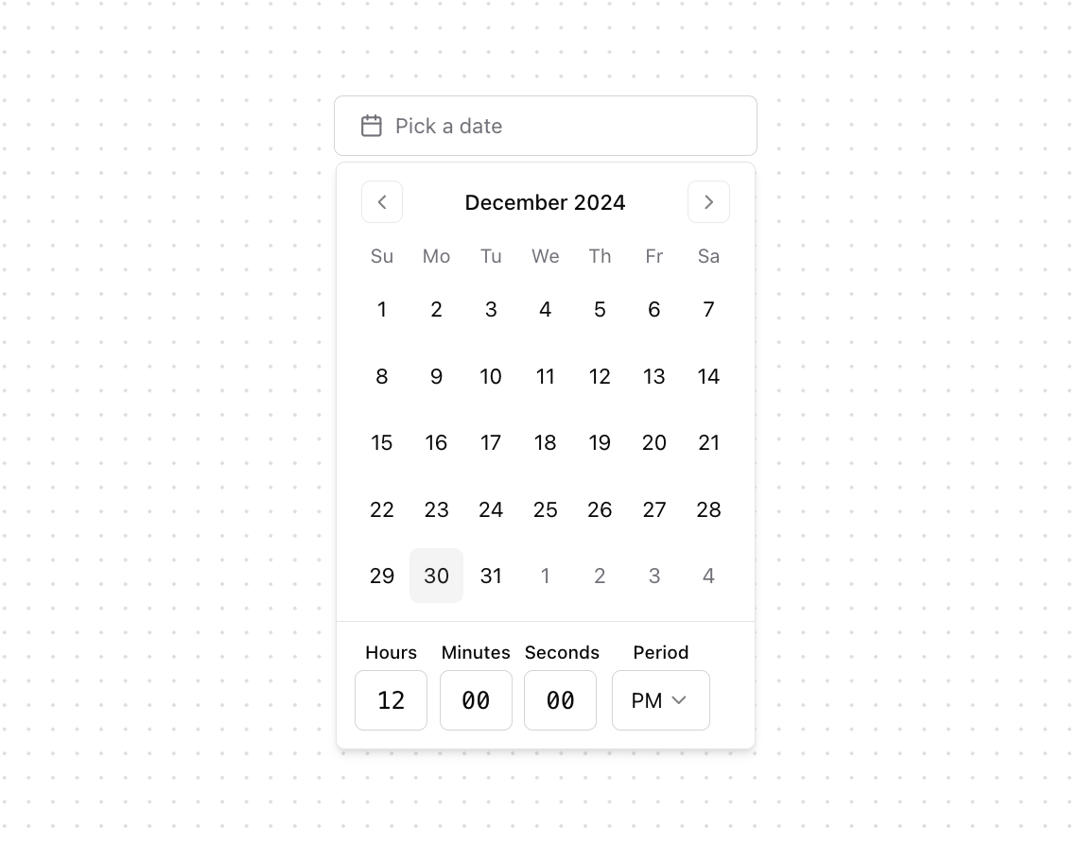
About
A <TimePickerInput /> component built with React and Shadcn UI. - No additional library - Listens to keydown events - Supports arrow navigation - Formats date values - Optimizes mobile keyboard Powered by OpenStatus
Built with React and Tailwind. Copy the prompt and paste it into Claude Code, Cursor or Lovable: your agent adds Datetime Picker to your project and fits it to your theme.
Code
How Datetime Picker is used: the demo's code. The component's own source comes with a free account.
Usage.tsx
"use client";

import * as React from "react";
import { format, add } from "date-fns";
import { Calendar as CalendarIcon } from "lucide-react";
import { Button } from "@/components/ui/button";
import { Calendar } from "@/components/ui/calendar";
import { Popover, PopoverContent, PopoverTrigger } from "@/components/ui/popover";
import { Form, FormControl, FormField, FormItem, FormLabel } from "@/components/ui/form";
import { cn } from "@/lib/utils";
import { TimePicker } from "@/components/ui/datetime-picker";

// Basic DateTimePicker Demo
export function DateTimePicker() {
  const [date, setDate] = React.useState<Date>();

  const handleSelect = (newDay: Date | undefined) => {
    if (!newDay) return;
    if (!date) {
      setDate(newDay);
      return;
    }
    const diff = newDay.getTime() - date.getTime();
    const diffInDays = diff / (1000 * 60 * 60 * 24);
    const newDateFull = add(date, { days: Math.ceil(diffInDays) });
    setDate(newDateFull);
  };

  return (
    <Popover>
      <PopoverTrigger asChild>
        <Button
          variant={"outline"}
          className={cn(
            "w-[280px] justify-start text-left font-normal",
            !date && "text-muted-foreground"
          )}
        >
          <CalendarIcon className="mr-2 h-4 w-4" />
          {date ? format(date, "PPP HH:mm:ss") : <span>Pick a date</span>}
        </Button>
      </PopoverTrigger>
      <PopoverContent className="w-auto p-0">
        <Calendar
          mode="single"
          selected={date}
          onSelect={(d) => handleSelect(d)}
          initialFocus
        />
        <div className="p-3 border-t border-border">
          <TimePicker setDate={setDate} date={date} />
        </div>
      </PopoverContent>
    </Popover>
  );
}

// Form Demo
export function DateTimePickerForm() {
  const [selectedDate, setSelectedDate] = React.useState<Date>();

  function handleSubmit(e: React.FormEvent) {
    e.preventDefault();
    console.log("Submitted date:", selectedDate);
  }

  return (
    <form
      className="flex items-end gap-4 justify-center"
      onSubmit={handleSubmit}
    >
      <div className="flex flex-col">
        <label className="text-left text-sm mb-2">DateTime</label>
        <Popover>
          <PopoverTrigger asChild>
            <Button
              variant="outline"
              className={cn(
                "w-[280px] justify-start text-left font-normal",
                !selectedDate && "text-muted-foreground"
              )}
            >
              <CalendarIcon className="mr-2 h-4 w-4" />
              {selectedDate ? (
                format(selectedDate, "PPP HH:mm:ss")
              ) : (
                <span>Pick a date</span>
              )}
            </Button>
          </PopoverTrigger>
          <PopoverContent className="w-auto p-0">
            <Calendar
              mode="single"
              selected={selectedDate}
              onSelect={setSelectedDate}
              initialFocus
            />
            <div className="p-3 border-t border-border">
              <TimePicker
                setDate={setSelectedDate}
                date={selectedDate}
              />
            </div>
          </PopoverContent>
        </Popover>
      </div>
      <Button type="submit">Submit</Button>
    </form>
  );
}

// Simple TimePicker Demo
export function TimePickerDemo({ date, setDate }: { date: Date | undefined; setDate: (date: Date | undefined) => void }) {
  return (
    <div className="flex flex-col gap-4">
      <TimePicker date={date} setDate={setDate} />
    </div>
  );
}
Dependencies
More by OpenStatus
View all

Status Bar
63
Status Calendar
More in Forms
View all

Premium Auth
500

Login 2
7
Authentication Card
47

Login 1
52

Contact Card
1K
Login Form
6

Form
16

Book A Demo 3
83
