About
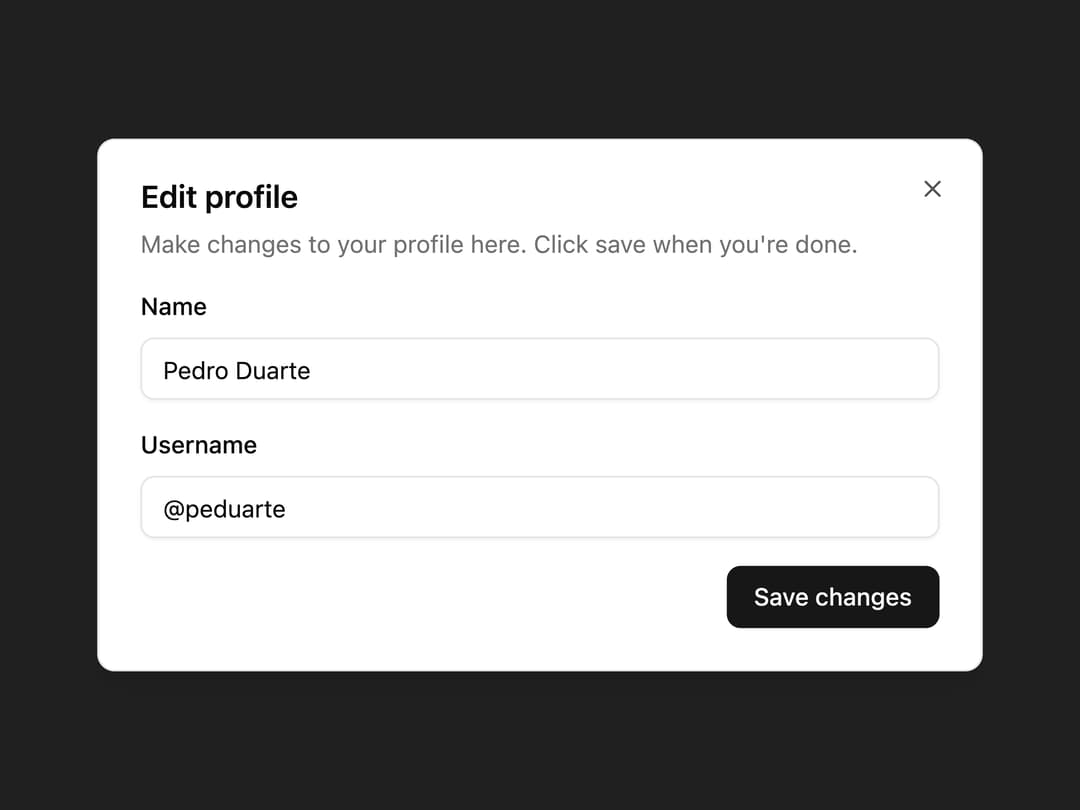
Accessible dialog and alert dialog content built on React Aria Components with shadcn styling, including header, footer, title, and description parts.
Built with React and Tailwind. Copy the prompt and paste it into Claude Code, Cursor or Lovable: your agent adds Dialog to your project and fits it to your theme.
Code
How Dialog is used: the demo's code. The component's own source comes with a free account.
Usage.tsx
"use client";
import * as Rac from "react-aria-components";
import {
Dialog,
DialogDescription,
DialogFooter,
DialogHeader,
DialogTitle,
} from "@/components/ui/oui-dialog";
export default function Demo() {
return (
<div className="flex min-h-[500px] w-full items-center justify-center p-6">
<Rac.DialogTrigger defaultOpen>
<Rac.Button className="inline-flex h-9 items-center justify-center rounded-md border bg-background px-4 py-2 text-sm font-medium shadow-xs outline-none data-hovered:bg-accent data-hovered:text-accent-foreground data-focus-visible:ring-2 data-focus-visible:ring-ring">
Edit Profile
</Rac.Button>
<Rac.ModalOverlay
isDismissable
className="fixed inset-0 z-50 bg-black/50 data-entering:animate-in data-entering:fade-in-0 data-exiting:animate-out data-exiting:fade-out-0"
>
<Rac.Modal className="fixed top-1/2 left-1/2 z-50 grid w-full max-w-[calc(100%-2rem)] -translate-x-1/2 -translate-y-1/2 gap-4 rounded-lg border bg-background p-6 shadow-lg data-entering:animate-in data-entering:fade-in-0 data-entering:zoom-in-95 data-exiting:animate-out data-exiting:fade-out-0 data-exiting:zoom-out-95 sm:max-w-lg">
<Dialog>
<DialogHeader>
<DialogTitle>Edit profile</DialogTitle>
<DialogDescription>
Make changes to your profile here. Click save when you're
done.
</DialogDescription>
</DialogHeader>
<div className="grid gap-4">
<div className="grid gap-2">
<label htmlFor="name" className="text-sm font-medium">
Name
</label>
<input
id="name"
defaultValue="Pedro Duarte"
className="h-9 rounded-md border bg-transparent px-3 py-1 text-sm shadow-xs outline-none focus-visible:ring-2 focus-visible:ring-ring"
/>
</div>
<div className="grid gap-2">
<label htmlFor="username" className="text-sm font-medium">
Username
</label>
<input
id="username"
defaultValue="@peduarte"
className="h-9 rounded-md border bg-transparent px-3 py-1 text-sm shadow-xs outline-none focus-visible:ring-2 focus-visible:ring-ring"
/>
</div>
</div>
<DialogFooter>
<Rac.Button
slot="close"
className="inline-flex h-9 items-center justify-center rounded-md bg-primary px-4 py-2 text-sm font-medium text-primary-foreground outline-none data-hovered:bg-primary/90 data-focus-visible:ring-2 data-focus-visible:ring-ring"
>
Save changes
</Rac.Button>
</DialogFooter>
</Dialog>
</Rac.Modal>
</Rac.ModalOverlay>
</Rac.DialogTrigger>
</div>
);
}
Dependencies
More by oui
View all

Text Field
5
Text Area
4
Number Field
Popover
Select
Keyboard
More in Forms
View all

Premium Auth
500

Login 1
52
Authentication Card
47

Book A Demo 3
83
Book A Demo 1
69

Contact Card
1K

Login Card
32

Login 2
7
