About
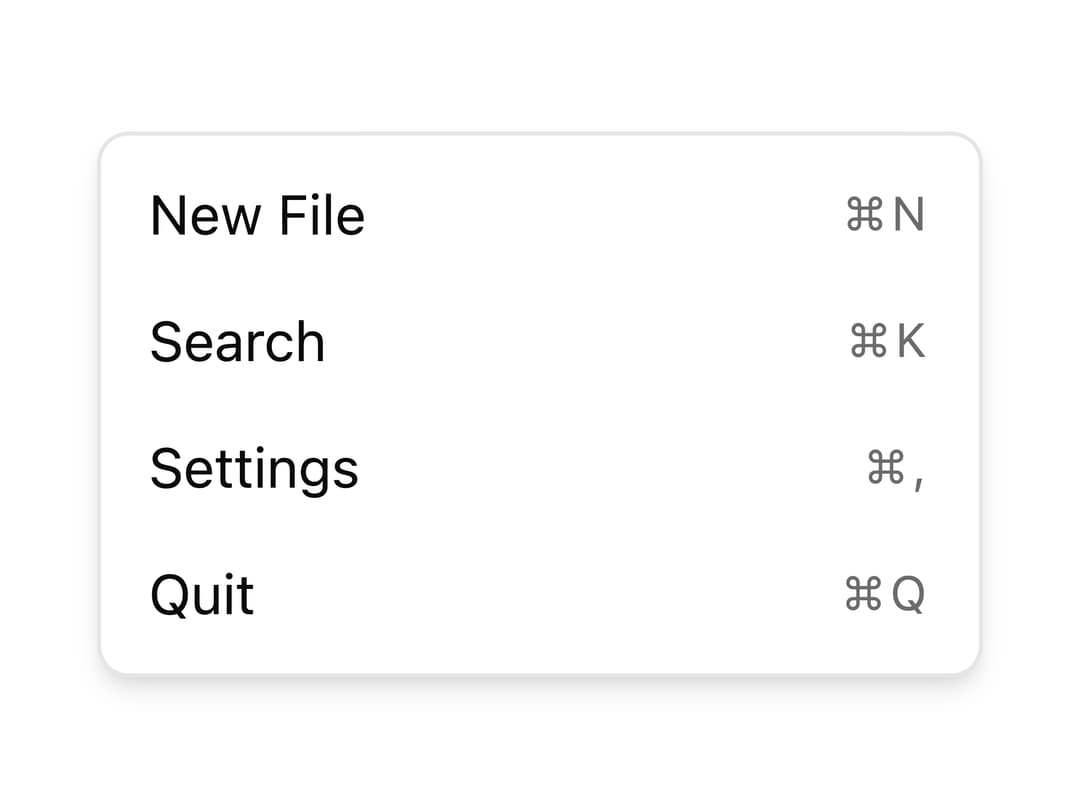
A keyboard shortcut hint element for displaying key combinations inside menus and buttons, built on React Aria Components with shadcn styling.
Built with React and Tailwind. Copy the prompt and paste it into Claude Code, Cursor or Lovable: your agent adds Keyboard to your project and fits it to your theme.
Code
How Keyboard is used: the demo's code. The component's own source comes with a free account.
Usage.tsx
"use client";

import { Keyboard } from "@/components/ui/oui-keyboard";

const items = [
  { label: "New File", keys: "⌘N" },
  { label: "Search", keys: "⌘K" },
  { label: "Settings", keys: "⌘," },
  { label: "Quit", keys: "⌘Q" },
];

export default function Component() {
  return (
    <div className="w-56 rounded-md border bg-popover p-1 text-popover-foreground shadow-md">
      {items.map((item) => (
        <div
          key={item.label}
          className="flex items-center gap-x-2 rounded-sm px-2 py-1.5 text-sm hover:bg-accent hover:text-accent-foreground"
        >
          {item.label}
          <Keyboard>{item.keys}</Keyboard>
        </div>
      ))}
    </div>
  );
}
Dependencies
More by oui
View all

Text Field
5
Text Area
4
Number Field
Popover
Select
Dialog