
About
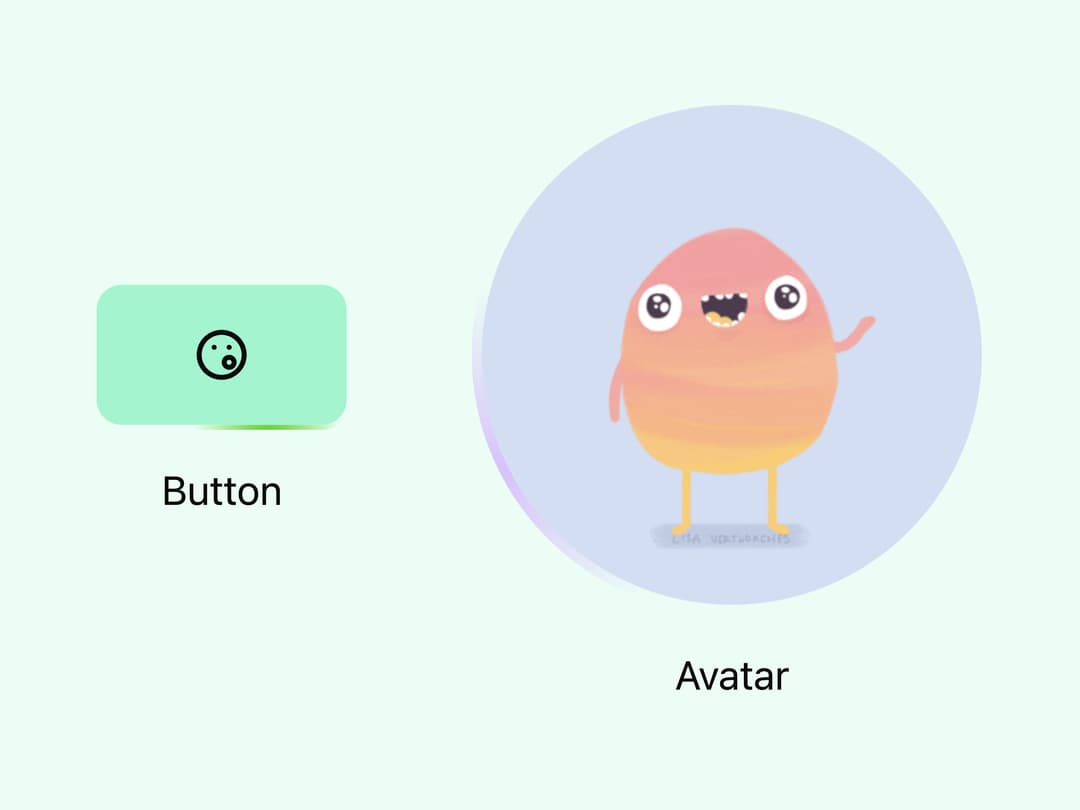
Animated gradient border that smoothly travels around any element, from rounded rectangles to perfect circles.
Built with React and Tailwind. Copy the prompt and paste it into Claude Code, Cursor or Lovable: your agent adds Moving Border to your project and fits it to your theme.
Code
How Moving Border is used: the demo's code. The component's own source comes with a free account.
Usage.tsx
import { MovingBorder } from "@/components/ui/moving-border";

export default function DemoOne() {
  return (
    <div className="flex justify-center items-center flex-wrap h-screen w-full gap-x-12 gap-y-6 bg-emerald-50">

            <div className="flex flex-col gap-3 justify-center items-center">

                {/* The radius prop should be identical with your rounded value */}
                <MovingBorder radius={10} borderWidth={2} gradientWidth={60} duration={3}
                              colors={["#dce817", "#10f400", "#75ba33"]}>
                    <button
                        className="rounded-[10px] w-[100px] aspect-video bg-emerald-200 flex justify-center items-center transition-all duration-500 hover:bg-emerald-300">
                        <svg xmlns="http://www.w3.org/2000/svg" width="24" height="24" viewBox="0 0 24 24" fill="none"
                             stroke="currentColor" strokeWidth="2" strokeLinecap="round" strokeLinejoin="round"
                             className="icon icon-tabler icons-tabler-outline icon-tabler-mood-sing">
                            <path stroke="none" d="M0 0h24v24H0z" fill="none"/>
                            <path d="M12 12m-9 0a9 9 0 1 0 18 0a9 9 0 1 0 -18 0"/>
                            <path d="M9 9h.01"/>
                            <path d="M15 9h.01"/>
                            <path d="M15 15m-2 0a2 2 0 1 0 4 0a2 2 0 1 0 -4 0"/>
                        </svg>
                    </button>
                </MovingBorder>

                <div>Button</div>
            </div>

            <div className="flex flex-col gap-3 justify-center items-center">

                {/* Circle */}
                <MovingBorder isCircle={true}
                              borderWidth={4}
                              gradientWidth={150}
                              duration={4}
                              colors={["#84b5ff", "#dad7f8", "#cb92ff"]}>
                    <div
                        className="w-[200px] aspect-square bg-accent rounded-full overflow-hidden flex justify-center items-center">
                        <img
                            className="object-cover w-full h-full"
                            src="https://cdn.21st.dev/assets/mirror/27/27682db1d698c7b74d30009b558c2658b1b65bd41393cc3547ad28dc5ef896a5.gif"
                            alt="A blurry photo of white flowers in a field"/>
                    </div>
                </MovingBorder>

                <div>Avatar</div>
            </div>
        </div>
  )
}
Dependencies
More by Phuc Bui
View all
Draw SVG
1
Infinite Image Carousel
1
Shimmer Layer
Magnetic

Text Ripple
More in Buttons
View all

Button
4

Button
47

App Store Button
452

Eclipse Button
39
Texture Button
92
Split Button
14
Native Button
12

Button
31


