
About
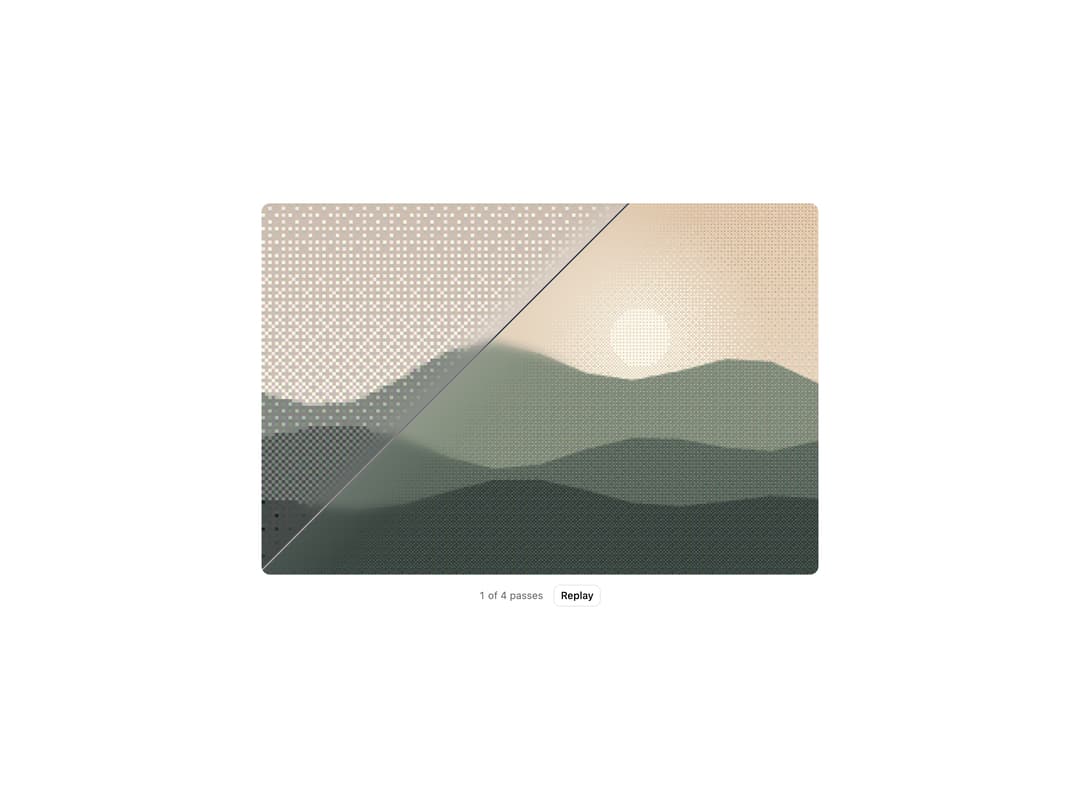
An image that starts as a 1-bit ordered dither. A diagonal scan line sweeps it a set number of times, and each pass sharpens the cells and brings back tone and color until the source is clean.
Built with React and Tailwind. Copy the prompt and paste it into Claude Code, Cursor or Lovable: your agent adds Dither Scan to your project and fits it to your theme.
Code
How Dither Scan is used: the demo's code. The component's own source comes with a free account.
Usage.tsx
"use client"

import { useCallback, useState } from "react"

import { DitherScan } from "@/components/ui/dither-scan"

const settings = {
  passes: 4,
  duration: 1400,
  pixelSize: 6,
  blur: 6,
  angle: 45,
  alternate: true,
  loop: true,
}

// Inline SVG landscapes, so the preview needs no network images.
function scene(
  sky: [string, string],
  sun: string,
  hills: [string, string, string],
  width = 1200,
  height = 800
) {
  const ridge = (base: number, amp: number, seed: number) => {
    let d = `M0 ${height}L0 ${base}`
    for (let x = 0; x <= width; x += width / 12) {
      const y = base - amp * (0.5 + 0.5 * Math.sin(x / 140 + seed) * Math.cos(x / 310 + seed * 2))
      d += `L${x.toFixed(0)} ${y.toFixed(0)}`
    }
    return `${d}L${width} ${height}Z`
  }
  const svg = `<svg xmlns="http://www.w3.org/2000/svg" width="${width}" height="${height}" viewBox="0 0 ${width} ${height}">
<defs><linearGradient id="s" x1="0" y1="0" x2="0" y2="1"><stop offset="0" stop-color="${sky[0]}"/><stop offset="1" stop-color="${sky[1]}"/></linearGradient>
<radialGradient id="g"><stop offset="0" stop-color="${sun}" stop-opacity=".9"/><stop offset="1" stop-color="${sun}" stop-opacity="0"/></radialGradient></defs>
<rect width="${width}" height="${height}" fill="url(#s)"/>
<circle cx="${width * 0.68}" cy="${height * 0.36}" r="${height * 0.34}" fill="url(#g)"/>
<circle cx="${width * 0.68}" cy="${height * 0.36}" r="${height * 0.08}" fill="${sun}"/>
<path d="${ridge(height * 0.58, height * 0.22, 1)}" fill="${hills[0]}"/>
<path d="${ridge(height * 0.72, height * 0.16, 4)}" fill="${hills[1]}"/>
<path d="${ridge(height * 0.86, height * 0.12, 7)}" fill="${hills[2]}"/>
</svg>`
  return `data:image/svg+xml;charset=utf-8,${encodeURIComponent(svg)}`
}

const IMAGE = {
  src: scene(["#F6C38B", "#FBE7C6"], "#FFF4D6", ["#7A8F6B", "#4E6650", "#2C4236"]),
  alt: "Layered green hills under a warm sunrise",
}

export default function DitherScanDemo(props: Partial<typeof settings>) {
  const s = { ...settings, ...props }
  const [replayKey, setReplayKey] = useState(0)
  const [cleared, setCleared] = useState(0)
  const onStart = useCallback(() => setCleared(0), [])
  const onPass = useCallback((pass: number) => setCleared(pass), [])

  const total = Math.max(1, Math.round(s.passes))
  const status = cleared >= total ? "Clean" : `${cleared} of ${total} passes`

  return (
    <div className="flex min-h-[520px] w-full flex-col items-center justify-center gap-3 bg-background p-4">
      <div className="flex h-[440px] w-full max-w-4xl items-center justify-center [container-type:size]">
        <DitherScan
          src={IMAGE.src}
          alt={IMAGE.alt}
          // Fit the image's own ratio inside the stage, like object-contain.
          className="w-[min(100cqw,calc(100cqh*var(--dither-scan-ratio)))] rounded-lg"
          passes={s.passes}
          duration={s.duration}
          pixelSize={s.pixelSize}
          blur={s.blur}
          angle={s.angle}
          alternate={s.alternate}
          loop={s.loop}
          replayKey={replayKey}
          onStart={onStart}
          onPass={onPass}
        />
      </div>
      <div className="flex items-center gap-3 text-xs text-muted-foreground">
        <span className="tabular-nums" aria-live="polite">
          {status}
        </span>
        <button
          type="button"
          className="rounded-md border border-border bg-background px-2 py-1 text-xs font-medium text-foreground transition-colors hover:bg-muted"
          onClick={() => setReplayKey((key) => key + 1)}
        >
          Replay
        </button>
      </div>
    </div>
  )
}
More by jay sharma
View all

Live Orb
218
Chrome Button
182
Frame Button
132
Highlight Button
76
ASCII Fluid
73
Motion Button
59
Brutal Button
56
Grid Button
49