
About
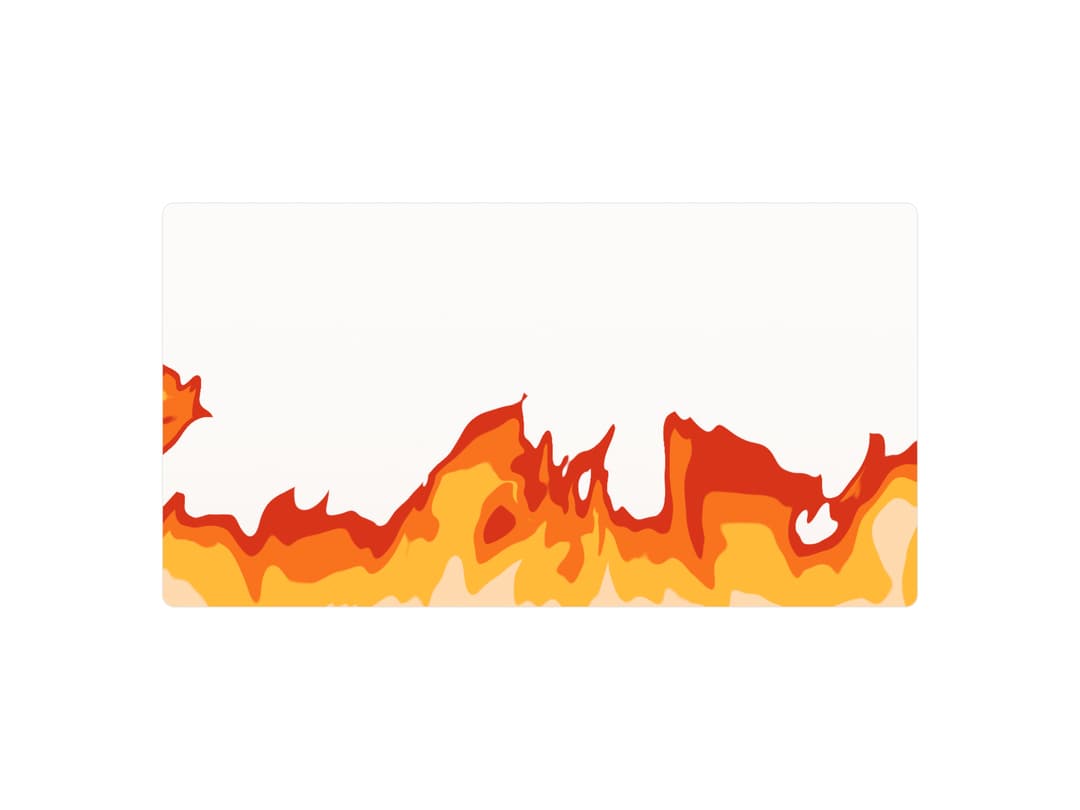
Cel-shaded WebGL flames for landing heroes: tongues lick up from the bottom in flat bands of heat, and the fire reaches for the pointer.
Built with React and Tailwind. Copy the prompt and paste it into Claude Code, Cursor or Lovable: your agent adds Shader Anime Fire to your project and fits it to your theme.
Code
How Shader Anime Fire is used: the demo's code. The component's own source comes with a free account.
Usage.tsx
"use client"

import { ShaderAnimeFire } from "@/components/ui/shader-anime-fire"

const settings = {
  colors: ["#B4200A", "#FF6512", "#FFC04A"],
  speed: 0.6,
  intensity: 1,
  height: 0.45,
  interactive: true,
  dither: false,
}

// Unchanged colors are left unset so the component picks its own light/dark palette.
function sameColors(a: string[], b: string[]) {
  return a.length === b.length && a.every((c, i) => c.toLowerCase() === b[i]!.toLowerCase())
}

export default function ShaderAnimeFireDemo(props: Partial<typeof settings>) {
  const s = { ...settings, ...props }

  return (
    <div className="flex min-h-[520px] w-full items-center justify-center bg-background p-4">
      <div className="relative h-[480px] w-full max-w-4xl overflow-hidden rounded-xl border border-border bg-background">
        <ShaderAnimeFire
          className="absolute inset-0"
          colors={sameColors(s.colors, settings.colors) ? undefined : s.colors}
          speed={s.speed}
          intensity={s.intensity}
          height={s.height}
          interactive={s.interactive}
          dither={s.dither}
        />
      </div>
    </div>
  )
}
More by jay sharma
View all

Live Orb
218
Chrome Button
182
Frame Button
132
Highlight Button
76
ASCII Fluid
73
Motion Button
59
Brutal Button
56
Shader Metal
49
More in Heroes
View all

SaaS Template
2.4K

Responsive Hero Banner
2K

Hero
1.2K
Centered Hero with Image Fan
932
Editorial Collage Hero
431
Glass Fold
212

HeroSectionWithGradient
336

Aero Hero-3
559
